Disclosure: some links on this page may be affiliate links. If you sign up through them, I may earn a commission at no extra cost to you.
Zoho Invoice is one of the few invoicing tools that is free without a catch you notice on day one. There is no paid tier, no trial clock and no ads. So the useful question for a freelancer is not “is it worth paying for?” but “where exactly does the free tool stop, and which of those walls will I hit first?” Zoho publishes the answer itself, in two comparison tables most reviews skip. This guide reads those tables from a freelancer’s point of view, ranks the limits by how soon they tend to bite, and explains when the next step is Zoho Books and when it is Zoho Billing.
A note on scope: Zoho runs regional editions with different tax features. I read the US pages for everything below, so check your own region’s pages if you invoice from elsewhere.
Start invoicing free with Zoho Invoice
What Zoho Invoice gives you for free
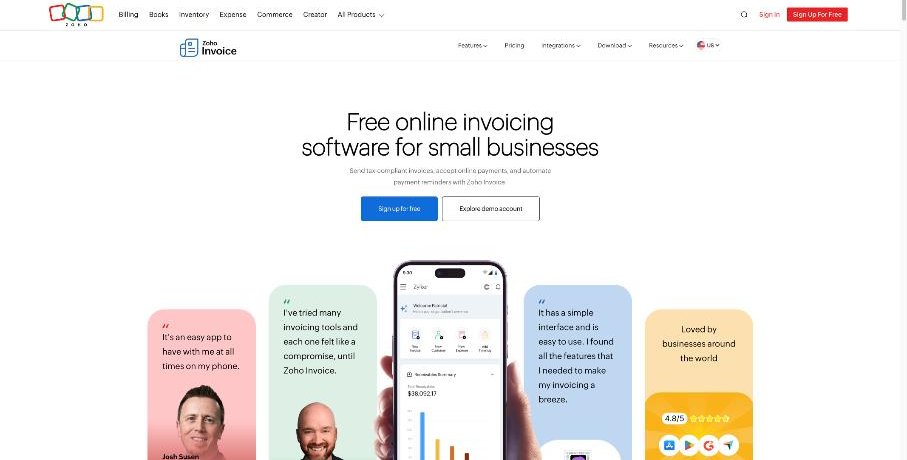
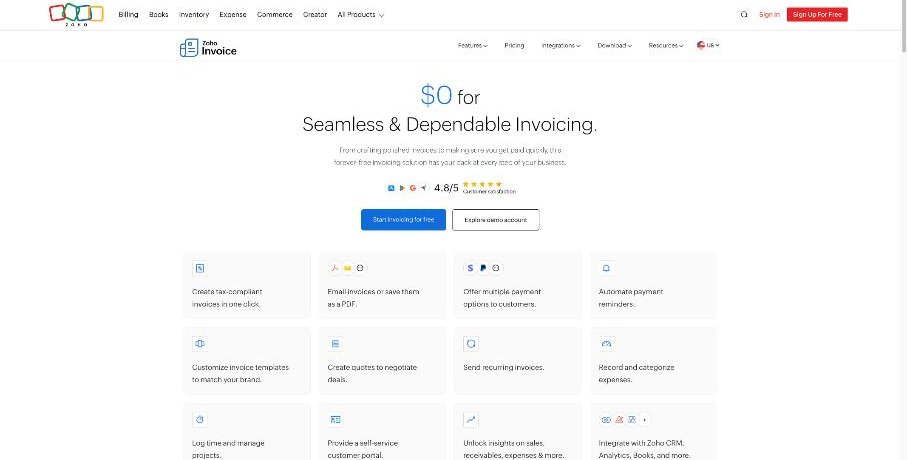
Zoho’s pricing page lists the free feature set plainly. For a solo freelancer it covers the whole get-paid loop:
- Invoices you can email or save as PDF, with customizable templates
- Quotes (formerly called estimates) to agree scope before you start
- Multiple online payment options for clients
- Automated payment reminders
- Recurring invoices for monthly clients
- Expense recording and categorization
- Time logging and project management
- A self-service customer portal
- Reports on sales, receivables and expenses
- Integrations with Zoho CRM, Zoho Analytics, Zoho Books and other Zoho apps
Zoho also says it does not show ads or sell your information, and it offers free email and voice support on weekdays. That combination is unusual. If you have read my notes on what Wave’s paid plan actually pays for, you will recognize the contrast: with Zoho Invoice there is simply nothing to upgrade to inside the product. When you outgrow it, you move to a different Zoho app.
The Zoho Invoice limits, straight from Zoho
Zoho’s help center has a page explaining why you might upgrade from Zoho Invoice to Zoho Billing. It includes a comparison table, and the Zoho Invoice column is effectively the list of free-plan limits:
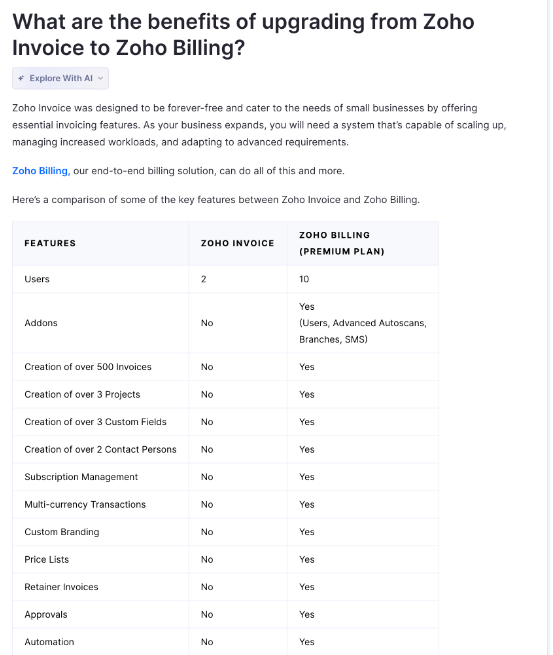
- Users: 2 (Zoho Billing Premium: 10)
- Invoices: no creation beyond 500 invoices
- Projects: no creation beyond 3 projects
- Custom fields: no creation beyond 3
- Contact persons: no creation beyond 2
- Not included: add-ons, subscription management, multi-currency transactions, custom branding, price lists, retainer invoices, approvals and automation
A second page, Zoho’s “Invoice to Books” comparison, adds the accounting angle. Against the Zoho Books Professional plan, it shows Zoho Invoice with 2 users and 500 invoices, versus 5 users and 10,000 invoices in Books Professional. Both include timesheets and sales reports. Only Books includes multi-currency invoices, banking, inventory, journal entries and personalized branding.
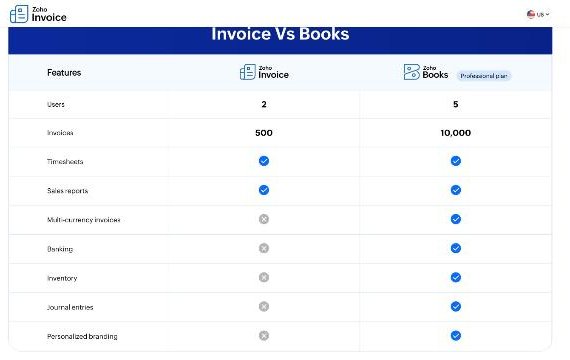
Which Zoho Invoice limit a freelancer hits first
The tables list the limits in no particular order. In real freelance work they arrive in a fairly predictable sequence. Here is how I would rank them, from “likely in your first months” to “only if you grow a lot”.
1. Three projects
This is the limit most freelancers feel first, and it is easy to miss because time tracking is listed as a free feature. If you organize work as one project per client so you can log hours and bill them, the fourth active client is where you run out. You can work around it by tracking time somewhere else and adding hours to invoices as line items, which is roughly the workflow I described in my Toggl Track month-end billing guide. But if you wanted one tool for time and invoices, three projects is a tight ceiling.
2. Foreign clients and multi-currency
Multi-currency transactions are not included in Zoho Invoice. For a freelancer who bills a US client in dollars and a European client in euros, this is often the real reason to move. On Zoho Books, multi-currency appears from the Professional plan, according to Zoho’s Books pricing page.
3. Two contact persons per client
Small clients are fine with one contact. Larger ones often want the invoice to go to accounts payable and a copy to the project manager, and sometimes a third person approves payments. With a limit of two contact persons, you will start forwarding invoices by hand.
4. Retainers
Retainer invoices are not in Zoho Invoice. If you take deposits or bill a monthly retainer that is drawn down against work, the free tool can send recurring invoices, but it does not handle the retainer as its own document. Zoho Billing includes retainer invoices, and Zoho Books lists “manage retainers” from its Professional plan.
5. Branding
You can customize invoice templates on the free plan, but “custom branding” and “personalized branding” are listed as upgrade features. If you care about clients never seeing another company’s name in the payment flow, check the customer portal and emails carefully during setup.
6. A second person, then a third
Two users is enough for a freelancer plus an accountant or assistant. A small studio with three people needs Books or Billing.
7. 500 invoices
Most freelancers will never get near this. Even 20 invoices a month is 240 a year. It matters for high-volume work such as tutoring, photography sessions or small repair jobs, where you might send several invoices a day.
Check Zoho Invoice’s free features
Next step: Zoho Books or Zoho Billing?
Zoho points Zoho Invoice users toward two different upgrades, and they solve different problems.
Choose Zoho Books if your problem is accounting
Zoho Books is full accounting software: banking with bank feeds and reconciliation, profit and loss, balance sheet and other financial reports, sales tax tracking, journal entries and accountant access. If you are paying a bookkeeper to re-enter what you invoice, or you want your books and invoices in one place, this is the move.
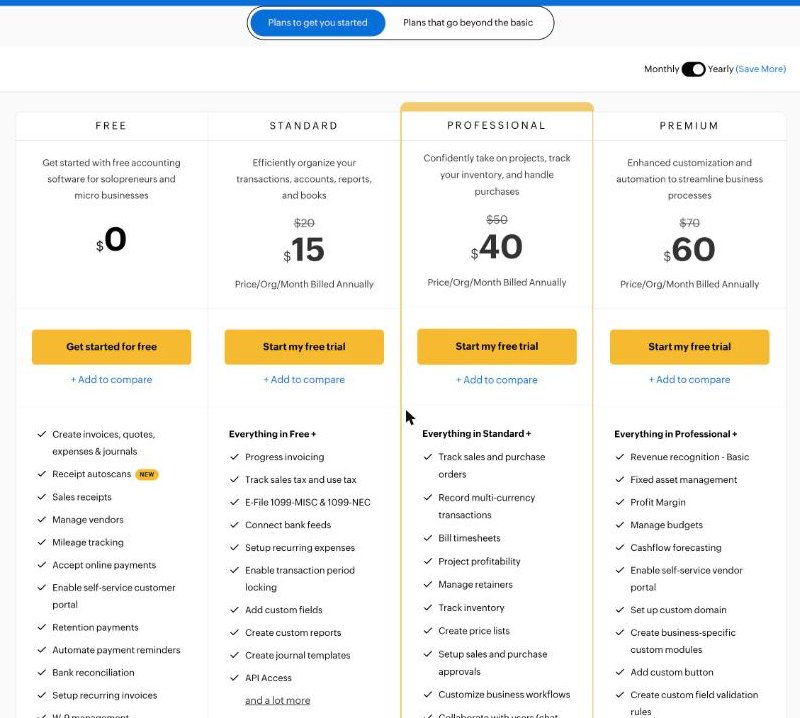
On the US pricing page today, Zoho Books has a Free plan for solopreneurs and micro businesses (listed with 1 user plus 1 accountant), then Standard at $20 per organization per month ($15 billed annually), Professional at $50 ($40 billed annually) and Premium at $70 ($60 billed annually), with higher Elite and Ultimate tiers above those. For a freelancer leaving Zoho Invoice, the deciding line is usually multi-currency: Zoho lists “record multi-currency transactions” in Professional, along with billing timesheets, project profitability and retainers. If you only need bank feeds and custom fields, Standard may be enough.
Zoho’s FAQ on the Invoice-to-Books page says that when you upgrade, you can try the Books Premium plan for 14 days at no extra cost, and afterwards choose to stay on Zoho Invoice for free or sign up for a paid Books plan. That makes the move low-risk to test.
Choose Zoho Billing if your problem is recurring revenue
Zoho Billing is Zoho’s end-to-end billing product. The comparison table shows what it adds over Zoho Invoice at its Premium plan: subscription management, retainer invoices, price lists, approvals, automation, multi-currency, custom branding, add-ons, and 10 users. If you sell productized services, memberships or maintenance plans with recurring charges, Billing fits better than Books. Check Zoho Billing’s own pricing page for current plan prices, since its comparison is made against Premium specifically.
A simple decision table
| Your situation | Stay on Zoho Invoice? | Likely next step |
|---|---|---|
| Solo, one currency, up to 3 time-tracked projects | Yes | None yet |
| Clients paying in different currencies | No | Zoho Books Professional or Zoho Billing |
| More than 3 active projects you bill by the hour | Only with outside time tracking | Zoho Books Professional |
| Monthly retainers or memberships | Partly (recurring invoices) | Zoho Billing |
| Need bank reconciliation and real accounts | No | Zoho Books |
| Team of three or more | No | Zoho Books or Zoho Billing |
How to set up Zoho Invoice so you outgrow it later, not sooner
A few setup choices stretch the free plan without fighting it:
- Use projects only for hourly clients. Fixed-price clients do not need a project. Invoice them from quotes or items, and save your three projects for work you bill by time.
- Turn on automated payment reminders from the first invoice. It is free and it is the feature that saves the most awkward emails. My FreshBooks reminders guide covers how to word reminder schedules, and the same thinking applies here.
- Pick your two contact persons deliberately. For larger clients, make the first one accounts payable, since that is who actually pays.
- Use recurring invoices for monthly clients, rather than duplicating last month’s invoice by hand.
- Invite the customer portal early. Clients who can see all their invoices and pay online in one place ask fewer “can you resend that?” questions.
Is Zoho Invoice right for you?
Zoho Invoice is a strong default for freelancers with a handful of clients in one currency. It covers quotes, invoices, reminders, recurring billing, expenses and a client portal at no cost, and Zoho is open about its limits. The walls are real, though, and they arrive in a predictable order: three projects, then currency, then contact persons and retainers. When you hit the first one that matters for your work, the choice is simple. Accounting problems point to Zoho Books, recurring-revenue problems point to Zoho Billing, and the 14-day Books trial lets you test the move before you pay anything.
FAQ
Is Zoho Invoice really free?
Yes. Zoho describes Zoho Invoice as forever-free for small businesses, freelancers and entrepreneurs, with no paid plan inside the product. When you need more, you move to Zoho Books or Zoho Billing.
How many invoices can I create in Zoho Invoice?
Zoho’s comparison tables list 500 invoices for Zoho Invoice, against 10,000 in Zoho Books Professional. Creating more than 500 invoices is listed as a Zoho Billing feature.
Does Zoho Invoice support multiple currencies?
No. Multi-currency transactions are not included in Zoho Invoice. Zoho Billing includes them, and in Zoho Books they appear in the Professional plan.
How many users can Zoho Invoice have?
Two users. Zoho Books Professional allows 5 and the Zoho Billing Premium plan allows 10.
Can I go back to Zoho Invoice after trying Zoho Books?
Yes. Zoho’s FAQ says you can try Zoho Books Premium for 14 days at no extra cost, then continue with Zoho Invoice for free or choose a paid Books plan.
What is the project limit in Zoho Invoice?
Zoho lists creation of more than 3 projects as unavailable in Zoho Invoice. If you track time per client project, that is the limit you are most likely to meet first.