
Most freelancers pick a FreshBooks plan by price and features, then discover the FreshBooks client limit a few months later when they try to add a new client and cannot. Lite allows 5 billable clients, Plus allows 50, and Premium and Select have no cap. The part that catches people out is what counts: according to FreshBooks’ own help center, archived clients still count toward the limit. Only deleted clients do not.
This guide explains exactly how the limit is counted, how to keep your client list lean without losing records, and when upgrading is cheaper than juggling. The plan prices and rules below come from the FreshBooks pricing page and support articles as they read today.
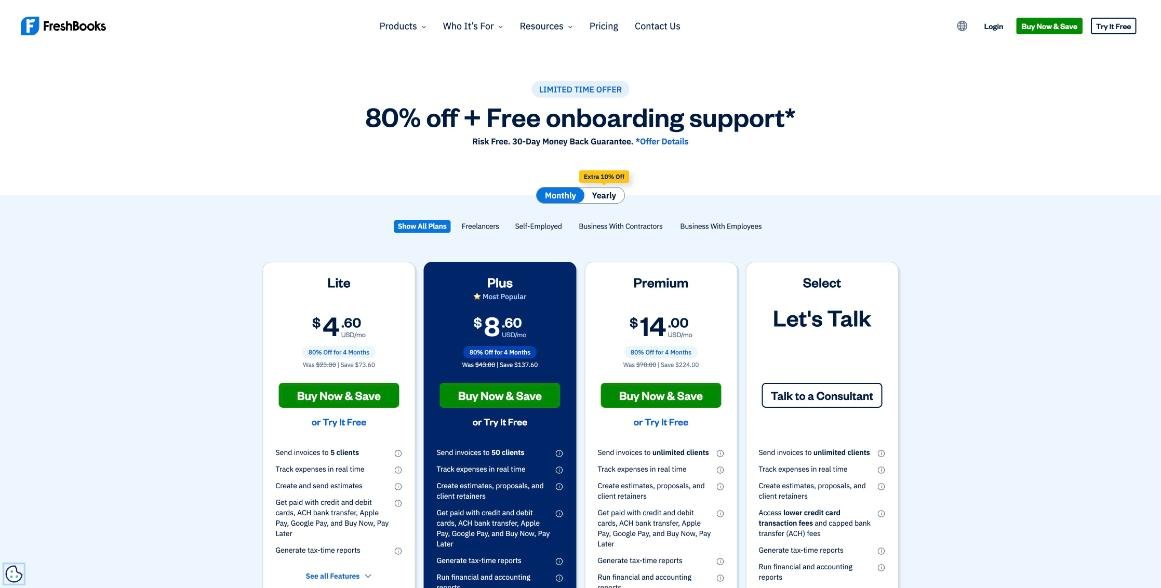
FreshBooks plans and their client limits
FreshBooks sells four plans. Here is what each one allows, with the regular monthly price shown on the pricing page next to the current promotion.
| Plan | Billable clients | Regular price | Key additions |
|---|---|---|---|
| Lite | 5 | $23/month | Invoices, estimates, expense tracking, online payments, tax-time reports |
| Plus | 50 | $43/month | Proposals, client retainers, accounting reports, receipt scanning, accountant access |
| Premium | Unlimited | $70/month | Project profitability, custom email templates, bill scanning with line items |
| Select | Unlimited | Custom quote | Lower card fees, branding removal, 2 team members included, phone support |
At the time of writing, FreshBooks advertises 80% off for the first four months on Lite, Plus and Premium, which brings them to $4.60, $8.60 and $14.00 a month during that period, plus an extra 10% off for yearly billing. There is also a 30-day free trial with no credit card required, and a 30-day money-back guarantee on purchases. Promotions change often, so check the pricing page on the day you buy and budget for the regular price after the offer ends.
One useful detail for testing: the FreshBooks FAQ says the free trial includes as many billable clients as you need. You will not hit the limit during the trial, which means you may not notice it until after you have paid.
What counts toward the FreshBooks client limit
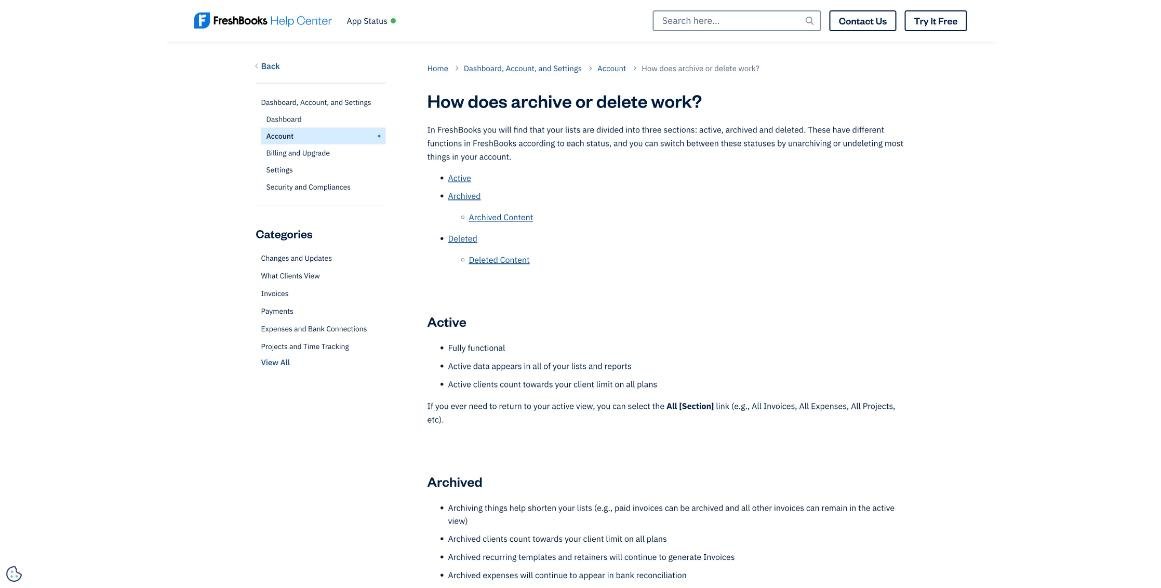
The pricing FAQ says the limit refers to the number of both active and archived clients in your account. The support article on archiving and deleting spells it out by status:
- Active clients count toward your client limit on all plans.
- Archived clients also count toward your client limit on all plans.
- Deleted clients do not count toward your client limit on all plans.
That is the opposite of what many people assume. Archiving feels like “putting a client away”, but for billing purposes an archived client is still a client. If you are on Lite with five clients and archive one you finished working with in March, you still have five clients and cannot add a sixth.
What deleting a client actually does
Deleting sounds drastic, but in FreshBooks it is reversible for clients. The help center lists what happens:
- Deleted clients do not appear in any lists and are completely inactive, but they can be undeleted later.
- Deleting a client does not delete their past invoices or payments.
- You can still include deleted clients in reports when All Clients is selected, but you cannot run a filtered report on one specific deleted client.
- Deleted sent emails remain accessible.
There is one important exception elsewhere in the same article: deleting credits, payments and time entries is permanent and cannot be undone. So delete the client record, never the individual payments.
Archive or delete: a simple rule for freelancers
Because archiving and deleting behave differently for the limit, I use one rule: archive work, delete finished clients.
- Archive paid invoices, old expenses and finished projects to shorten your lists. Archiving keeps them in reports and most searches.
- Delete clients you have no active or expected work with to free a slot. Their invoices and payments stay in your books.
- Undelete a client if they come back. You do not need to recreate them.
Watch for one trap in the archive rules: FreshBooks notes that archived recurring templates and retainers continue to generate invoices. Before you archive or delete anything tied to a finished client, open their recurring templates and retainers and stop them first, so nothing bills a client you no longer work with.
A month-end client clean-up
If you are close to your limit, a short routine at month end keeps you under it:
- Open Clients and sort by last activity.
- For each client with no work planned, check recurring templates and retainers and stop them.
- Before deleting, run and download any client-specific report you might need, such as an account statement, because filtered reports on a single deleted client are not available afterwards.
- Select the clients, choose Bulk Actions, then Delete.
- Count what remains: active plus archived clients must be at or under your plan’s limit.
If you already run a monthly bookkeeping routine, this fits at the end of it. I described a similar monthly habit in a freelancer’s month-end close in Xero, and the same timing works for FreshBooks.
When the limit means you should upgrade
Deleting finished clients works when your client base turns over. It stops working when you genuinely bill more clients at once than your plan allows. These are the signs I would watch for each plan.
Lite (5 clients): fine for retainers, tight for project work
A freelancer with two or three long-term retainer clients and the occasional small project can live on Lite for a long time. A designer or developer who takes many short projects will spend more time deleting and undeleting clients than invoicing them. There is a second reason to leave Lite that has nothing to do with the limit: client retainers and proposals start on Plus. If you sell retainers, Lite is not the right plan even with three clients.
Plus (50 clients): the comfortable middle
Fifty clients covers most solo freelancers, especially with a yearly clean-up of clients you no longer work with. Plus also adds accounting and financial reports, receipt scanning and accountant access, which is what most freelancers need at tax time. At regular prices the step from Lite to Plus is $20 a month.
Premium (unlimited): for volume, or for project profitability
Premium removes the cap and adds project profitability and customised email templates. At regular prices the step from Plus to Premium is $27 a month. If you invoice many small clients, such as a photographer with dozens of one-off shoots a year or a tutor billing families directly, the time saved on client clean-up can justify it. If you have fewer than 50 clients and do not need profitability tracking, Premium is mostly paying for headroom you do not use.
Three freelancer profiles, three plan choices
To make the limit concrete, here is how I would choose for three common freelance setups.
The retainer copywriter
Three monthly retainer clients, billed the same amount every month, plus one or two small projects a year. The client count fits Lite, but the business runs on retainers, which start on Plus. Recurring invoices can bill a fixed monthly fee, but if you want to use FreshBooks’ dedicated client retainer feature, Plus is the honest choice from day one.
The web designer with short projects
Around twenty projects a year, each with a different small business, with maybe six clients active at any time. Lite would mean deleting clients almost every month. Plus covers a full year of clients without any clean-up, and the accounting reports help at tax time. My pick: Plus, with a yearly clean-up of clients who have not returned.
The tutor or photographer billing families
Dozens of one-off clients a year, each paying for a session or a shoot, and some returning unpredictably. Even Plus fills up within a year or two unless you delete regularly, and deleted clients that come back must be undeleted before you can invoice them again. If the admin time bothers you, Premium removes the question entirely. If budget matters more, Plus with a quarterly clean-up works.
In all three cases, the deciding factor is how many clients you bill in a year, not how many you are working with today, because finished clients keep counting until you delete them.
Other costs to plan for
The client limit is not the only thing that changes your monthly cost. The pricing page lists these add-ons on Lite, Plus and Premium:
- Team Members: $11 a month per user.
- Advanced Payments: $20 a month (included on Select).
- FreshBooks Payroll: $40 a month plus $6 a month per user.
Payment processing has its own fees. The FreshBooks FAQ lists FreshBooks Payments at 2.9% + $0.30 per credit card transaction and 1% for bank transfers (ACH), and Stripe at 2.9% + $0.30 on most cards. Select customers get access to lower card fees and capped ACH fees. If a lot of your income arrives by card, compare these fees with how you get paid today. If you are weighing a lighter invoicing tool instead, my look at Zoho Invoice’s limits covers where a free option runs out.
Who should look at another tool
- Freelancers with many one-off clients on a tight budget. Lite’s 5-client cap will force either constant deletion or an early upgrade.
- Anyone who wants a permanent free plan. FreshBooks offers a 30-day trial, not a free tier.
- People who need per-client reports for old clients regularly. If you delete clients to stay under the limit, you lose filtered reports for those clients until you undelete them.
Bottom line
The FreshBooks client limit is easy to manage once you know that archived clients count and deleted clients do not. Archive old work, delete finished clients after stopping their recurring templates and downloading any reports you need, and undelete them if they return. If you sell retainers or bill more than five clients at a time, start on Plus. Move to Premium only when you regularly bill close to 50 clients or need project profitability.
FAQ
How many clients can I have on FreshBooks Lite?
Five billable clients. Plus allows 50, and Premium and Select allow unlimited clients.
Do archived clients count toward the FreshBooks client limit?
Yes. FreshBooks counts both active and archived clients toward the limit on all plans.
Will deleting a client delete their invoices?
No. Deleting a client does not delete their past invoices or payments, and the client can be undeleted later. Deleting individual payments, credits or time entries, however, is permanent.
Does the FreshBooks free trial have a client limit?
No. The FreshBooks FAQ says the 30-day trial includes as many billable clients as you need. The limit applies once you choose a paid plan.
Which FreshBooks plan includes client retainers?
Client retainers and proposals are included from the Plus plan upward.