
Most freelancers set up a booking page to get more calls. A few months later, the problem flips. Discovery calls, check-ins and “quick questions” land at 10:30 on a Tuesday, right in the middle of the morning you meant to spend writing, designing or coding. The booking link that brought in clients is now quietly eating the hours that pay for them.
This guide looks at Acuity Scheduling from that angle only: not as a way to get booked, but as a way to keep client calls inside the windows you choose. Acuity has an unusually deep set of scheduling limits, and a few of them, such as minimize gaps and look busy, are rarely discussed in freelancer reviews. All features and prices below come from Acuity’s pricing page and help center as they read today.
The real cost of an open booking page
A single 30-minute call rarely costs 30 minutes. There is the context switch before it, the notes after it, and the half hour that is too short to start anything serious. Two calls scattered across a morning can break it into pieces where no deep work happens at all.
Most booking tools let you set working hours and stop there. That still lets a client pick 9:00, another pick 11:30 and a third pick 2:15. The fix is not fewer hours. It is controlling where calls cluster, how many fit in a day, and how close to the call a client can book or move it. That is the part of Acuity Scheduling worth paying attention to.
Step 1: Draw the call windows
Start with availability, not limits. Decide which blocks of the week are for clients and which are for work. A pattern that works for many solo freelancers:
- Deep-work blocks: mornings, Monday to Thursday. No client calls at all.
- Call windows: two or three afternoons a week, for example Tuesday and Thursday from 2 pm to 5 pm.
- Admin time: Friday afternoon for invoices, proposals and follow-ups.
Set your Acuity availability to match only the call windows. If you already keep focus blocks in your own calendar, connect that calendar so busy time is respected when clients book. Everything after this step narrows what clients can do inside those windows.
Step 2: Set notice and booking horizon
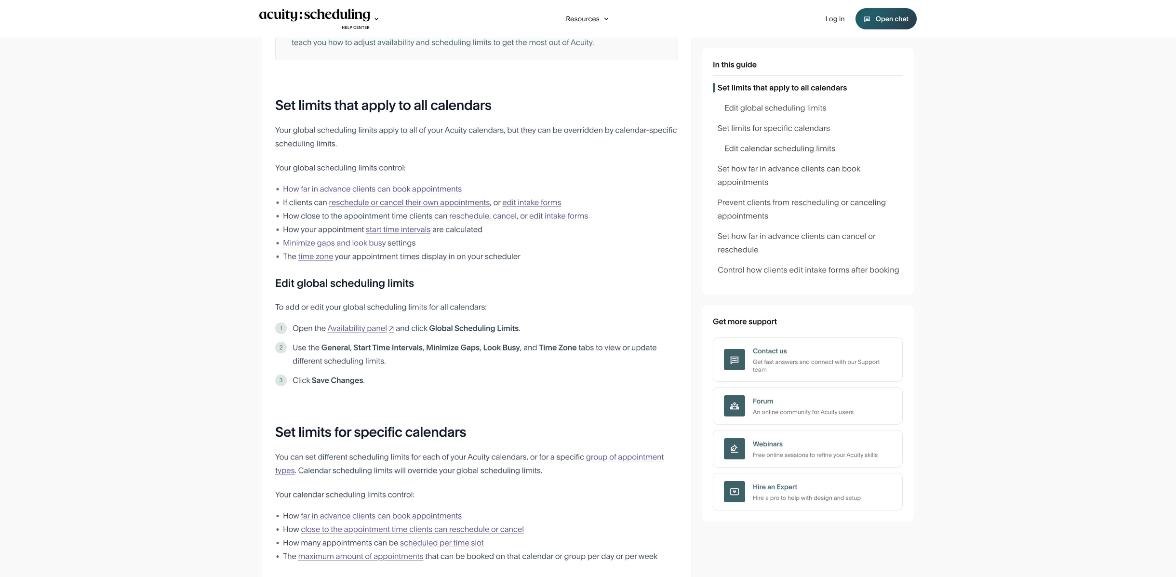
Acuity’s help center describes global scheduling limits that apply to every calendar, plus calendar-specific limits that override them. Two of the most useful for protecting your week are:
- Minimum hours before the start time that an appointment can be booked. Set it to 24 or 48 hours and nobody can book a call for this afternoon while you are in the middle of a project.
- Maximum days in advance an appointment can be booked. A two- to four-week horizon stops a prospect from claiming a slot two months out in a week you may want to block for a launch.
Rescheduling and cancellation cutoffs
The same limits also control what happens after booking. Acuity lets you turn off client rescheduling or cancellation entirely, or set how close to the start time clients can still reschedule or cancel. For a freelancer, a 24-hour cutoff is a reasonable middle ground: clients keep flexibility, and you do not lose a prepared afternoon to a last-minute move.
Step 3: Cap calls per day and per week
Calendar-specific limits in Acuity include the maximum number of appointments that can be booked on a calendar, or on a group of appointment types, per day or per week. This is the setting that turns “available” into “sustainable”.
A simple rule I like: decide the most calls you can take in a day without losing the next morning, then set that number as the daily cap. For many freelancers that is two or three. A weekly cap of five or six keeps a busy week from turning into a meeting week.
Calendar limits can also control how many appointments can be scheduled in the same time slot. For a solo freelancer this should almost always be one.
Step 4: Make calls cluster with minimize gaps
This is the setting most freelancer guides skip, and it is the one that protects deep work best. According to Acuity’s help center, when you turn on minimize gaps, clients only see open slots directly before or after appointments that already exist. If nothing is booked on a given day yet, all slots show until the first booking lands.
You get two options:
- Avoid any gaps between appointments during the day. Calls stack back to back.
- Avoid small gaps, but allow gaps of at least a set size. Acuity describes this as removing short gaps while still allowing larger gaps of two to six hours between groups of appointments.
In practice, the second option is often better for freelancers. Three calls in a row with no breathing room is tiring, and you may want a gap to write notes. Allowing a larger gap while banning 30-minute crumbs keeps your call afternoon compact.
Acuity’s help article is clear about the limits of this feature. It may not work as expected if several calendars share an appointment type with pooled availability, and if your day has separate sections of availability (for example a morning block and an afternoon block), one booking can hide the other section for that day. If you only open afternoons for calls, the second point works in your favor.
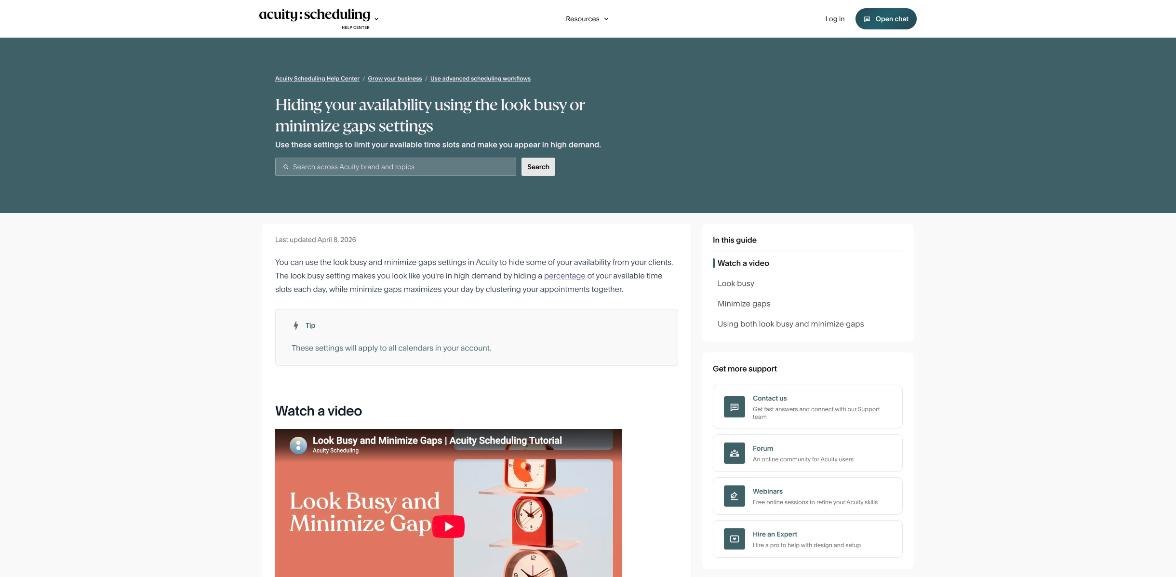
Watch the official walkthrough
Acuity’s own tutorial shows both settings in the dashboard:
Step 5: Decide whether to look busy
Look busy hides a percentage of each day’s open slots from clients. You still see your full availability in your own calendar. Acuity’s example: with 10 slots and 50% hidden, clients see 5 slots, and the number shown stays the same as bookings come in until you start running out of slots. Different times may be shown on different days.
For deep work, look busy is a softer tool than a daily cap. It spreads fewer visible options across your call windows, which can reduce the number of bookings per day without a hard limit. Some freelancers also like that a half-full calendar reads as in-demand to new prospects. I would use it carefully: if you are trying to fill your pipeline, hiding half your slots can cost you bookings. Combine it with minimize gaps only after testing how your booking page looks from a client’s side.
Step 6: Use start time intervals and buffers
Acuity’s global limits also include how appointment start time intervals are calculated. If a 45-minute call can start every 15 minutes, a single booking can leave odd fragments around it. Setting start times on the hour or half hour keeps the calendar readable, and pairing that with a short buffer gives you time to write notes before the next call.
If your discovery calls also need a short intake questionnaire, I covered that side of the setup in my guide to Calendly for freelancer client intake, and most of the same question ideas apply to Acuity’s custom client forms.
Which Acuity Scheduling plan you need for this
| Plan | Billed annually | Billed monthly | Calendars | Notable for freelancers |
|---|---|---|---|---|
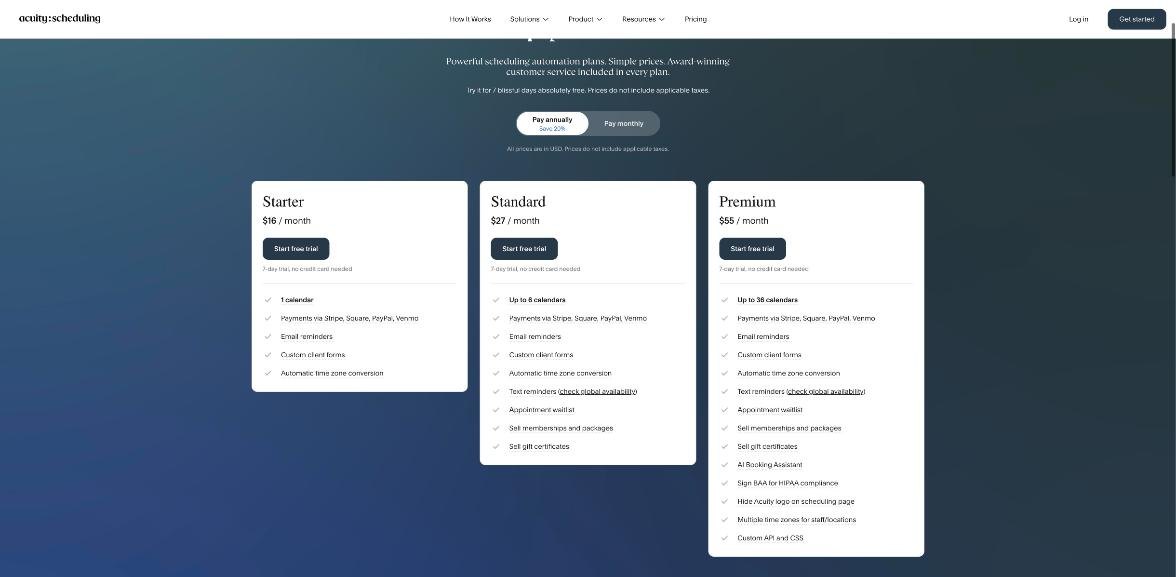
| Starter | $16/month | $20/month | 1 | Payments via Stripe, Square, PayPal, Venmo; email reminders; custom client forms; time zone conversion |
| Standard | $27/month | $34/month | Up to 6 | Adds text reminders, waitlist, packages and memberships, gift certificates |
| Premium | $55/month | $69/month | Up to 36 | Adds AI Booking Assistant, HIPAA BAA, hiding the Acuity logo, custom API and CSS |
Every plan starts with a 7-day free trial with no credit card needed, according to the pricing page. Prices do not include applicable taxes.
For a solo freelancer protecting deep work, Starter is usually enough. The plan comparison lists client self-scheduling, payments and deposits, and the main video meeting integrations (Google Meet, Zoom and GoToMeeting) across plans. Standard becomes worth it if you want to sell prepaid call packages, or if you want separate calendars, for example one for discovery calls with tight limits and one for paying clients with looser ones. Calendar-specific limits make that split useful.
If you mainly want to take paid consultations at the lowest possible cost, my look at Setmore’s free plan for paid consultations covers a cheaper route, with fewer controls.
A sample setup for a solo freelancer
Putting it all together, here is a starting configuration you can copy and adjust:
- Availability: Tuesday and Thursday, 2 pm to 5 pm only.
- Minimum notice: 24 hours.
- Booking horizon: 21 days.
- Reschedule and cancel cutoff: 24 hours before start.
- Daily cap: 3 appointments. Weekly cap: 5.
- Minimize gaps: on, with “avoid small gaps” so calls group together.
- Look busy: off at first. Turn it on later only if you want fewer visible slots.
- Start times: every 30 minutes, with a short buffer after each call.
Run it for two weeks, then look at your calendar. If calls still leak into mornings, the cause is almost always availability (Step 1), not the limits.
Who should skip Acuity for this job
- Freelancers who need every booking they can get. If your pipeline is thin, tight limits and look busy will cost you calls. A simpler, cheaper tool may serve you better until demand catches up.
- Freelancers who only share a link a few times a month. With low call volume, the protection features matter less than price.
- Teams that rely on pooled “any available” booking. Acuity notes minimize gaps may not behave as expected with pooled availability across calendars.
My take
Acuity Scheduling is usually reviewed as a booking and payments tool for salons, coaches and clinics. For freelancers, its most valuable side is defensive. Minimum notice, a short booking horizon, daily and weekly caps and, above all, minimize gaps let you put client calls where they cost the least deep work. Starter at $16 a month billed annually covers this for a single calendar. Try it during the 7-day trial, set the limits on day one, and judge it by one thing: how many uninterrupted mornings you get back.
FAQ
How much does Acuity Scheduling cost?
Starter is $16 per month billed annually or $20 monthly, Standard is $27 or $34, and Premium is $55 or $69, according to Acuity’s pricing page. Taxes are not included.
Does Acuity Scheduling have a free trial?
Yes. Each plan has a 7-day free trial and no credit card is needed.
What does minimize gaps do in Acuity?
It shows clients only the open slots directly before or after existing appointments, so bookings cluster together. You can avoid all gaps or allow larger gaps of a set size.
What is the look busy setting?
It hides a percentage of each day’s available slots from clients. You still see your full availability internally.
Can I limit how many appointments clients book per day?
Yes. Calendar scheduling limits include a maximum number of appointments per day or per week for a calendar or group of appointment types.
Can I stop clients from booking at short notice?
Yes. Set the minimum hours before the start time in your scheduling limits, for example 24 or 48 hours.