
Most freelancers meet WeTransfer the same way: a client sends a big file, you send one back, and nobody pays anything. Then the work turns into a business, and two lines on WeTransfer’s pricing page start to matter. The Free plan is labeled “for individual, non-commercial use only”, and it allows 10 transfers or 3 GB in any rolling 30 days. Choosing the right WeTransfer plan for client deliveries is less about speed or storage than about those two lines.
This guide walks through the plans from a freelancer’s point of view: how many deliveries you actually send, how big they are, how long clients need the link to stay alive, and whether your name or the WeTransfer brand should be on the page the client sees. All prices and limits below come from WeTransfer’s pricing page and help center as they read today.
The plans at a glance
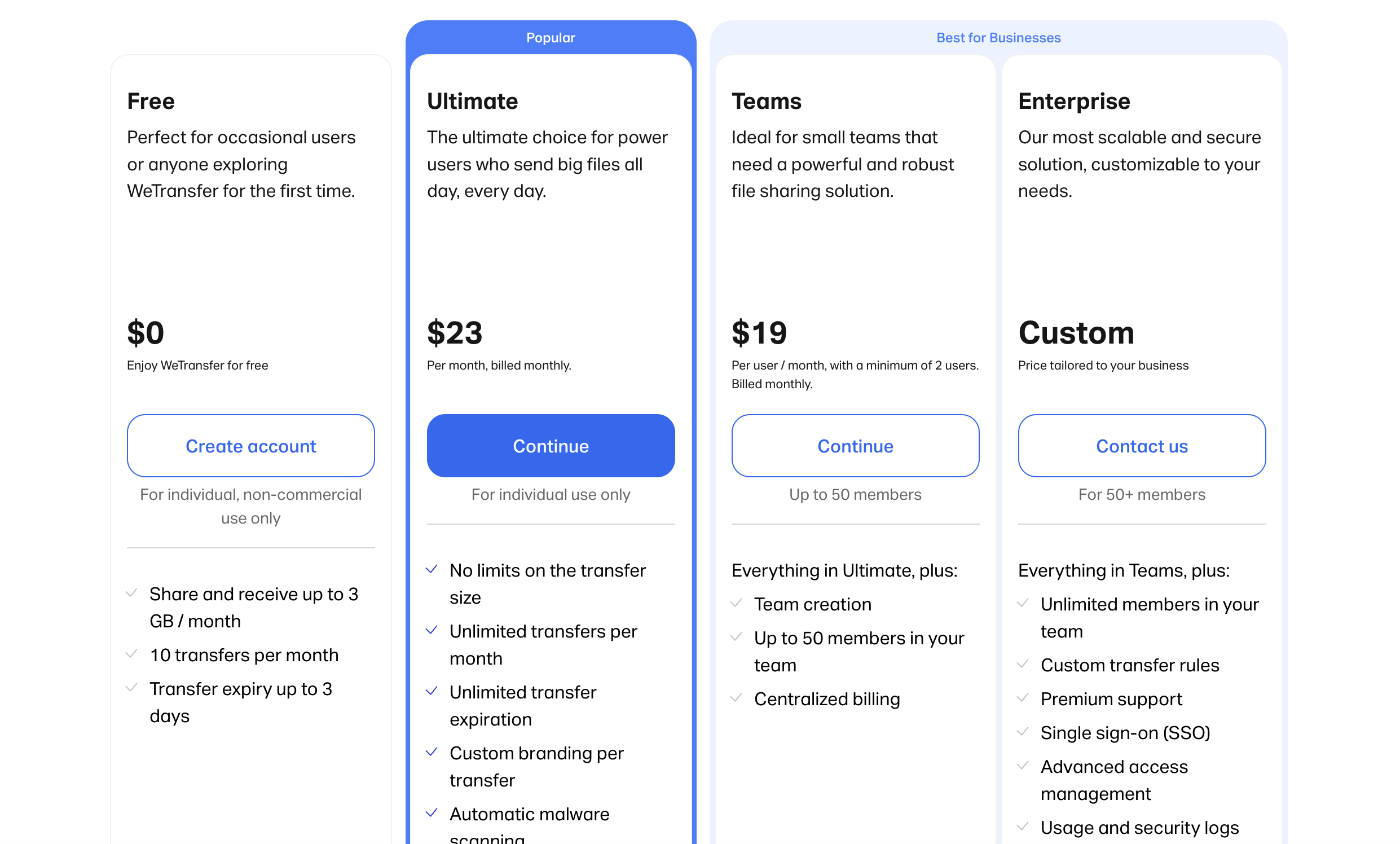
| Plan | Monthly billing | Yearly billing | Transfers and data | Use |
|---|---|---|---|---|
| Free | $0 | $0 | 10 transfers or 3 GB per rolling 30 days | Individual, non-commercial use only |
| Starter | $8/month | $7/month | 10 transfers or 300 GB per rolling 30 days | Individual use only |
| Ultimate | $23/month | $19/month | Unlimited transfers, no limit on transfer size | Individual use only |
| Teams | $19 per user/month, minimum 2 users | $16.58 per user/month | Everything in Ultimate, up to 50 members | Small teams |
| Enterprise | Custom | Custom | Custom storage, SSO, SCIM | 50+ members |
WeTransfer also states there is no difference in upload or download speed between Free and paid plans. Speed depends on your connection, so do not pay for a plan expecting faster deliveries.
Why the Free plan is the wrong home for client work
The Free card on the pricing page says “For individual, non-commercial use only.” Delivering paid work to a client is commercial use, so a freelancer sending client files on Free is outside what the plan is for, regardless of how few files they send.
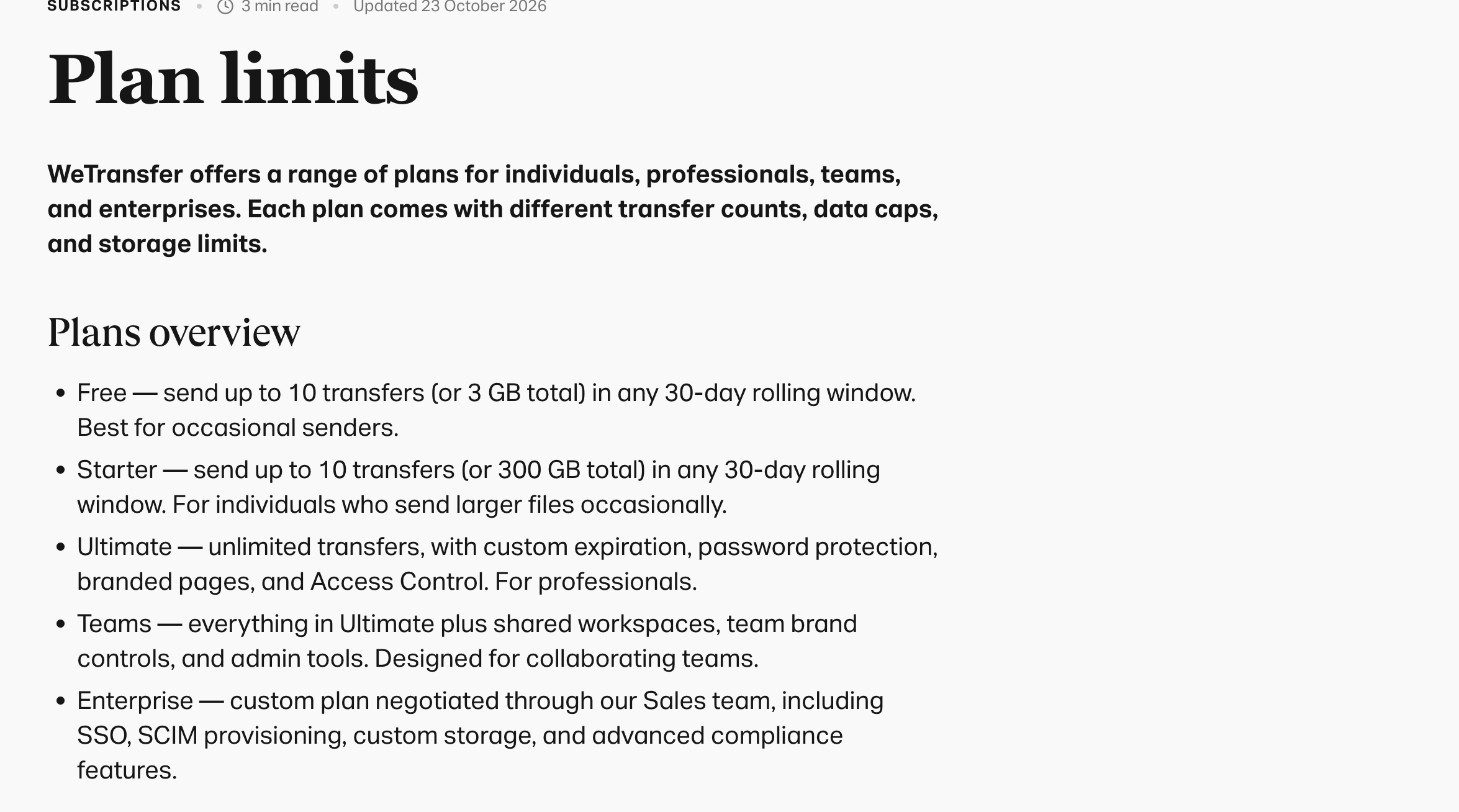
The limits are tight as well. The help center describes Free as up to 10 transfers or 3 GB total in any 30-day rolling window, and transfers on Free expire after up to 3 days. A client who opens the email on day four, or forwards it to a colleague the following week, finds an expired link. On Free, expired transfers cannot be recovered.
Counting your deliveries first
Before comparing paid plans, count what you send. A simple way is to look back over the last month of client work and list each time you sent files, including revisions. Then note three things for each delivery: total size, whether the client needed more than three days to download, and whether you would have liked your own branding on the download page.
The 30-day window is rolling, not a calendar month. WeTransfer’s example: send 2 transfers on the 1st and 8 more on the 15th, and you get 2 slots back on the 1st of the following month and 8 more on the 15th. For freelancers with bursty work, such as a big launch week followed by quiet weeks, the rolling window can run out at exactly the wrong moment.
Three typical freelance patterns
- Few, large deliveries. A video editor sending four or five final exports a month, each tens of gigabytes. Volume is low but size is high.
- Many small deliveries. A designer sending drafts, revisions and final assets to several clients, often 20 or more transfers a month, each under a gigabyte.
- Client-facing branding matters. A photographer or studio where the download page is part of the client experience.
Starter: the plan for few, large deliveries
Starter costs $8 a month on monthly billing or $7 a month billed yearly. It keeps the 10-transfer limit from Free, but raises the data cap to 300 GB per rolling 30 days, and it is labeled for individual use rather than non-commercial use only.
That makes Starter a reasonable fit for the first pattern: a freelancer who sends a handful of large files each month. It does not fit the second pattern at all. If you send revisions often, ten transfers disappear in a week.
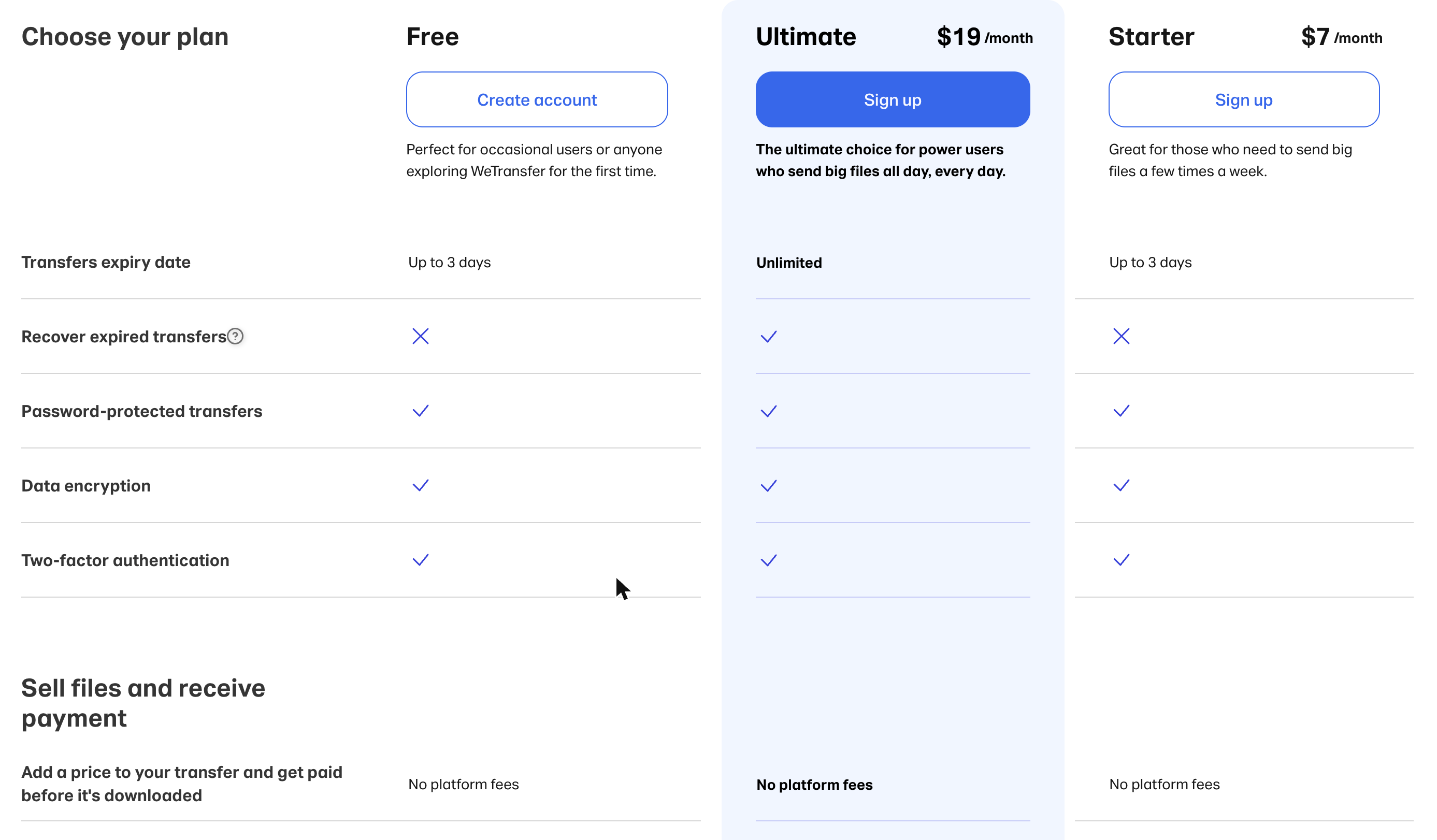
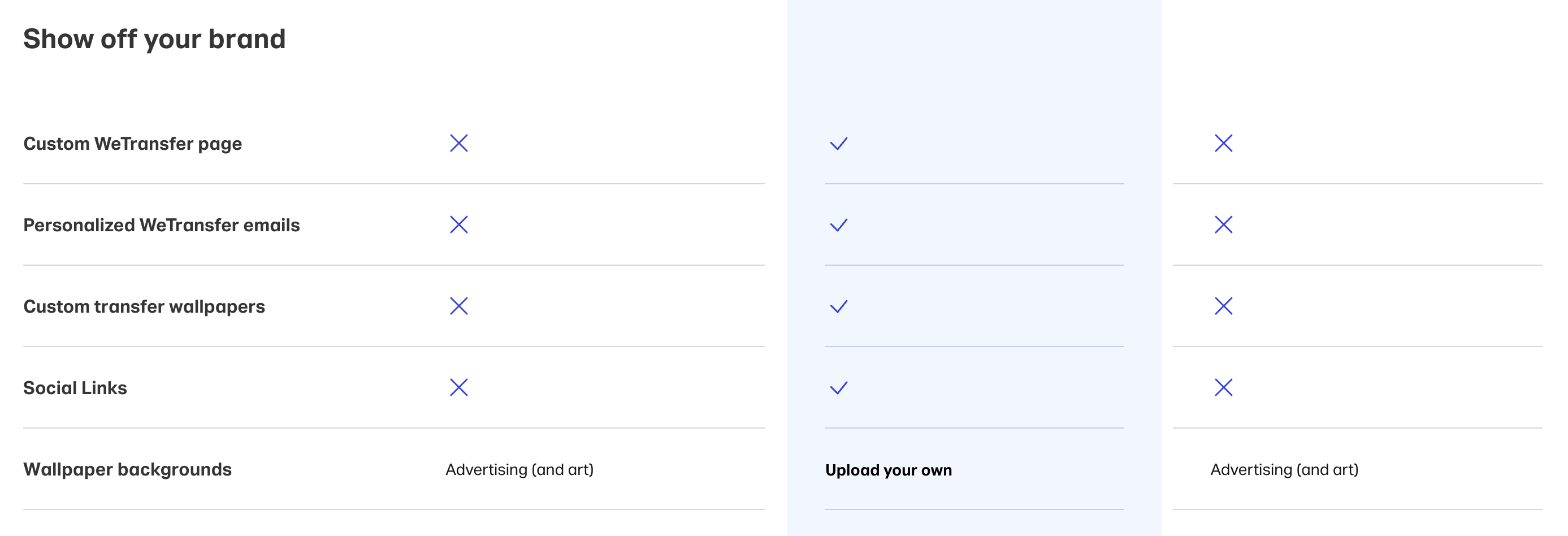
What Starter does not change matters too. According to the comparison table on the pricing page, Starter transfers still expire after up to 3 days, expired transfers cannot be recovered, and the branding features (custom WeTransfer page, personalized emails, custom wallpapers and social links) are not included. Download pages show WeTransfer’s advertising wallpapers, as on Free.
Ultimate: the plan for frequent senders and branded delivery
Ultimate is $23 a month on monthly billing or $19 a month billed yearly. It removes the transfer count and transfer size limits, and changes three things that matter for client work:
- Expiry. Transfer expiration is listed as unlimited, so you can keep a delivery link alive until a project closes.
- Recovery. Expired transfers can be recovered, which helps when a client comes back months later asking for the final files.
- Branding. Ultimate includes a custom WeTransfer page, personalized emails, custom transfer wallpapers and social links, and lets you upload your own wallpaper backgrounds instead of WeTransfer’s advertising.
The pricing card also lists automatic malware scanning for Ultimate, and WeTransfer currently offers a 7-day free trial of Ultimate.
For the designer sending 20+ transfers a month, Ultimate is the only individual plan that works. For the photographer, the branding is the reason to choose it even if volume is modest.
Teams: only when someone else sends too
Teams is $19 per user per month with a minimum of 2 users on monthly billing, or $16.58 per user per month billed yearly. It includes everything in Ultimate plus team creation, up to 50 members and centralized billing. The help center adds shared workspaces, team brand controls and admin tools.
For a solo freelancer, Teams costs more than Ultimate (two seats at $19 is $38 a month) and adds nothing you need. It starts to make sense when you subcontract regularly and want an assistant or a second editor to send deliveries under the same brand, from the same account, with one bill.
Getting paid before the client downloads
One feature changes how some freelancers might use WeTransfer: paid transfers. WeTransfer says you can put a price on a transfer and keep the files locked until the buyer pays through Stripe; the download unlocks automatically, and WeTransfer collects no platform fee. The pricing table shows this on Free, Starter and Ultimate, and WeTransfer’s page says it works from a desktop browser. Buyers can preview supported file types before paying.
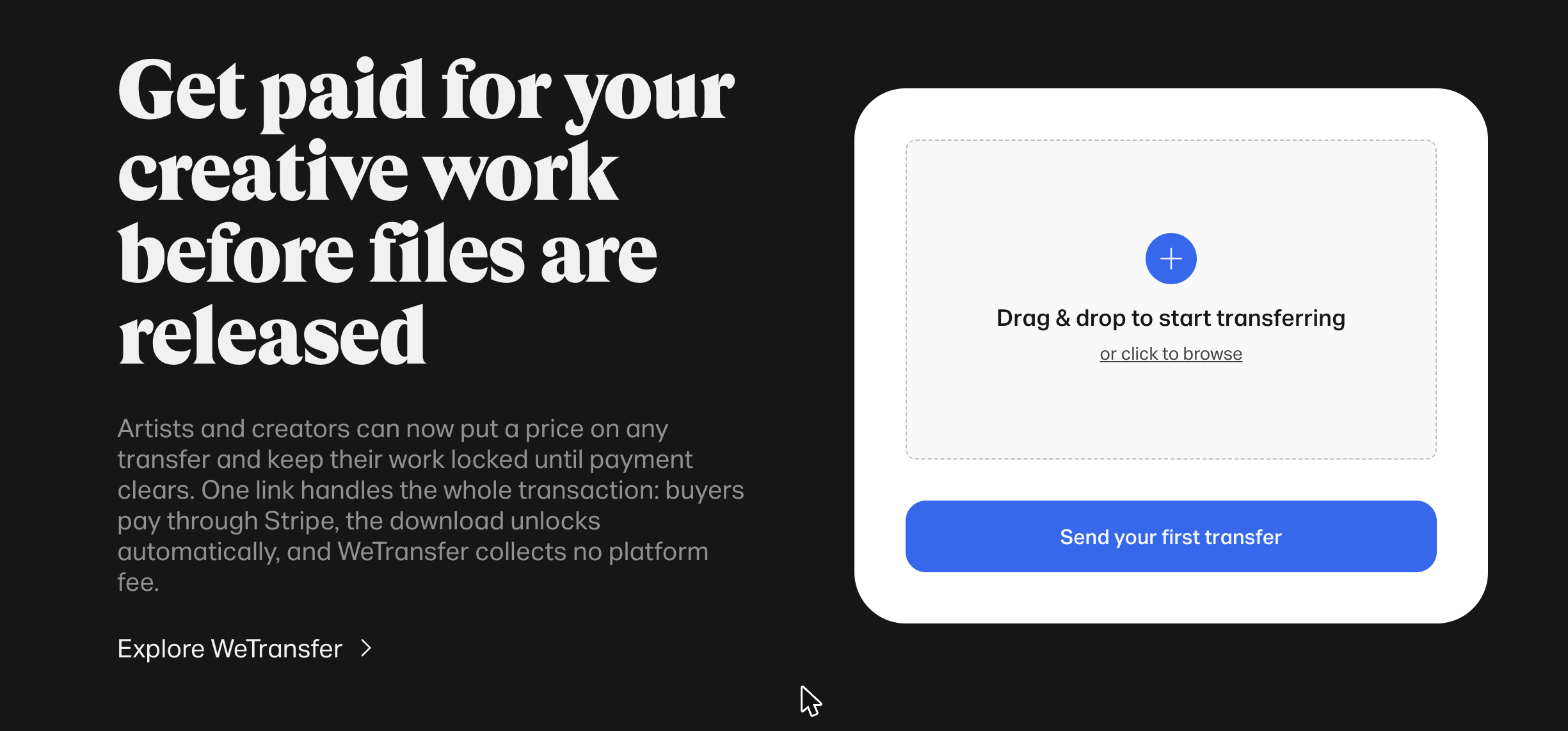
For freelancers, this is most useful for the final delivery on small one-off jobs where you would otherwise send an invoice and wait. It is not a replacement for an invoicing tool on retainers. “No platform fee” describes WeTransfer’s side; payments run through Stripe, so read your Stripe account terms before relying on it.
What each pattern costs over a year
Using today’s listed prices, here is what the three freelance patterns above would pay over twelve months.
- Few, large deliveries on Starter: $84 a year on yearly billing ($7 × 12), or $96 paying month to month. That buys 300 GB and 10 transfers per rolling 30 days.
- Many small deliveries on Ultimate: $228 a year on yearly billing ($19 × 12), or $276 paying month to month.
- Branded delivery on Ultimate: the same $228 to $276, since branding is not sold separately on the individual plans.
- Freelancer plus one subcontractor on Teams: about $398 a year for two seats on yearly billing ($16.58 × 2 × 12), or $456 month to month.
The jump from Starter to Ultimate is the real decision for most solo freelancers, roughly $144 a year on yearly billing. A useful test: if even one client in the past year needed files resent because a 3-day link expired, or if you had to wait for transfer slots to free up before sending a revision, Ultimate is likely worth the difference. If neither happened, Starter is enough, and yearly billing saves a little on either plan.
Which WeTransfer plan to pick
- Sending client work at all: skip Free; it is non-commercial only.
- Up to 10 deliveries a month, mostly large, no branding needed: Starter at $7 to $8 a month. Remember the 3-day expiry.
- More than 10 deliveries a month, or clients who download late: Ultimate at $19 to $23 a month.
- Branded download pages: Ultimate.
- You and a subcontractor both send deliveries: Teams, from 2 seats.
If you also need long-term storage for archives rather than delivery links, a cloud storage plan is a better home for the master files, with WeTransfer used only for the handoff. The comparison in the Dropbox Plus vs Standard comparison for freelancers covers that side, and the guide to pCloud for freelance file delivery looks at an alternative that also handles handoffs.
A simple delivery routine
- Keep master files in your storage tool, organized by client and project.
- Send the final delivery through WeTransfer with a clear title and a short message listing what is included.
- On Starter, tell the client the link expires within 3 days. On Ultimate, set an expiry that matches the project’s close date.
- Use password protection for sensitive work and send the password separately.
- Log the transfer date in your project notes, so you know when a client’s files were delivered.
FAQ
Can I use the free WeTransfer plan for client work?
The pricing page labels Free “for individual, non-commercial use only”, so it is not intended for delivering paid client work. Starter and Ultimate are labeled for individual use.
What is the WeTransfer Free limit?
Up to 10 transfers or 3 GB total in any rolling 30-day period, with transfers expiring after up to 3 days.
What is the difference between WeTransfer Starter and Ultimate?
Starter keeps the 10-transfer limit with a 300 GB data cap and 3-day expiry. Ultimate has unlimited transfers and size, unlimited expiry, recovery of expired transfers and branding features.
How much does WeTransfer Ultimate cost?
$23 a month on monthly billing or $19 a month billed yearly, with a 7-day free trial currently offered.
Are paid WeTransfer plans faster?
No. WeTransfer says there is no difference in upload or download speed between Free and paid plans.
Does WeTransfer take a fee on paid transfers?
WeTransfer says it collects no platform fee on paid transfers. Payments go through Stripe, so Stripe’s processing terms apply.