
Disclosure: some links in this guide are partner links. If you sign up through them, I may earn a commission at no extra cost to you. Plan details come from Elementor’s pricing page and Help Center articles as they read today.
Most freelancers who build on WordPress pick Elementor Pro for the editor, not for the licensing. Then a project ends, the client takes over the site, and a question nobody wrote into the proposal shows up: whose Elementor Pro license is running on that site, and what happens when it expires?
I have seen this go wrong in both directions. A freelancer keeps every client site on their own multi-site plan, then a client leaves on bad terms and the license on their site quietly stops being renewed. Or a client buys their own license, forgets the renewal, and calls a year later because the Pro widgets on their homepage can no longer be edited. Neither is an Elementor problem. Both are a proposal problem.
This guide is about deciding who holds the Elementor Pro license on a client site before the project starts, using what Elementor’s own pricing page and Help Center say about plans, expiry and transfers.
The plans a freelancer actually chooses between
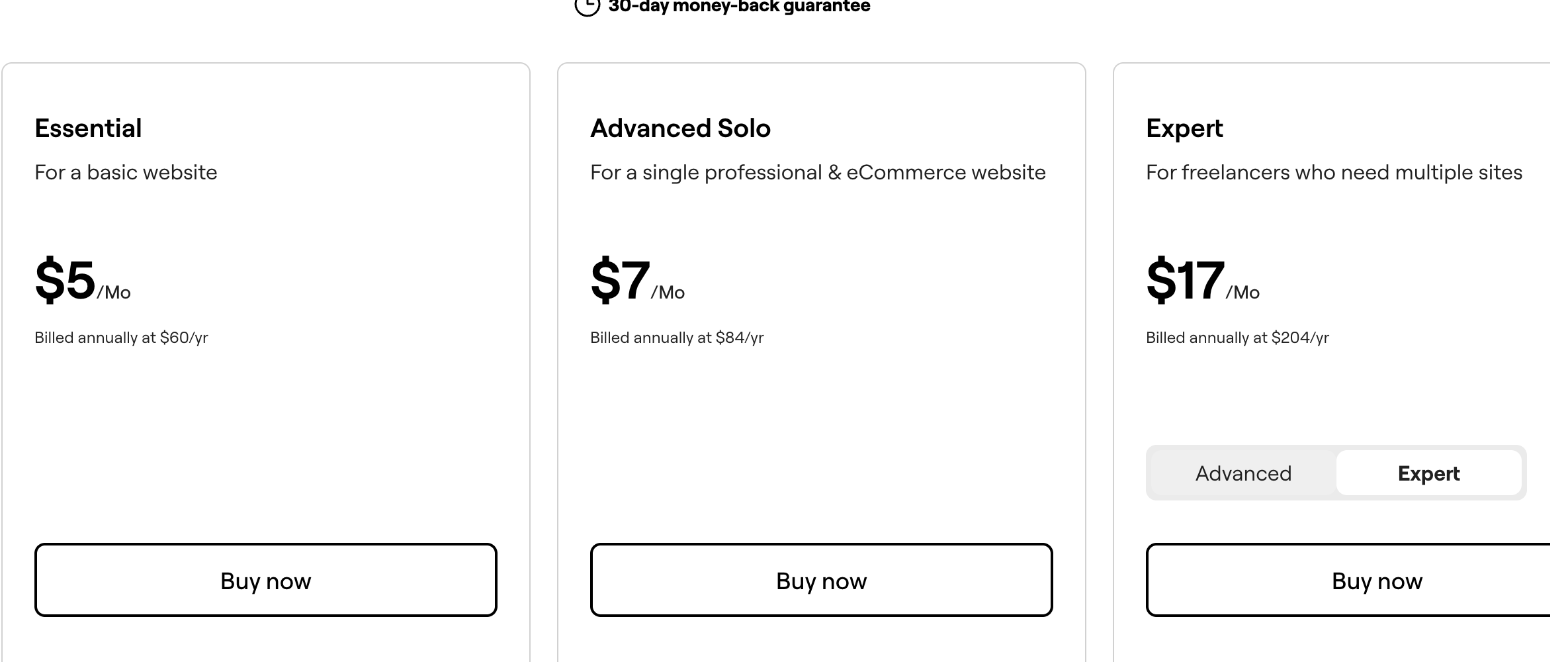
Elementor’s pricing page now shows Pro plans and the newer Elementor One plans side by side. All prices below are billed annually.
| Plan | Price | Sites | Notes from the pricing page |
|---|---|---|---|
| Essential | $5/mo ($60/yr) | 1 | No Popup Builder, custom code or eCommerce features |
| Advanced Solo | $7/mo ($84/yr) | 1 | All 85 Editor Pro widgets, popups, custom code, eCommerce |
| Advanced | $9/mo ($108/yr) | 3 | Same features as Advanced Solo |
| Expert | $17/mo ($204/yr) | 25 | Described as “for freelancers who need multiple sites” |
| One | $15/mo ($180/yr first year) | 1 | Renews at $228/yr; 25,000 monthly One credits |
| One Agency | $36/mo ($432/yr first year) | Unlimited | Renews at $540/yr; 350,000 monthly One credits |
Elementor says the 30-day money-back guarantee applies only to annual plans.
What happens when an Elementor Pro license is not renewed
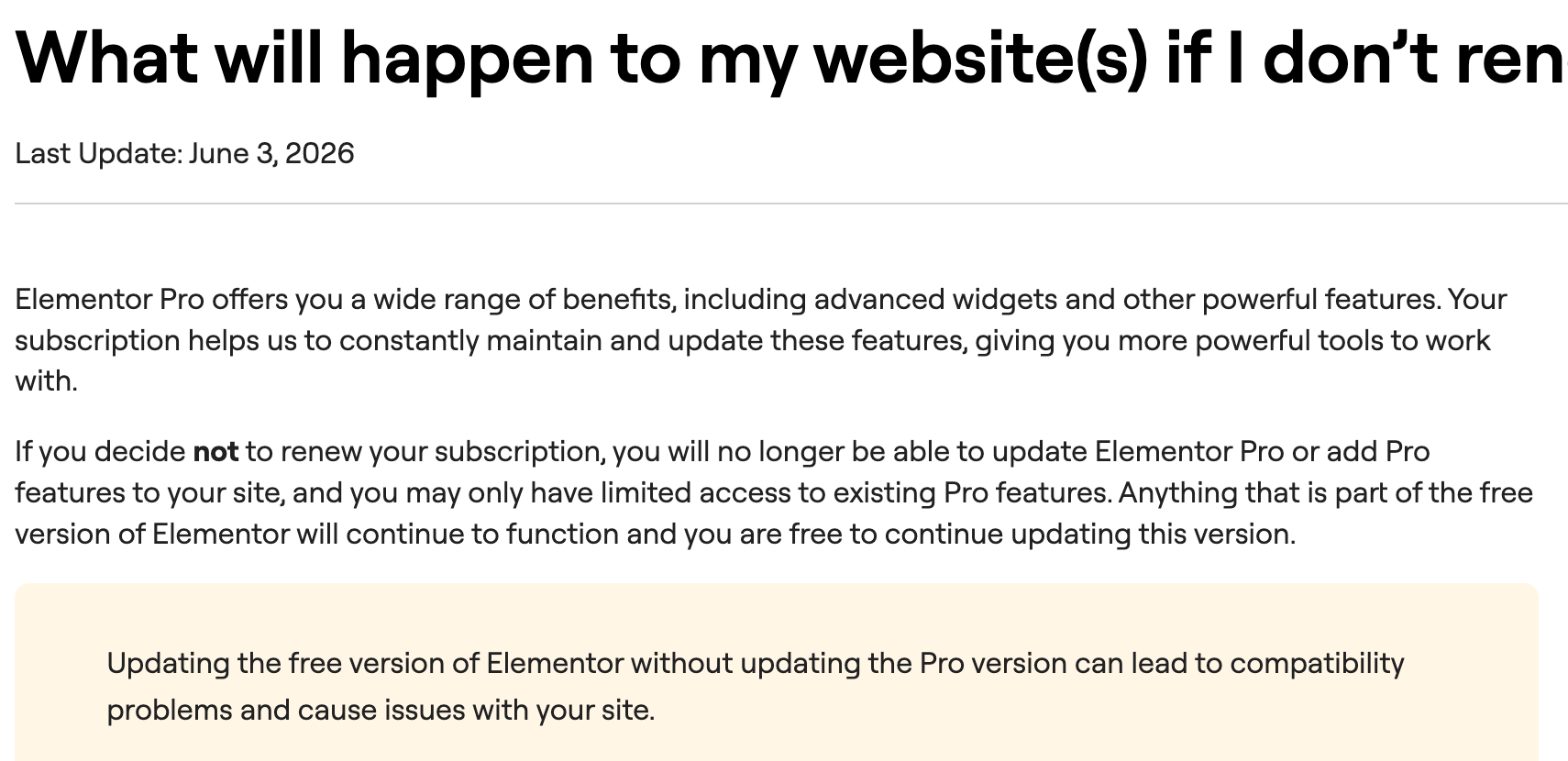
This is the part every client needs to understand, and it is the reason the license question matters at all. Elementor’s Help Center article on not renewing says:
- You will no longer be able to update Elementor Pro or add Pro features to the site.
- You may only have limited access to existing Pro features.
- Anything that is part of the free version of Elementor keeps working, and the free version can still be updated.
- Updating the free version without updating Pro can lead to compatibility problems.
The same article lists what renewing keeps you eligible for: updating the Pro plugin, editing sites created with Pro or Expert-level kits, adding Pro widgets, duplicating Pro widgets, adding new dynamic tags, and getting help through the Virtual Assistant.
In plain terms: the site does not disappear when the license lapses, but whoever owns it loses the ability to keep Pro updated and to edit or extend Pro elements properly. If the homepage was built with Pro widgets and Theme Builder templates, that is most of the site.
Three ways to handle the Elementor Pro license on client sites
Option 1: The client buys their own license from day one
The client creates their own Elementor account, buys Essential or Advanced Solo, and gives you access to activate it on their site. You never touch their billing.
- Good for: one-off builds where you hand over the site and leave.
- Cost to the client: $60 or $84 a year for a single site, depending on whether they need popups, custom code or eCommerce.
- Risk: the client forgets to renew. Write the renewal date into your handoff document and tell them what the expiry article above says.
Option 2: You hold the license under a care plan
You buy Expert (25 sites) or One Agency (unlimited sites) and activate it on client sites you maintain. The license cost is folded into a monthly care or maintenance fee.
- Good for: clients who pay you every month to keep the site updated.
- Cost per site: Expert at $204 a year spread over 25 sites is about $8.16 per site per year if you fill every slot; with only five clients it is about $40.80 each, still below a single-site plan.
- Risk: when the care plan ends, so should your license on that site. That needs a clause in the contract and an exit step, covered below.
Option 3: You buy it for the client, then transfer it
You buy a single-site plan during the build, using your own account for convenience, then hand the subscription over to the client when the project ends. Elementor supports this through a “Transfer subscription” option.
- Good for: clients who want ownership but do not want to deal with setup during the build.
- Risk: refunds. Elementor’s Help Center notes that after a transfer, the account will not be eligible for a refund for the original purchase, including the 30-day refund.
How the subscription transfer works
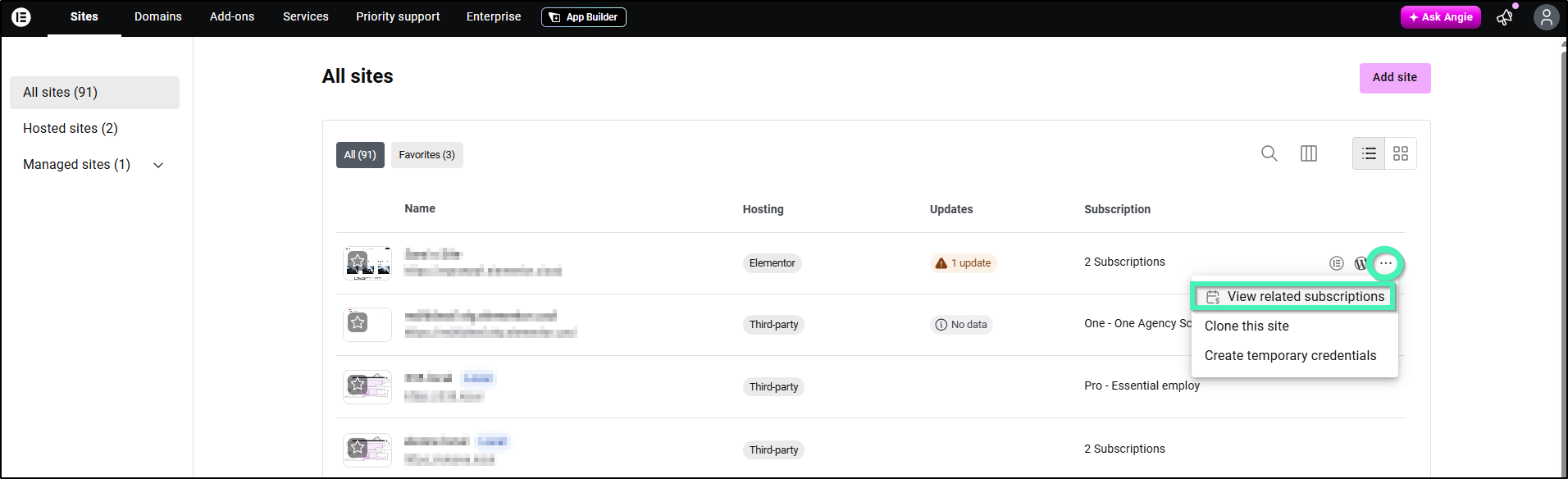
The Help Center describes the steps inside your Elementor account. Under Sites, find the website, open the three-dot menu and choose View related subscription.
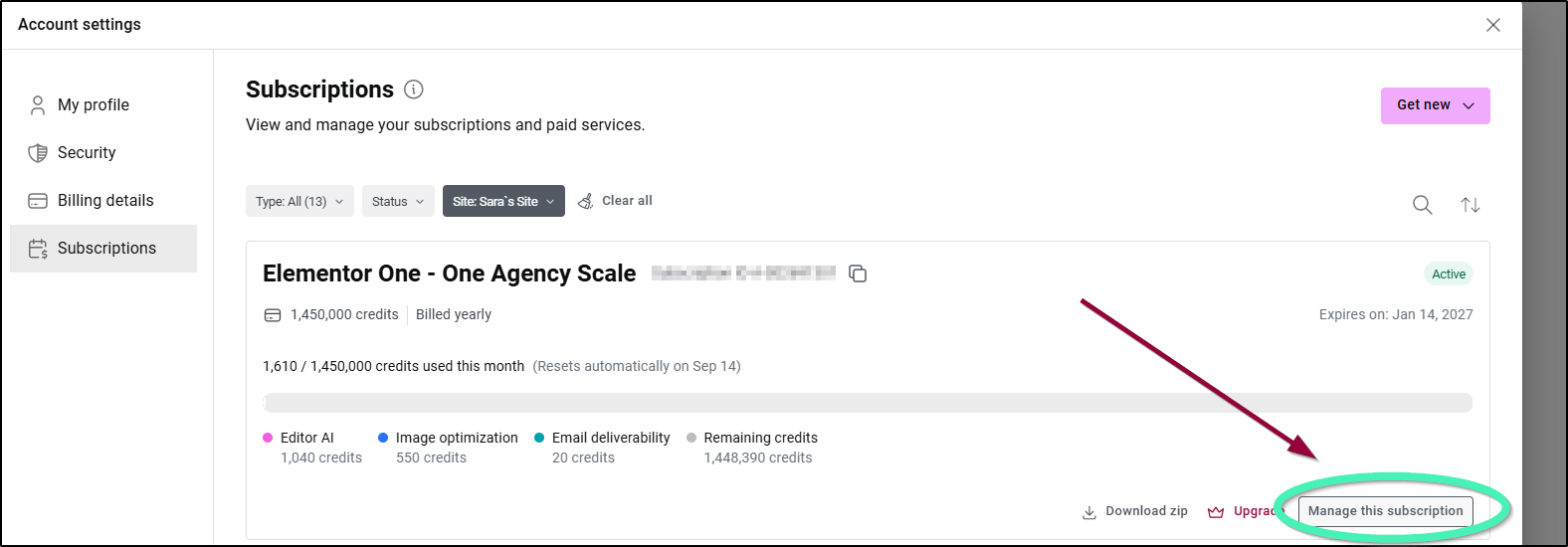
On the subscription card, click Manage this subscription.
Then open the three-dot menu on the subscription page and choose Transfer subscription.
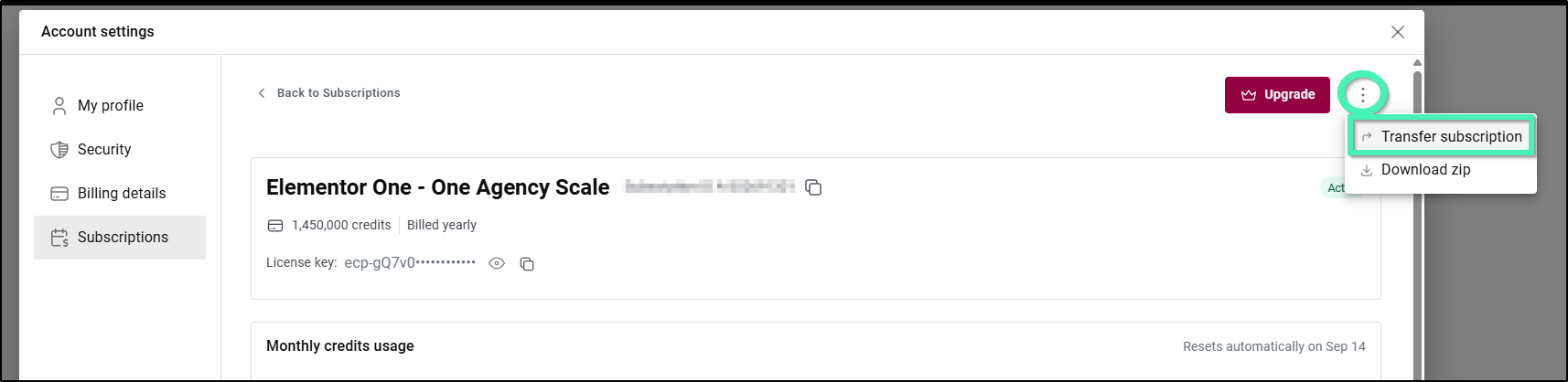
Two details from the same article are worth putting in your process notes. First, the refund note above: once you transfer, the original purchase is no longer refundable. Second, Elementor explains that deactivating and reactivating a license on different domains is meant for changing a site’s domain when needed, and that there is a limit on the number of unique domains a subscription can be used on. So do not treat a single-site license as something you can move between client projects every few months.
The clause I would put in every proposal
Whichever option you choose, write it down. A short licensing section in the proposal saves an awkward email later. Here is the structure I would use:
- Who owns the license. “The Elementor Pro license on this site is held by [client / freelancer].”
- Who pays for renewal. Name the plan and its current annual price, and note that prices are set by Elementor and can change.
- What happens at the end of a care plan. For Option 2: “If the maintenance agreement ends, the client will purchase their own Elementor Pro license within [X] days, after which the freelancer’s license will be deactivated on the site.”
- What expiry means. One sentence summarizing Elementor’s expiry article: the site stays online, but Pro can no longer be updated and Pro elements may become limited.
- Account access. Who can log into which Elementor account, and that you will never ask for the client’s billing details.
If you already use a client-portal or proposal tool, add this as a standard block. If you also provide hosting, my guide to setting up Hostinger agency hosting with client logins covers the hosting side of the same ownership question. And for asset licenses, the same thinking applies to stock and templates, which I covered in Envato Elements for freelancers.
Expert or One Agency for a freelancer?
If you choose Option 2, the decision is usually between Expert and One Agency.
Expert ($204 a year, 25 sites) is the plan Elementor itself labels for freelancers with multiple sites. It includes all 85 Editor Pro widgets, the Theme Builder, dynamic content, the form and popup builders, custom code and eCommerce features.
One Agency ($432 for the first year, renewing at $540 a year) covers unlimited sites and adds a shared pool of 350,000 monthly One credits. According to the pricing FAQ, those credits pay for AI generation, image optimization, accessibility fixes, email delivery and cookie consent, and on One Agency they can be used across any of your client sites. Credits reset monthly and do not roll over. Elementor One does not include hosting.
For a freelancer with fewer than 25 maintained sites who already has image optimization and email delivery handled elsewhere, Expert is the simpler and cheaper choice. One Agency starts to make sense when you would otherwise pay for those extra services separately on each client site, or when you pass 25 sites.
A handoff checklist for Elementor sites
- Record the plan name, renewal date and account owner in the handoff document.
- If the client owns the license, confirm it is activated on the live domain, not the staging one.
- If you are transferring a subscription, tell the client beforehand that the transfer ends refund eligibility for the original purchase, including the 30-day guarantee.
- If you are removing your own license after a care plan ends, agree on the date in writing and give the client time to activate theirs first.
- Remind the client not to update the free Elementor plugin on its own if Pro has expired, because Elementor warns this can cause compatibility problems.
My take
The Elementor Pro license question is easy to solve and expensive to ignore. For one-off builds, let the client buy and own a single-site plan from the start. For clients on a monthly care plan, an Expert license is a fair cost to absorb, as long as the contract says what happens when the care plan ends. Use Elementor’s Transfer subscription option when you need to hand a license over, but know that it ends refund eligibility.
Whatever you choose, decide it in the proposal, not after launch.
Elementor Pro license FAQ
What happens to my client’s site if the Elementor Pro license expires?
Elementor says the site keeps the free version’s features, but Pro can no longer be updated, Pro features cannot be added, and access to existing Pro features may be limited.
Can I transfer an Elementor Pro license to a client?
Yes. Elementor’s account dashboard has a Transfer subscription option under the subscription’s three-dot menu. After a transfer, the original purchase is no longer eligible for a refund.
Which Elementor plan is best for freelancers with many client sites?
Elementor describes Expert, at $204 a year for 25 sites, as the plan for freelancers who need multiple sites. One Agency covers unlimited sites and adds monthly credits for AI and site services.
Can I move one Elementor Pro license between client sites?
You can deactivate a license on one domain and activate it on another, but Elementor says this is meant for changing a site’s domain and that there is a limit on the number of unique domains per subscription.
Does Elementor One include hosting?
No. Elementor One includes the Editor Pro and connected services, but hosting is a separate Elementor offering. One works with any compatible WordPress host.