Disclosure: some links on this page may be affiliate links. If you sign up through them I may earn a commission at no extra cost to you.
Contra’s headline promise is simple: it never takes a commission from freelancers. What gets less attention is that Contra now offers several quite different ways for a client to pay you, from escrow-backed projects to a plain payment link you can paste into a DM. Each one gives you a different mix of protection and speed. If you want to get paid on Contra without surprises, the method you pick for each client matters more than the commission-free label.
Below I rank the seven payment options Contra describes in its own payments guide, starting with the one that protects you most and ending with the one that is fastest to set up. Then I cover the fees that remain, when the Pro plan earns its price, and how the money actually reaches your bank.
How Contra payments work in one paragraph
Contra Payments is the system behind every transaction on the platform. Clients pay by card, and for some methods by ACH or SEPA bank transfer. The money lands in your Contra wallet, and you withdraw it to a bank account, debit card (US only), PayPal, Payoneer or crypto. Contra says it is 100% commission-free for creatives, but that does not mean nothing costs anything: there are client-side platform fees on the free plan, card processing fees, and payout fees charged by the payment providers. I break those down further on.
The seven ways to get paid on Contra, ranked
Contra splits its options into structured projects (with contracts and, for some, escrow) and lighter tools for quick billing. Here they are in order of how much protection they give you as the freelancer.
1. One-time fixed project (escrow)
The client pays the full project fee upfront. If you set an upfront amount, that part is released to you immediately; the rest is held securely and released when the client approves the work. Contra recommends it for new relationships where the scope is fixed.
Use it for: a first project with a new client, especially one you found on the open internet. The money exists before you start, which is the single best protection a freelancer can have.
2. Milestones (escrow)
The client funds each milestone in full before it starts. Each milestone is released separately once you submit it and the client approves. Contra positions this for larger projects delivered in phases.
Use it for: anything longer than a few weeks. You never carry more than one milestone of risk, and the client never prepays the whole project, which makes big projects easier to sell.
3. One-time hourly project (escrow)
The client pays the maximum hours times your rate upfront. Funds are released as you submit hours and they are approved, and if you work fewer hours than the maximum, the client is refunded the difference.
Use it for: new clients when the scope is fuzzy. Agree a sensible cap, and you are protected up to it. If the work grows, set a new cap rather than working beyond the funded hours.
4. Fixed invoice billing
Invoices are generated automatically on a fixed cadence, weekly, bi-weekly or monthly, and the client is prompted to pay on the invoice date. There is no escrow here. Contra suggests it for established relationships with ongoing work.
Use it for: retainers. You get predictable billing without sending invoices manually, but you are trusting the client to pay each cycle.
5. Hourly invoice billing
You submit hours on an ongoing basis, and each submission generates a payable invoice. The client is notified and prompted to pay.
Use it for: trusted clients with variable workloads. It is flexible, but you are working before you are paid, so keep submission periods short.
6. One-off invoice
For ad-hoc work without creating a full project. You enter the client’s name and email, line items, quantities and rates, plus optional tax, payment terms, an invoice number, due date and memo. The client gets an email with a checkout link and does not need a Contra account to pay. Card, ACH and SEPA are supported. Invoices move through statuses such as Unpaid, Unpaid processing (a bank payment in progress), Past due, Paid and Refunded, and only paid invoices reach your balance.
Use it for: small jobs and existing clients who would not bother creating an account. It is the least friction for the client, and you can send it to clients who are not on Contra at all.
7. Payment link
A shareable checkout link with a title, description and price, either one-time or as a subscription, with optional pricing tiers. Clients pay as guests by card, ACH or SEPA. You can edit a live link and deactivate it at any time, and an invoice is generated with each payment.
Use it for: productised services, such as a fixed-price audit or a monthly maintenance package, and anywhere you want someone to pay without a conversation first. It is the most flexible option and the least protective: there is no contract or escrow attached.
A bonus option: digital products
Contra also lets you sell digital products such as templates, prompt packs, AI workflows, downloads and subscriptions, including free products for lead generation. Here Contra acts as the merchant of record, handling payment processing, tax calculation and remittance, and disputes and chargebacks. Buyers can pay by card, Apple Pay, Google Pay or Cash App. It is a 1:many income stream rather than client billing, so I left it out of the ranking, but it is worth knowing if you want a side product next to client work.
Contracts: the paperwork behind projects
Projects come with contracts, and you choose from three options: Contra’s standard template, a locally-compliant contract for international or region-specific work, or your own PDF. For the first two, Contra fills in the project details and captures e-signatures. For a custom PDF, Contra appends the payment terms and the e-signatures to your document.
My suggestion: use the standard template for small projects and your own contract once a client’s legal team gets involved. Whatever you choose, make sure the scope written in the project matches what you agreed in chat, because that is what any dispute will be judged against.
What happens if a project goes wrong
This is where escrow earns its place, so it is worth understanding the limits. When a dispute is raised, Contra’s support team starts a 14-day dispute assistance period, helping both sides reach a mutual agreement by email. Contra is clear that it cannot decide the outcome for you; it can only facilitate. If there is no agreement within 14 days, the two parties have to settle it directly or through arbitration or court, and the disputed funds stay in escrow for three months.
Two details matter for freelancers. Upfront payments, and money already withdrawn from your Contra wallet, are not refundable through Contra because Contra no longer holds those funds. And refunds only happen when both sides agree. In practice, this means an upfront amount on a fixed project is genuinely yours once released, which is a good reason to ask for one.
The fees that remain on a commission-free platform
Commission-free is accurate: Contra does not take a percentage of what you earn. But there are other costs, and some land on your client.
- Client payment fee (free plan): $15 per payment under $500 and $29 per payment over $500. Contra Pro removes it.
- Card processing: 2.9% + 30¢ per successful charge for domestic cards, charged by the payment processor rather than Contra. Other variable fees may apply.
- ACH: 0.8%, capped at $5 per charge, by request only.
- SEPA: 0.5% + 30¢, capped at $6 per charge, also by request.
- Digital product fee (free plan): 5%, with a minimum of $3 and a maximum of $29. None on Pro.
Because the platform fee is charged to the person paying you, the free plan is not free from your client’s point of view. On a $400 invoice, a $15 fee is noticeable; on a $5,000 milestone, $29 is minor. If you bill many small amounts, either factor the fee into your pricing conversation or look at Pro. If you are weighing Contra against a marketplace that takes a cut from you instead, my Upwork fee worksheet shows how to compare the two models.
When Contra Pro pays for itself
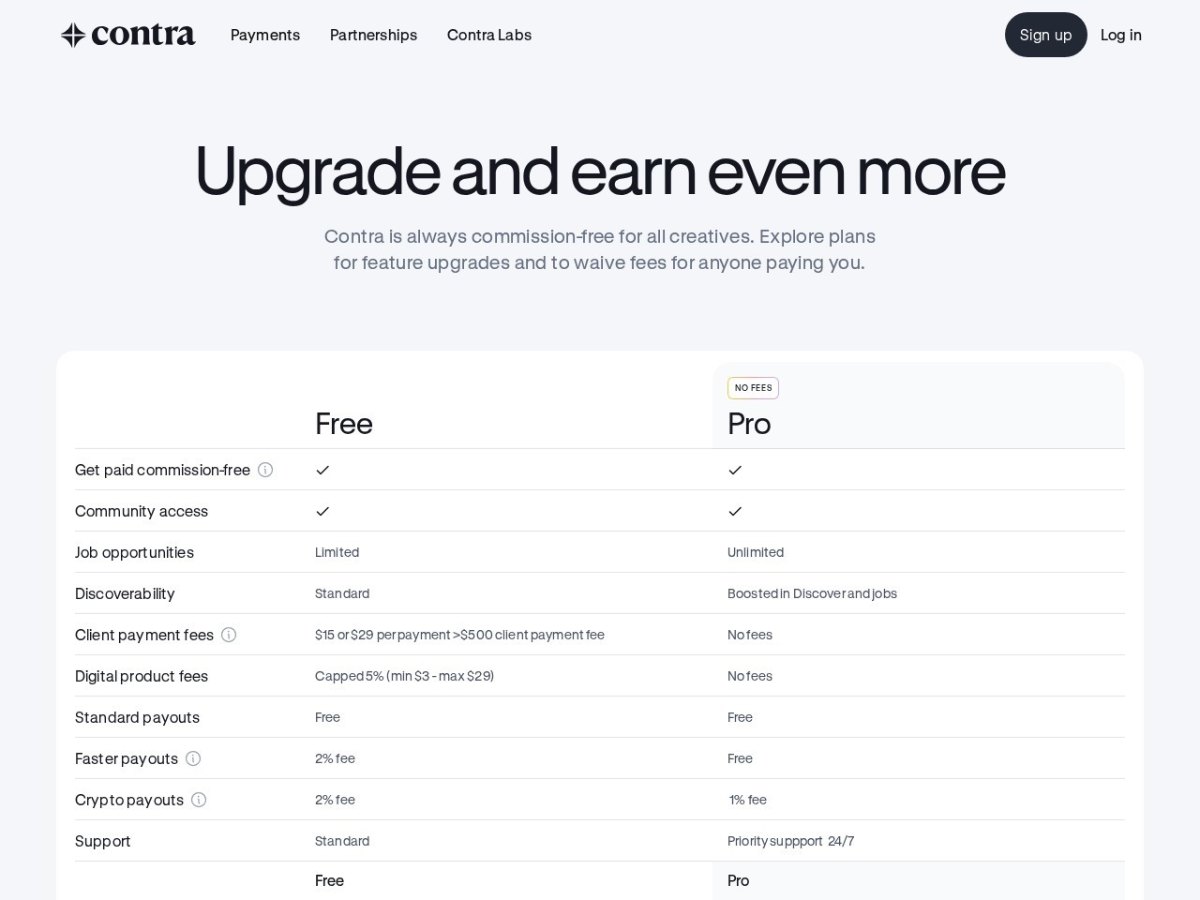
Contra Pro costs $29 per month or $199 per year. According to the pricing page, it removes the client payment fees and the digital product fees, makes faster payouts free (they cost 2% on the free plan), lowers crypto payout fees from 2% to 1%, gives unlimited rather than limited job opportunities, boosts you in Discover and jobs, and adds priority support. Contra has also announced a higher tier, Contra Max, which can waive all fees, including crypto payout fees.
A rough way to decide: the annual plan is $199. If your clients make about seven payments over $500 a year, the $29 fees they would otherwise pay already add up to more than that. With smaller payments at $15 each, the break-even is around fourteen payments. Add the value of free faster payouts if you often need cash quickly, and Pro makes sense for anyone using Contra as their main billing tool. If you only take an occasional project through Contra, stay on the free plan and mention the client fee upfront.
Getting the money out
Funds on Contra are always held in USD. When a client pays by ACH, the money takes 3 to 5 business days to settle before you can withdraw it, and SEPA takes 7 to 10. Standard payouts also go through a 4-day safety-clearance period on top of the provider’s own timeline:
- Bank account: 4 to 7 business days standard, or 0 to 3 with a faster payout.
- Debit card (US only): 4 business days standard, or within an hour with a faster payout.
- PayPal and Payoneer: 4 business days standard, or within 30 minutes with a faster payout.
- Crypto: always instant.
The providers charge their own fees. Local bank payouts vary by country; Contra’s table lists, for example, USD 2.00 for Vietnam, USD 0.50 for the UK and USD 1.00 for SEPA euro accounts, with SWIFT payouts at $15 to $25 or more. Converting from USD adds 0.40% for major currencies and 1% for the rest. PayPal charges 2% on withdrawals, and Payoneer charges $3 plus 1 to 2%, or a flat fee of up to $15 in some countries.
For most freelancers outside the US, a local bank payout is the cheapest route. If you already receive money through other platforms, it is worth comparing these numbers with what you pay today. I traced a full invoice through Payoneer’s fees and looked at getting paid from abroad with Wise in earlier guides.
Bringing existing clients onto Contra
You do not have to find clients on Contra to use its payments. Contra lets you invite an existing client with just their name and email, through a project invite, a one-off invoice, a direct message or a network invite. A client invited to pay sees a guest payment flow; a client invited to a project goes through a light onboarding that asks only for a name and company.

The order I would follow with a long-standing client: start with a one-off invoice so they experience the guest checkout, then move recurring work to fixed invoice billing once they are comfortable. Save escrow projects for new clients, where the protection matters most.
Who Contra suits, and who should look elsewhere
A good fit if you are a designer, developer, marketer or other creative who wants one place for your portfolio, contracts, invoices and payments, and you dislike marketplaces that take a cut of every project. The escrow options make it a solid choice for working with new clients safely.
Look elsewhere if you mainly bill a handful of large corporate clients who pay by bank transfer on their own terms, since you may not need a platform in the middle. The same applies if your clients would refuse a per-payment platform fee and you do not want to pay for Pro. And because funds are held in USD, freelancers who invoice in another currency should check the conversion costs carefully.
My verdict
Contra deserves its commission-free reputation, but the real strength is the range of ways to get paid. Escrow-backed fixed, milestone and hourly projects protect you with new clients, while invoice billing, one-off invoices and payment links keep things quick with people you trust. The costs are clear once you read Contra’s own breakdown: a client-side fee on the free plan, standard card processing, and provider payout fees. Match the method to the relationship, ask for an upfront amount on new projects, and upgrade to Pro once Contra becomes your main billing tool.
FAQ
Is Contra really commission-free?
Yes. Contra does not take a commission from freelancers. On the free plan, clients pay a platform fee of $15 per payment under $500 or $29 over $500, and card processing and payout provider fees still apply.
What is the safest way to get paid on Contra?
An escrow project: one-time fixed, milestones or one-time hourly. The client funds the work before you start and money is released on approval.
Do clients need a Contra account to pay?
Not for one-off invoices or payment links, which support guest checkout. Projects use a light client onboarding that asks for a name and company.
How much is Contra Pro?
$29 per month or $199 per year at the time of writing. It removes client payment fees and digital product fees and makes faster payouts free.
How long do Contra payouts take?
Standard payouts include a 4-day safety-clearance period, so a bank payout takes 4 to 7 business days. Faster payouts can arrive in 0 to 3 business days for banks, or within 30 minutes for PayPal and Payoneer.
Can Contra decide a dispute for me?
No. Contra offers 14 days of dispute assistance to help both sides agree, but it cannot impose a resolution. Disputed funds stay in escrow for three months while you resolve it.