The Upwork freelancer service fee used to be one number everyone memorized. Today it is a range: Upwork’s help center says the fee runs from 0% to 15% per contract, is set by factors Upwork does not fully spell out, and is shown to you before you submit a proposal or accept an offer. That small change breaks the old habit of quoting one rate on every job and mentally subtracting a fixed percentage.
This guide turns that into a simple rate worksheet. It covers how the fee works according to Upwork’s own documentation, a formula to price each proposal so your take-home stays the same, how to add the cost of Connects, and the contract types where the fee drops or disappears. Every fee and Connects detail below comes from Upwork’s help center as it reads today.
How the Upwork freelancer service fee works now
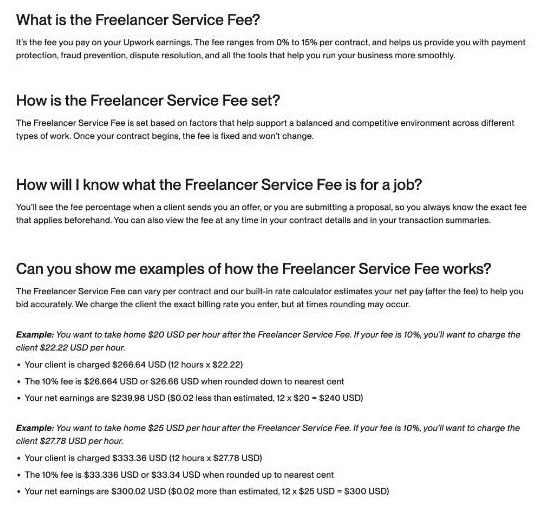
Upwork describes the Freelancer Service Fee as the fee you pay on your Upwork earnings, covering payment protection, fraud prevention, dispute resolution and its business tools. The key rules, from the help article:
- It ranges from 0% to 15% per contract. Different contracts can carry different fees.
- You see it before you commit. The fee percentage is shown when a client sends you an offer or when you submit a proposal, and you can check it later in your contract details and transaction summaries.
- It is locked in. Once a proposal, offer or contract is sent, the fee will not change for that contract.
- Refunds include the fee. If money is refunded to a client, Upwork returns the fee you paid on that amount.
- No regular discounts. Upwork says it is not offering ongoing fee discounts, though it may run promotions.
The practical consequence: the fee is a property of each job, not of your account. Two proposals you send on the same afternoon can carry different fees. If you quote the same hourly rate on both, your take-home will differ.
The one formula you need
Instead of choosing a client rate and hoping, start from what you want to keep and work backwards:
Client rate = target take-home ÷ (1 − fee)
Upwork’s own example uses exactly this logic. To take home $20 an hour on a contract with a 10% fee, it suggests charging $22.22. Over 12 hours the client is charged $266.64, the fee is $26.66 after rounding, and you net $239.98, two cents short of $240 because of rounding. Upwork also has a built-in rate calculator that estimates your net pay as you enter a rate, so you can check the number before sending.
Here is the same formula applied to a $50 an hour target at three fee levels:
| Fee shown on the job | Rate to quote | What you keep per hour |
|---|---|---|
| 5% | $52.63 | about $50.00 |
| 10% | $55.56 | about $50.00 |
| 15% | $58.82 | about $50.00 |
The gap between a 5% and a 15% job is more than $6 an hour on the client’s side for the same take-home. On a 40-hour project that is roughly $250 of difference in what the client sees. Whether you pass that on or absorb it is a pricing decision, and the worksheet makes it a conscious one.
Build a per-proposal rate worksheet
A spreadsheet with one row per proposal is enough. These are the columns I recommend:
- Job link and client name.
- Fee shown on the proposal screen. Copy it exactly before you submit.
- Target take-home. Hourly, or total for fixed-price work.
- Quoted rate. Calculated with the formula above, then rounded to a number you are comfortable showing the client.
- Connects spent. Including any boost.
- Outcome. No reply, interview, hired, or job cancelled.
After a month you will know your typical fee range, how many proposals it takes to win a job, and what Connects really cost you per contract. Those three numbers are what you need to set a sensible minimum rate on Upwork.
Fixed-price projects
The same formula works on a project total. If you want to keep $1,200 for a website audit and the job shows a 10% fee, quote about $1,333. For milestones, apply it to each milestone so the split stays clean if the client ends the contract early.
Decide your rounding rule
Quoting $55.56 looks odd to clients. Many freelancers round up to the nearest dollar or five dollars. Pick one rule and keep it in the sheet so you are not deciding again on every proposal.
Add the cost of Connects
The fee is only half of Upwork’s cost to a freelancer. The other half is Connects, the tokens used to submit proposals and to pay for ad products such as boosted proposals and the Availability Badge.
What Upwork’s Connects article says:
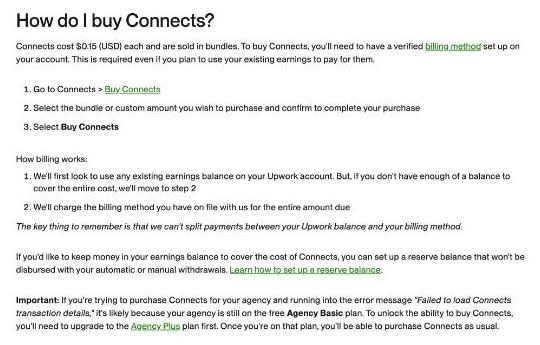
- Connects cost $0.15 each and are sold in bundles. You need a verified billing method to buy them, even if you pay from your earnings balance.
- The number of Connects a job needs varies by job and can change while the job is posted, based on project size, scope and market demand.
- Boosting puts your proposal at the top of the client’s list; you bid extra Connects against other freelancers.
- Connects are returned if a client cancels a project before a contract is made, or if Upwork removes a post for violating its terms. They are not returned if the client rejects you, hires someone else, the job expires without a hire, or you withdraw.
Turn Connects into a cost per win
Connects look cheap one proposal at a time. The real number is what you spend per contract you actually win. From your worksheet:
Connects cost per win = (total Connects spent × $0.15) ÷ contracts won
For example, if you send ten proposals at an average of 16 Connects and win one, that is 160 Connects, or $24, for one contract. On a small job that matters; on a long contract it disappears. This is why the worksheet tracks outcomes. If your cost per win is high relative to typical project size, you are either bidding on the wrong jobs or bidding too widely.
Free Connects worth knowing about
Upwork lists several ways to earn Connects without buying them, though some are tests and not guaranteed:
- 30 Connects for each talent badge (Rising Talent, Top Rated, Top Rated Plus), up to 90 in total.
- A possible 12 Connects when you submit three or more proposals and spend at least 54 Connects doing so, up to twice per month. Upwork notes this is being tested and not every freelancer receives it.
- A one-time 10 Connects for your first successful boost.
- Possible Connects when you get an interview with an established client, which may show partly as a refund of the Connects you used to apply.
Contracts where the fee drops
The fee range applies to normal marketplace contracts. Upwork’s fee article lists exceptions, and two of them can change your pricing a lot.
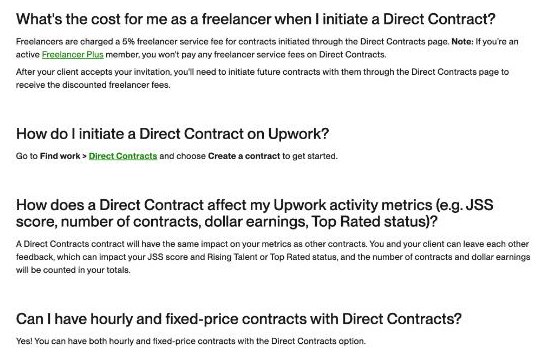
- Direct Contracts. When you bring a client to Upwork through the Direct Contracts page, the Direct Contracts help article says you pay a 5% freelancer service fee, and nothing if you are an active Freelancer Plus member. After the client accepts, you need to start future contracts with them through the Direct Contracts page to keep the discounted fee. Your client pays their own marketplace and contract initiation fees.
- Any Hire. No freelancer service fee on Any Hire contracts, which are negotiated with a client who met you off Upwork or paid a conversion fee.
- Upwork Payroll. Freelancers paid through Upwork Payroll are paid by a third-party staffing firm and do not pay the service fee.
- Enterprise clients. Upwork says freelancers working with Enterprise clients typically pay 10%, but the exact rate depends on that client’s agreement.
For freelancers with their own clients, Direct Contracts is the line worth testing. If you already invoice a client outside Upwork but want Upwork’s payment protection or time tracker, it can cost far less than a marketplace contract. If you are happy with your own invoicing and payment setup, you may not need Upwork for that client at all. Freelancers paid by overseas clients often handle this with a multi-currency account instead; I covered that setup in getting paid from abroad with a Wise Business account.
A short pre-submit checklist
Before each proposal, five checks take less than a minute:
- Read the fee on the proposal screen and put it in your sheet.
- Calculate the quote from your target take-home, not from habit.
- Check the Connects required. Upwork’s own tips are sensible here: review the job and the client’s history, check whether they have already hired, and look at how many proposals and interviews the post already has.
- Decide on boosting only for jobs where you are a strong match. A boost is extra Connects on top of the proposal cost.
- Use the rate calculator as a final check that your net matches the sheet.
A clear proposal also helps you justify a higher quote on high-fee jobs. Structured, branded proposals tend to win more often than a plain message; if you send proposals outside Upwork as well, my guide to writing freelance proposals in PandaDoc covers a reusable template.

Who this approach suits, and who it does not
A per-proposal worksheet suits freelancers who bid regularly on marketplace jobs, especially those working across different kinds of projects where fees may vary. It is less useful if most of your Upwork income comes from a few long-term clients on locked-in contracts, because their fee will not change once the contract starts.
It is also worth remembering that fees and Connects are only part of the picture. Withdrawal methods, currency conversion and taxes all affect what you finally keep, and they depend on your country and payment method. Check those separately in your Upwork settings.
Bottom line
A variable Upwork freelancer service fee rewards freelancers who price each proposal on purpose. The fix is simple: start from your target take-home, divide by one minus the fee shown on the job, track Connects as a cost per win, and use Direct Contracts for clients you bring yourself. A month of tracking will show you your real Upwork costs more clearly than any average quoted online.
FAQ
How much is the Upwork freelancer service fee?
Upwork’s help center says it ranges from 0% to 15% per contract. You see the exact percentage before submitting a proposal or accepting an offer.
Can the fee change during a contract?
No. Once a proposal, offer or contract is sent, the fee is locked in for that contract. Different contracts can still have different fees.
Do I get the fee back if a client is refunded?
Yes. Upwork says it returns the freelancer service fee on any amount refunded to the client.
How much do Upwork Connects cost?
Connects cost $0.15 each and are sold in bundles. The number needed per job varies.
What is the fee on Direct Contracts?
The Direct Contracts help article lists a 5% freelancer service fee, and no freelancer service fee for active Freelancer Plus members.
Are there discounts on the freelancer service fee?
Upwork says it does not offer regular discounts, though it may run occasional promotions for some freelancers.