
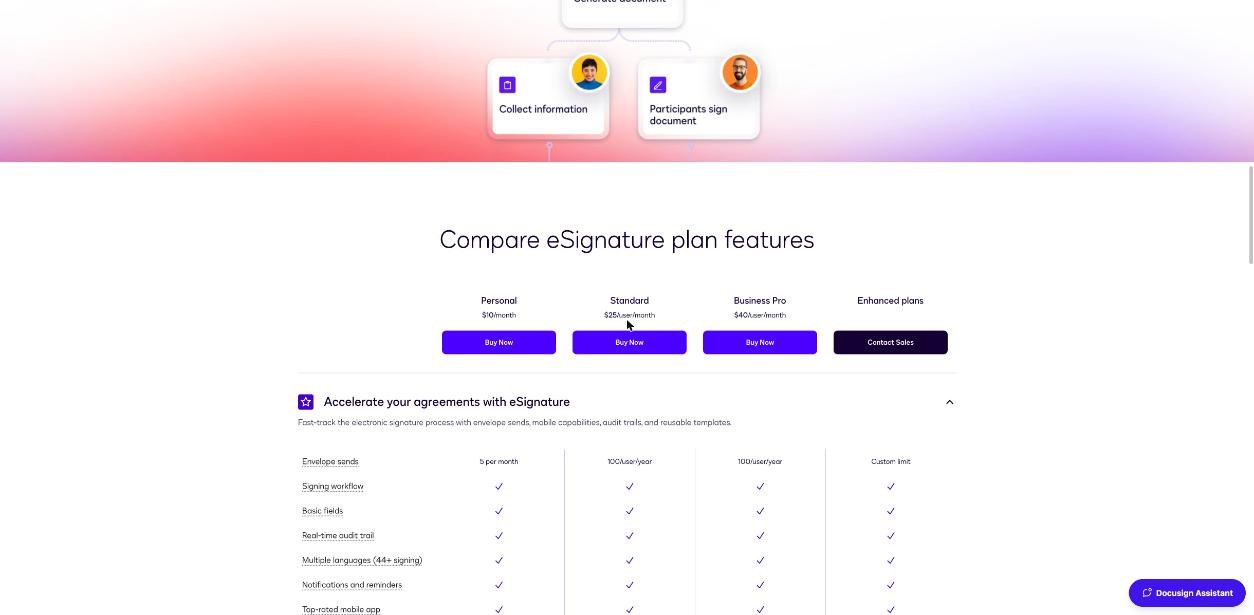
Most freelancers who look at Docusign ask one question: is the Personal plan enough? The pricing page answers it with a single line, “Send 5 envelopes per month”, and leaves you to work out what that means for your business. Five sounds like plenty when you sign two new clients a month. It sounds less like plenty once you count everything else that needs a signature: the statement of work for a second project, a change order when the scope grows, an NDA before a discovery call, a subcontractor agreement when you bring in help.
So this is not a feature tour. It is a count. I went through Docusign’s eSignature pricing page, its plan comparison table and its own explanation of what an envelope is, and worked out how a freelancer actually uses Docusign envelopes in a normal month and a busy one. The goal is simple: decide whether Personal fits, when Standard becomes necessary, and how to stretch five envelopes further without cutting corners.
All prices and limits below are from Docusign’s own pages as they read when I checked.
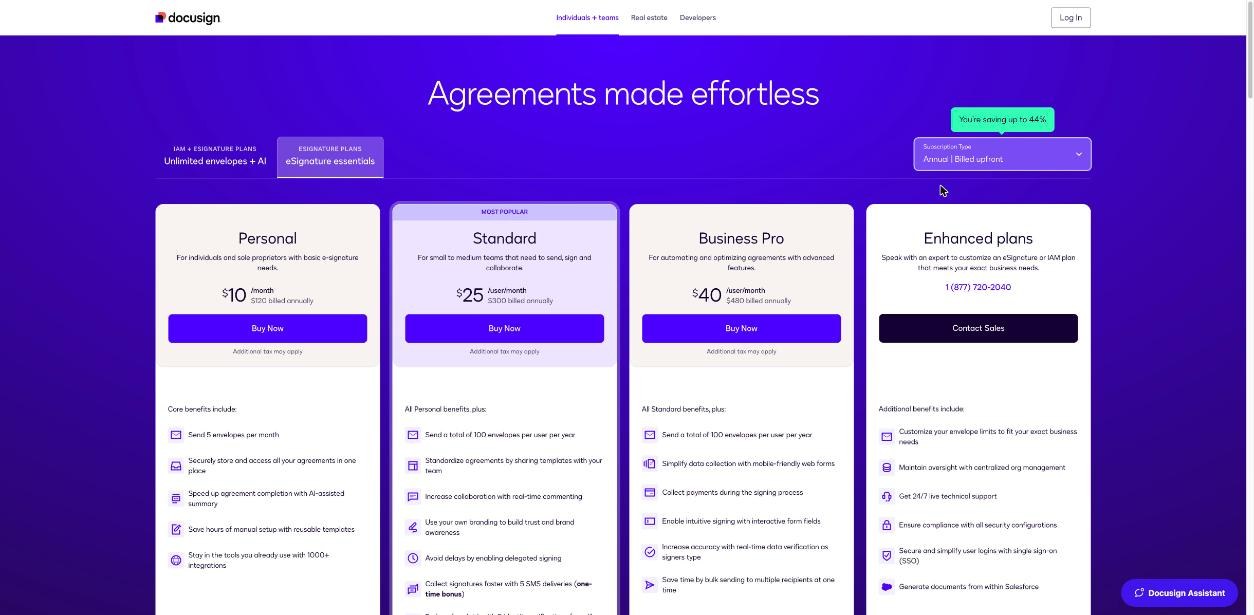
What a Docusign envelope actually is
Docusign describes an envelope as an electronic container used to send documents for signature. The important part for a freelancer is this line from Docusign’s own explainer: an envelope is not the document itself, and it can contain multiple documents and be sent to multiple recipients for signing or review.
That changes the math. Your contract, your statement of work and your NDA do not have to be three envelopes. If they go to the same client at the same time, they can travel together in one.
Two more details from Docusign that matter when you are counting:
- Resending does not cost another envelope. A Docusign community moderator confirmed that re-sending an envelope does not subtract from your allowance; it is counted once, when it is first sent. Sending a reminder to a slow client is free.
- Corrections happen inside the envelope. Docusign’s Manage page lets you correct, void, copy or save an envelope as a template. If you spot a typo after sending, correcting the existing envelope is the habit to build. I would not count on a voided envelope being returned to your monthly allowance, so treat a void as a used envelope.
Docusign pricing for one person
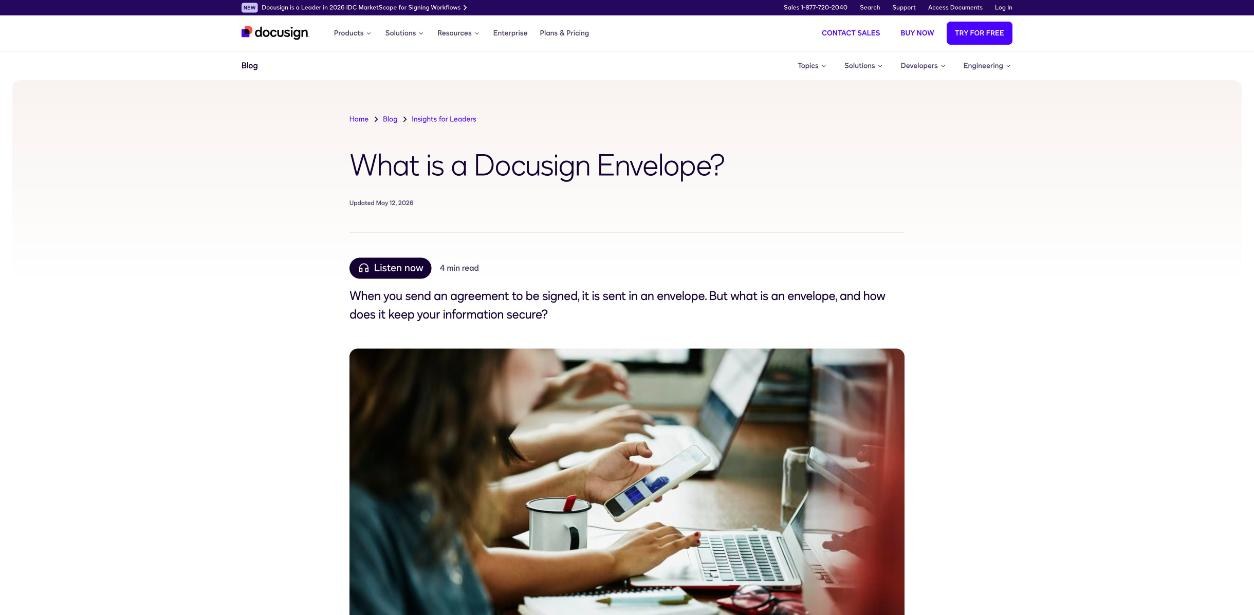
Docusign offers three billing options on its eSignature page: monthly, annual billed monthly, and annual billed upfront. Here is how the plans a freelancer would consider compared when I checked:
| Plan | Monthly billing | Annual, billed monthly | Annual, billed upfront | Envelopes |
|---|---|---|---|---|
| Personal | $15/month | $11/month ($132 commitment) | $10/month ($120 a year) | 5 per month |
| Standard | $45/user/month | $30/user/month ($360 commitment) | $25/user/month ($300 a year) | 10 per user per month on monthly; 100 per user per year on annual |
| Business Pro | Not compared here | $45/user/month ($540 commitment) | $40/user/month ($480 a year) | 100 per user per year on annual |
Docusign notes that tax may be added. The site also offers a free trial with no credit card required.
The rule most freelancers miss: Personal cannot buy extra envelopes
This is the detail that decides whether Personal is safe for you. Docusign’s envelope explainer says you can buy additional envelopes from the Plans and Billing page, but only on a Standard or Business Pro web account, and only with administrative access. For Personal, Docusign’s answer to needing more than five envelopes a month is to upgrade.
In practice, that means envelope six in a busy month is not a small overage charge. It is a plan change. If you are on Personal and you land three new clients in the same week, plus a change order and an NDA, you either upgrade on the spot or make someone wait for next month’s allowance. Neither is a good look when a client is ready to sign.
Counting a freelancer’s real month
Here is how the documents in a typical freelance practice turn into envelopes. The trick is to separate the moments when you send, because each send is one envelope no matter how many documents are inside.
A normal month
| Moment | Documents | Envelopes |
|---|---|---|
| New client A signs on | Contract + SOW + NDA, sent together | 1 |
| New client B signs on | Contract + SOW, sent together | 1 |
| Existing client starts a second project | New SOW | 1 |
| Scope grows on a current project | Change order | 1 |
| Total | 4 of 5 |
A busy month
| Moment | Documents | Envelopes |
|---|---|---|
| Three new clients sign on | Contract + SOW each | 3 |
| NDA before a discovery call with a prospect | NDA | 1 |
| Two change orders | Change order each | 2 |
| Subcontractor brought in | Subcontractor agreement | 1 |
| Total | 7 of 5 |
The normal month fits with one to spare. The busy month breaks Personal by two envelopes, and because Personal cannot buy extras, those two envelopes cost you a plan change. The pattern is clear: Personal fits a steady practice with two or so new clients a month. It does not fit a practice with lumpy months, or one where change orders are frequent.
Five ways to stretch five envelopes
- Bundle at signing. Send the contract, SOW and NDA in one envelope whenever they go to the same person at the same time.
- Write change orders into the SOW. A clause that lets small scope changes be agreed by email, with a signed change order only above a set amount, removes many envelopes. Ask a lawyer to word it for your jurisdiction.
- Use a master agreement. Sign a master services agreement once, then add projects with SOWs. Repeat clients then need one envelope per project, not two documents per project.
- Correct, do not re-send new. Use the correct option on an envelope you already sent rather than voiding it and sending a new one.
- Remind freely. Resending to a slow signer does not use your allowance, so there is no reason to start over.
If you also want a record of what was said before anything was signed, a call recorder helps; I covered that angle in my look at Fathom’s free plan for client calls.
When Standard is worth it
Standard is priced per user and is aimed at small and medium teams, but a solo freelancer can buy a single seat. What changes for you:
- More envelopes, and the option to buy more. On an annual plan you get 100 envelopes per user per year. On monthly billing it is 10 per user per month. Either way, you can buy extra envelopes if you run out, which Personal cannot do.
- Your own branding on the signing experience.
- Delegated signing, useful when your contact is not the person who signs.
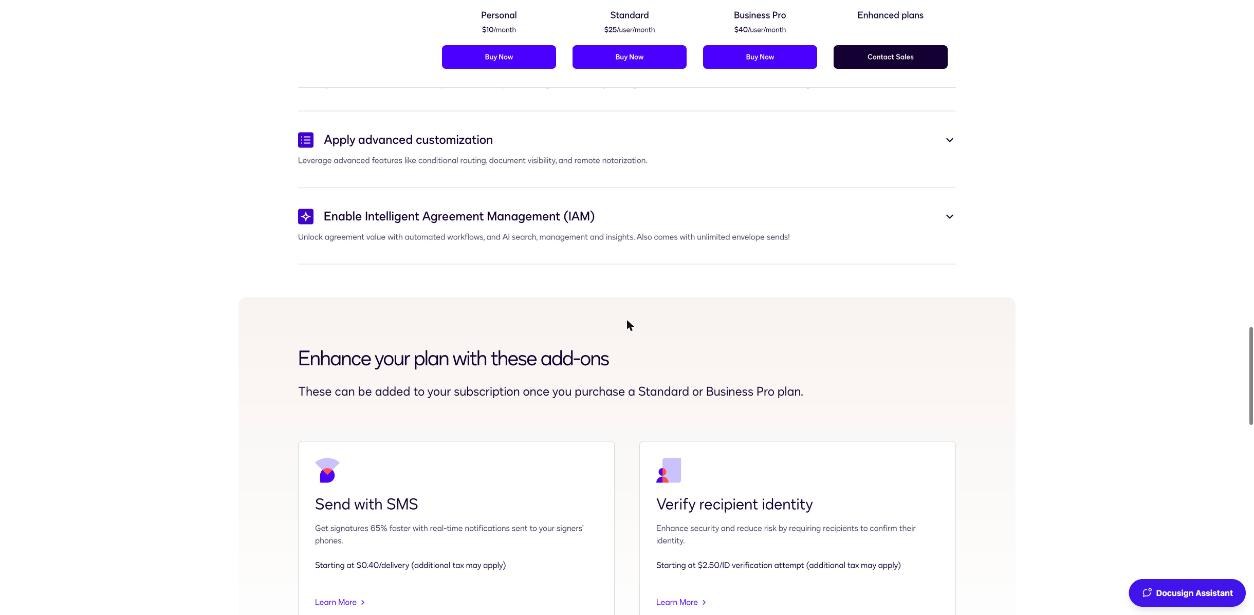
- Add-ons for SMS delivery and recipient identity verification, which Docusign only offers on Standard or Business Pro.
The annual pool is the bigger change than the number. One hundred envelopes a year averages a little over eight a month, but you can use twenty in a busy month and two in a quiet one. For a freelancer with lumpy months, that flexibility is the real reason to move up.
The cost difference on annual billed upfront is $120 a year for Personal versus $300 a year for one Standard seat. On monthly billing it is $15 versus $45 a month. If you only break five envelopes two or three months a year, consider whether bundling and a master agreement can keep you on Personal before you triple your spend.
Business Pro and the deposit question
One Business Pro feature is especially relevant to freelancers: collecting payments during the signing process. If your workflow is “sign the contract and pay the deposit”, Business Pro can do both in one step. It also adds web forms, interactive form fields, real-time data verification and bulk sending.
At $40 per user per month on annual billing upfront ($480 a year), it is a big step from Personal. Many freelancers handle deposits with their invoicing tool instead and keep e-signature simple. If you already send proposals through a dedicated tool, check whether it handles signing and payment before you pay for both; I compared that kind of trade-off in my Proposify break-even review.
What about “unlimited envelopes”?
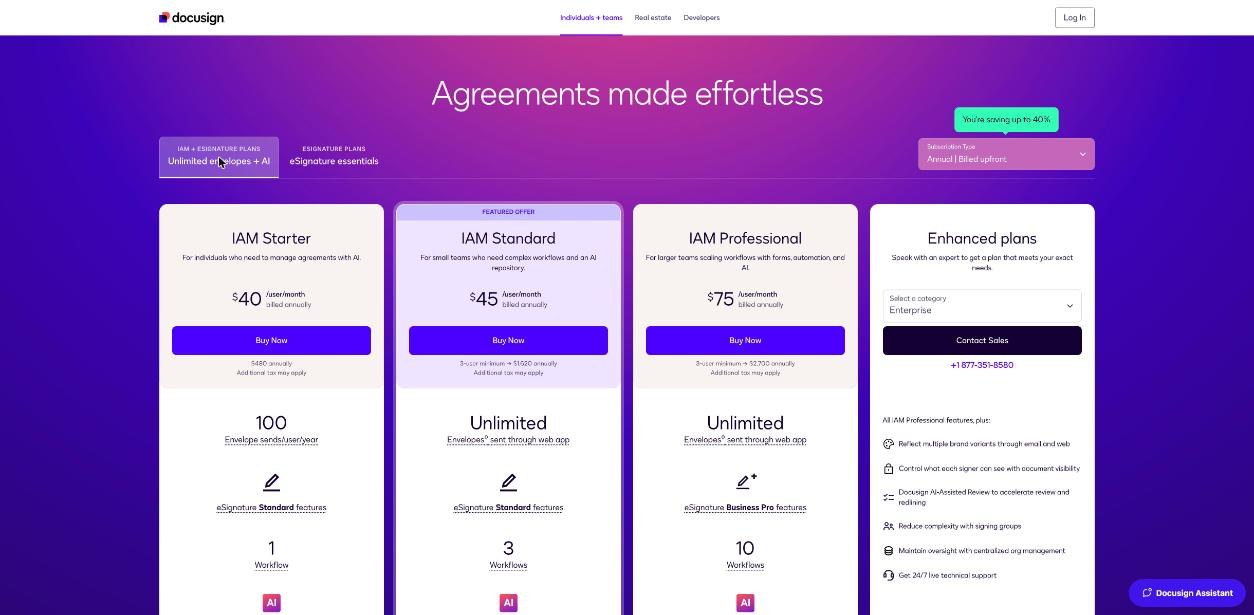
Docusign also sells Intelligent Agreement Management (IAM) plans, advertised with unlimited envelopes and AI. Read the plan cards closely before you get excited. When I checked, IAM Starter, the plan described for individuals, was $40 per user per month billed annually ($480 a year) and included 100 envelope sends per user per year, not unlimited. Unlimited envelopes through the web app appeared on IAM Standard, which had a 3-user minimum, or $1,620 a year. For a one-person business, “unlimited” is effectively a team product.
Who should use which plan
| Your practice | Plan |
|---|---|
| One or two new clients a month, few change orders, comfortable bundling documents | Personal, annual billing |
| Uneven months, frequent change orders or subcontractors | Standard, one seat, annual billing for the pooled 100 envelopes |
| You want signature and deposit in one step | Business Pro, or keep Personal and take deposits through invoicing |
| You sign a handful of documents a year | Personal on monthly billing only in the months you need it, or a free alternative |
Verdict
Docusign Personal is a sensible plan for a steady freelance practice, and at $10 to $15 a month it is easy to justify for the trust a recognised signing experience adds. The catch is not the number five. It is that Personal has no overflow: envelope six means an upgrade. Count your real month, bundle documents into one envelope per signing moment, and Personal will cover most solo freelancers. If your months are uneven, a single Standard seat on annual billing is the safer buy because its envelopes pool across the year and you can buy more.
FAQ
How many envelopes does Docusign Personal include?
Five envelopes per month, according to Docusign’s pricing page.
Can I put several documents in one Docusign envelope?
Yes. Docusign says an envelope can contain multiple documents and be sent to multiple recipients, so a contract, SOW and NDA for the same client can go in one envelope.
Does resending a Docusign envelope use another one?
No. A Docusign community moderator confirmed that resending does not subtract from your allowance; an envelope is counted once, when first sent.
Can I buy extra envelopes on Docusign Personal?
Docusign says additional envelopes can be bought on Standard or Business Pro web accounts. On Personal, the route to more envelopes is upgrading.
How much does Docusign cost for a freelancer?
When I checked, Personal was $15 a month on monthly billing, $11 a month on annual billed monthly, or $120 a year billed upfront. A Standard seat was $45 monthly, $30 a month annual billed monthly, or $300 a year upfront.
Does Docusign have a free trial?
Yes. Docusign offers a free trial with no credit card required.