
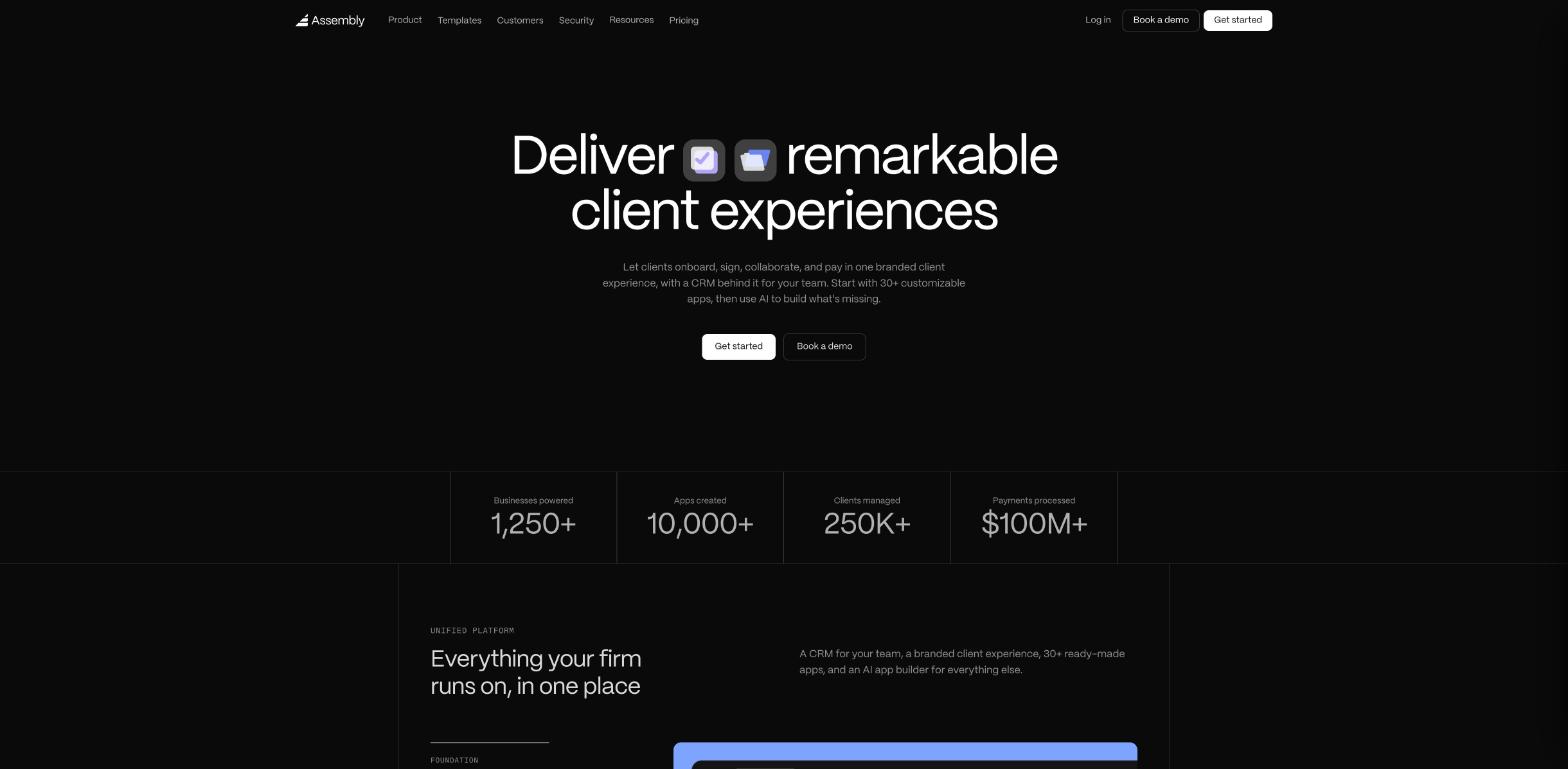
Most freelancers I know run their client side on a patchwork: proposals in one tool, contracts in another, invoices in a third, files in a shared Drive folder and everything else in email threads. An Assembly client portal promises to pull that into one branded place your clients log in to. Assembly is the company formerly called Copilot, and it now combines a CRM, a branded client experience, more than 30 ready-made apps and an AI app builder that creates new apps from a written description.
That last part is what makes Assembly different from older portal tools, and it is also where a freelancer can waste money. The app builder runs on monthly “build credits”, and the free plan gives you 75 of them. So instead of a feature tour, I went through Assembly’s current pricing page, FAQ and template library to answer a practical question: how should a solo freelancer plan a client portal on Assembly so the credits and the plan tier go to the right things?
What an Assembly client portal includes before you build anything
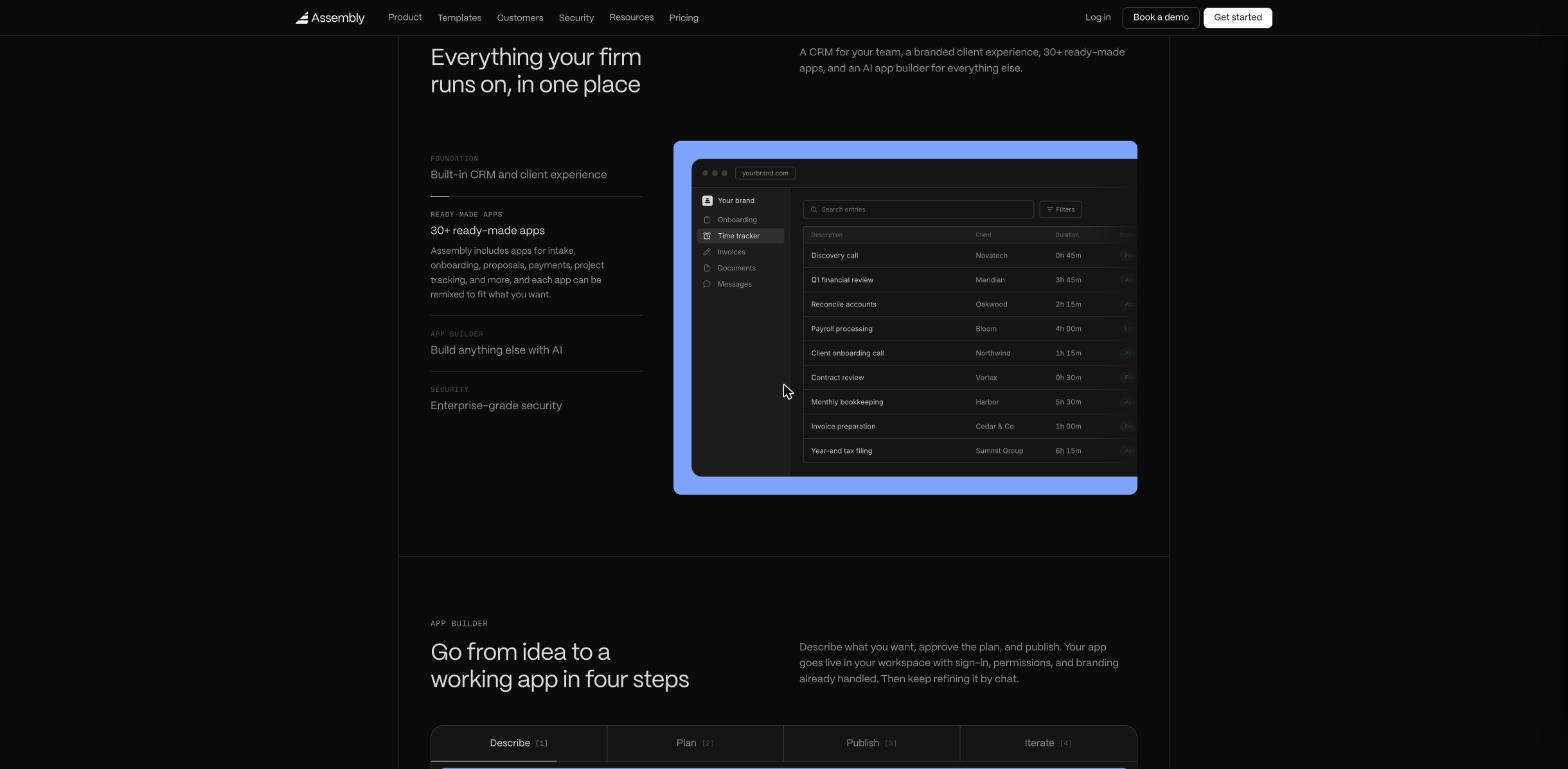
Every plan, including the free one, comes with the same foundation: a CRM for your contacts and companies, a branded client experience where clients message you, share files, sign contracts and pay, a messaging and team inbox, billing and payments, the app builder and the library of 30+ pre-made apps.
Clients sign in with secure magic links or Google, according to Assembly’s FAQ, so you are not asking them to remember yet another password. Assembly also says sign-in, permissions and data isolation are handled by the platform rather than generated by AI, that every app runs in its own sandbox, and that it is SOC 2 Type II certified. It states that it does not use your apps or your clients’ data to train AI models.
For a freelancer, that foundation already replaces a lot: a shared folder, a client messaging channel and a payment page in one login. The question is what you add on top.
Step 1: Map your client journey to ready-made apps first
Before touching the app builder, write down the five or six moments every client goes through with you. For most freelancers it looks like this: inquiry, proposal, contract, kickoff, delivery and feedback, invoicing. Then check Assembly’s template library for each one. Starting from a template is cheaper than building from scratch, and Assembly says each template can be reshaped by chat afterwards.
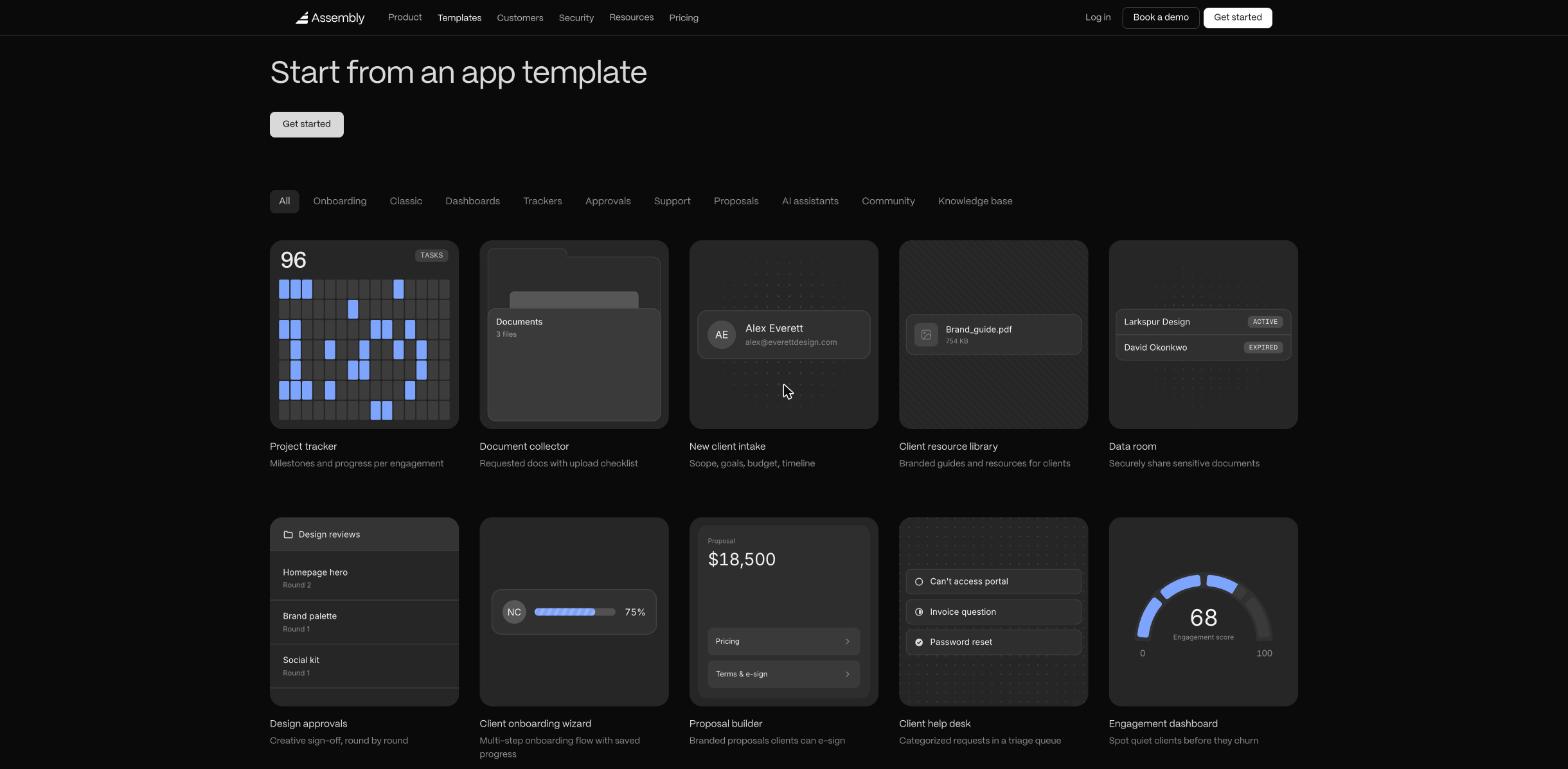
Here is how the templates I found line up with a typical freelance workflow:
| Client moment | Assembly template to start from |
|---|---|
| Inquiry and qualification | New client intake (scope, goals, budget, timeline) |
| Proposal | Proposal builder (branded proposals clients can e-sign) |
| Contract | Contracts |
| Kickoff | Client onboarding wizard, Document collector |
| Delivery and feedback | Project tracker, Design approvals, Markup & comments |
| Support between projects | Client help desk, Client resource library |
| Billing | Payments, Time tracker, plus QuickBooks and Xero integrations |
One catch to plan around: Assembly counts apps the same way whether you build them or install them from the library. The Free plan includes 3 apps and every paid plan includes 5. Extra apps cost $5 per month each on paid plans. So a portal with intake, proposals, contracts, payments, a project tracker and a help desk is already six apps, one more than a paid plan includes.
My suggestion: pick the three apps that remove the most email from your week and start there. For a designer, that is probably intake, design approvals and payments. For a consultant, intake, proposals and a document collector.
Step 2: Decide what is worth building with AI
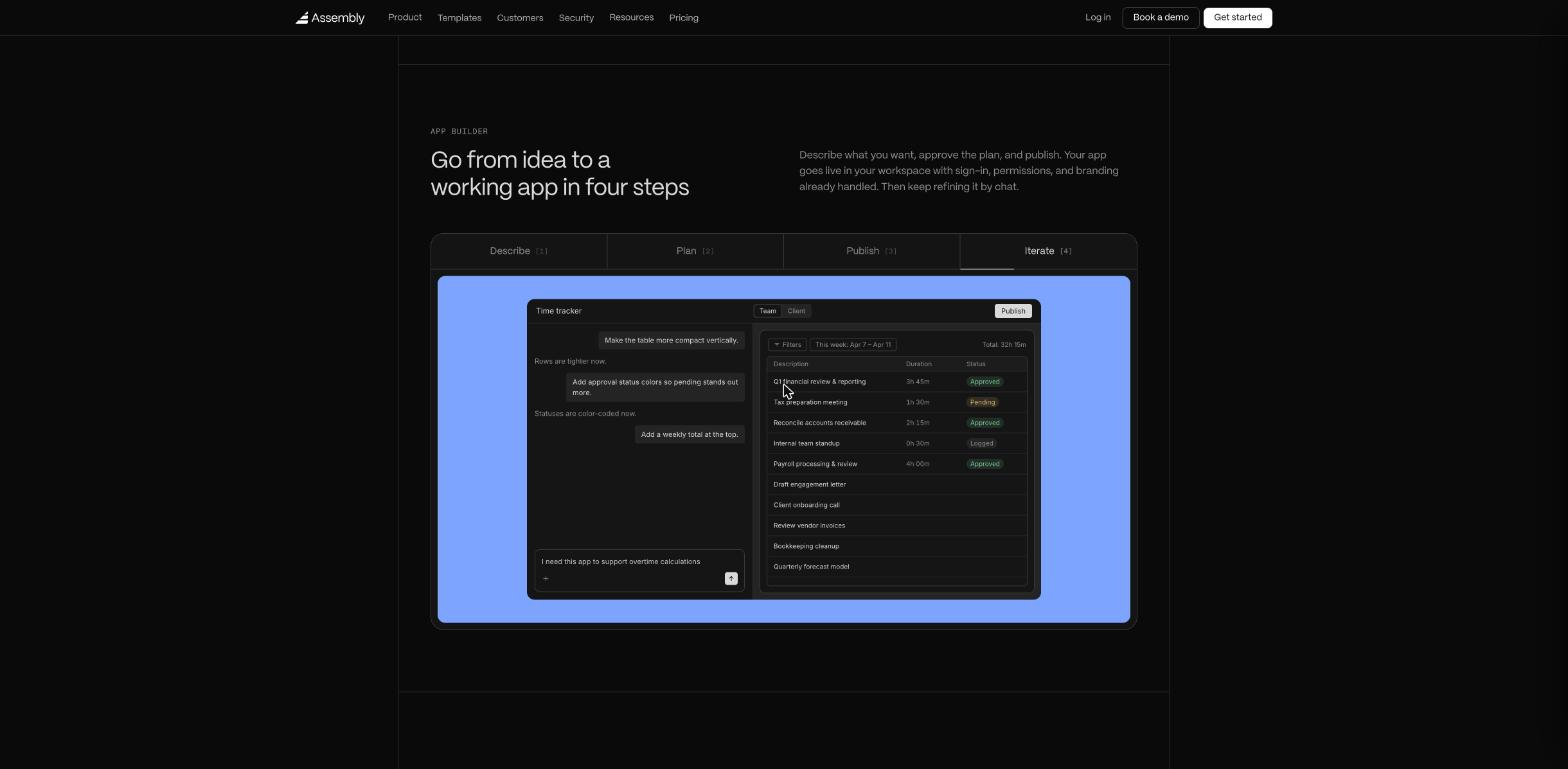
The app builder is for the gap between what the templates do and how you actually work. Assembly describes it as four steps: describe what you want, approve the plan, publish, then keep refining by chat. The builder asks product questions first, for example whether the app should be visible to clients or stay internal.
Here is the part of Assembly’s FAQ that matters most for budgeting, because it tells you what does and does not cost credits:
- Free: describing your idea, answering the builder’s questions and reviewing the plan. Credits are only used once you approve the plan and building starts.
- Free: failed builds. They do not consume credits.
- Free: using an app once it is live. You and your clients can use it as much as you want.
- Costs credits: creating or editing an app. Assembly says a typical app takes a few dozen credits to build from scratch, and smaller changes use less.
Credits refresh every month on every plan, and unused credits roll over for one extra month before expiring. On paid plans you can buy more at $0.60 per credit above the 200 included, up to 10,000 a month. Running out never breaks live apps.
That makes the planning stage your free sandbox. Write the whole spec in the description, answer every question the builder asks, and edit the plan until it is right before you approve it. Every revision you make at the plan stage is a revision you do not pay for later.
Good candidates for a custom build, in my view, are things no template covers exactly: a change-request form that adds hours to a retainer, a monthly report page that pulls your deliverables together, or an internal tracker for your own pipeline. If a template gets you 80% of the way, start from the template and make small chat edits instead.
Step 3: Choose the plan by contacts and branding, not features
Most of Assembly’s tools are on every plan, so the real differences for a freelancer are how many clients can log in, how many credits you get and whether the portal can carry your own domain.
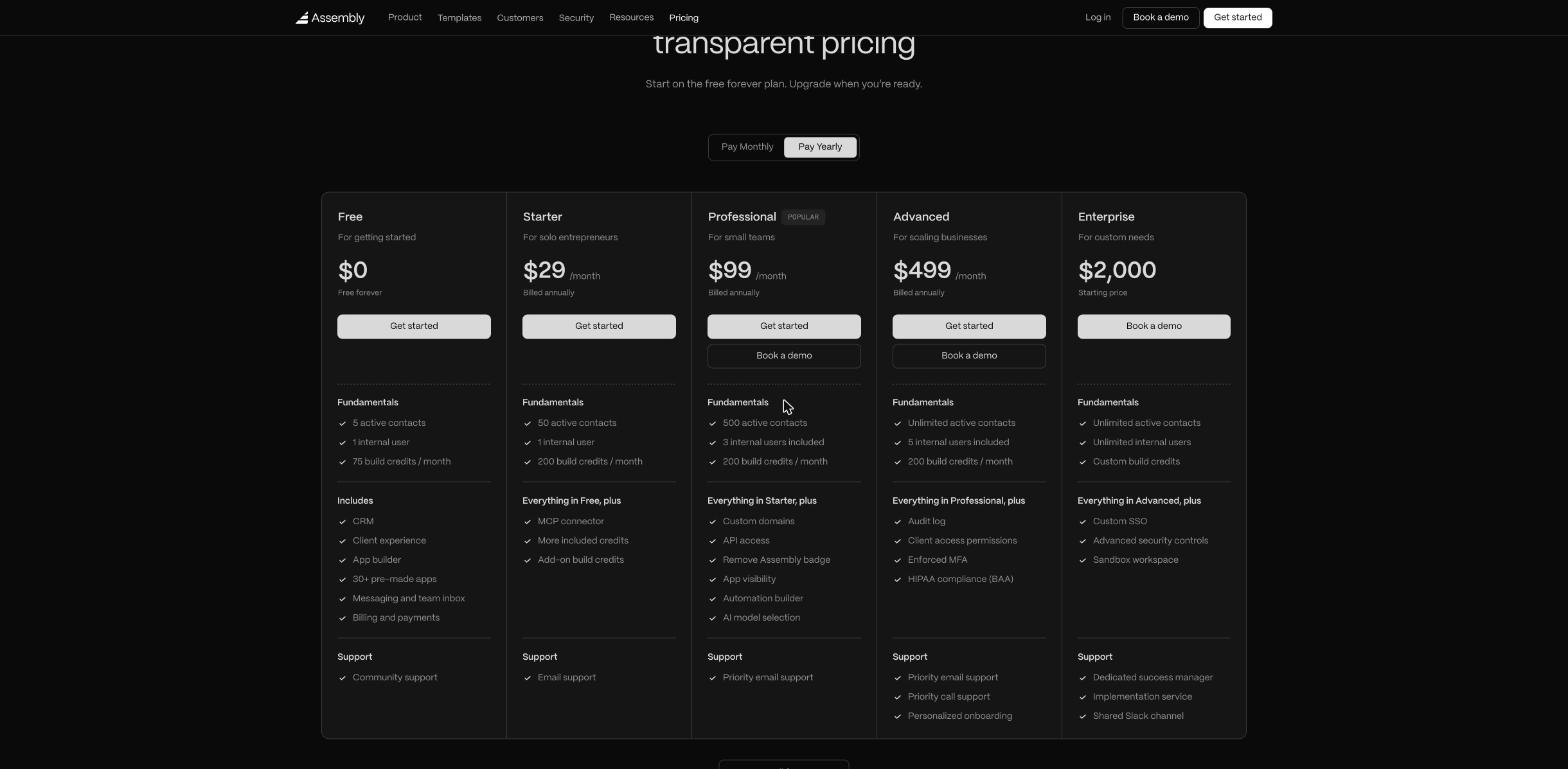
| Plan | Billed yearly | Billed monthly | Active contacts | Internal users | Build credits |
|---|---|---|---|---|---|
| Free | $0 | $0 | 5 | 1 | 75/month |
| Starter | $29/month | $49/month | 50 | 1 | 200/month |
| Professional | $99/month | $139/month | 500 | 3 included | 200/month |
| Advanced | $499/month | $599/month | Unlimited | 5 included | 200/month |
| Enterprise | From $2,000 | Unlimited | Unlimited | Custom | |
An “active contact” is a client record in your CRM, meaning a person who can sign in to your client experience. Your own team members are counted separately as internal users.
Three things stood out to me as a freelancer:
- Free works for a small, steady client list. Five active contacts, 3 apps and 75 credits a month is enough to test a real portal with your current clients. The free plan does not expire.
- Starter is the solo plan. It raises you to 50 contacts and 200 credits, adds the MCP connector, add-on credits and email support. For most one-person businesses, 50 client logins is plenty.
- Your own domain is a Professional feature. Custom domains, removing the Assembly badge, API access, the automation builder and AI model selection all start at Professional. If a fully white-label portal on your own domain matters to your brand, budget $99 a month on yearly billing, not $29.
Payments are the other cost to know about. Assembly says there are no setup fees, hosting fees or per-client charges, but payment processing fees apply when you collect payments through it, and those rates improve on higher plans.
See Assembly’s current plans and start on the free plan
Where Assembly is not the right fit
Assembly is candid about one limit in its own FAQ: it is not built for public-facing sites. Marketing websites, public directories and consumer apps are better built elsewhere. Your portfolio and landing pages stay on your website builder; Assembly is only for logged-in client work.
It is also more than many freelancers need. If your clients only ever see a proposal and an invoice, a lighter tool may serve you better. I have looked at that trade-off before in my notes on the SuiteDash Start plan for freelancers and on auditing which Plutio apps a freelancer really uses. Assembly makes the most sense when clients come back often: retainers, multi-stage projects, or work where files and approvals move back and forth every week.
Finally, the app limit is real. Five apps on a paid plan disappears quickly if you install every template that looks useful. Treat apps like subscriptions and remove the ones clients never open.
My take
Assembly is one of the more interesting client portal options for freelancers right now, because the templates cover most of a client journey and the AI builder fills the gaps without code. The pricing is clear, and the credit rules are generous in the right places: planning is free, failed builds are free, and using live apps never costs credits.
The way to get value from it is to plan before you build. Map your client journey, start from templates, keep custom builds for the steps no template covers, and pick your plan by how many clients need to log in and whether you need your own domain. Start on the free plan with your three most active clients, and upgrade only when you hit a real limit.
FAQ
Is Assembly the same as Copilot?
Yes. The client portal company previously known as Copilot now operates as Assembly, at assembly.com.
Is there a free Assembly client portal plan?
Yes. The free plan never expires and includes 5 active contacts, 1 internal user, 75 build credits a month and 3 apps. Apps you publish on it are live apps your clients can use.
How many build credits does an app take?
Assembly says a typical app takes a few dozen credits to build from scratch, and smaller edits use less. Planning, answering the builder’s questions and failed builds do not use credits.
Can I use my own domain on Assembly?
Custom domains are listed from the Professional plan, which is $99 a month billed yearly or $139 billed monthly. Professional also removes the Assembly badge.
Does Assembly charge per client?
No. Assembly says there are no per-client charges, setup fees or hosting fees. Each plan has a limit on active contacts, and payment processing fees apply if you collect payments through Assembly.
Can I cancel or change plans any time?
Yes. Plan changes are self-serve. Upgrades take effect immediately, while downgrades and cancellations take effect at the end of the current billing period, with no cancellation fees on self-serve plans.