
Disclosure: some links on this page may be affiliate links. If you sign up through them I may earn a commission at no extra cost to you.
Every all-in-one tool promises to replace your stack. The useful question is narrower: which of the apps you pay for today could you actually cancel next month? This audit looks at Plutio for freelancers from that angle. I took the tools a typical one-person business pays for, one category at a time, and checked each against what Plutio lists on its official pricing and feature pages for the entry-level Core plan.
The result is not a simple “yes, it replaces everything”. Some apps Plutio Core can retire outright, some it can retire with a condition, and a few it does not try to replace at all.
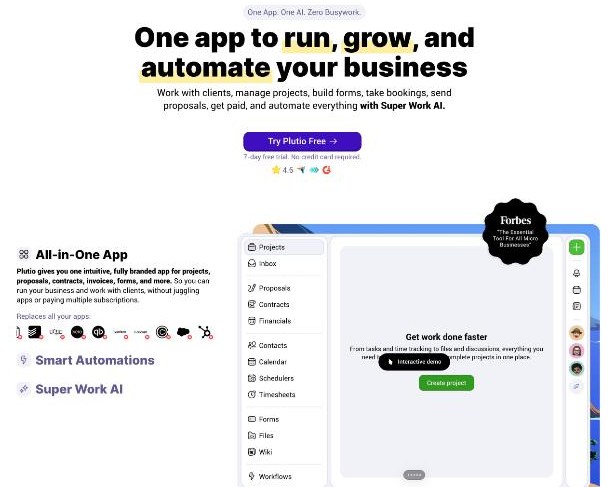
What Plutio Core includes
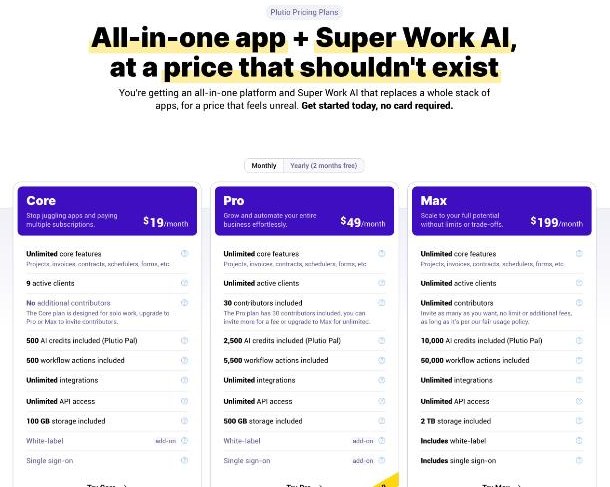
Plutio has three plans. The official pricing page lists them like this:
| Plan | Monthly | Annual | Active clients | Contributors |
|---|---|---|---|---|
| Core | $19/month | $190/year | 9 | None (solo use) |
| Pro | $49/month | $490/year | Unlimited | 30 included |
| Max | $199/month | $1,990/year | Unlimited | Unlimited (fair use) |
Core also includes 500 AI credits for Plutio’s assistant (Plutio Pal), 500 workflow actions, 100 GB of storage, unlimited integrations and unlimited API access. White-label branding is a $9 per month add-on on Core and Pro and is included on Max. Single sign-on is not available on Core.
The important point for this audit: Plutio says the core features are the same on every plan. Projects, invoices, proposals, contracts, time tracking, scheduling, forms, the client portal, task management and file storage are all on Core. The plans differ in limits, not in the basic toolkit.
The audit: app by app
1. Project and task management: replace
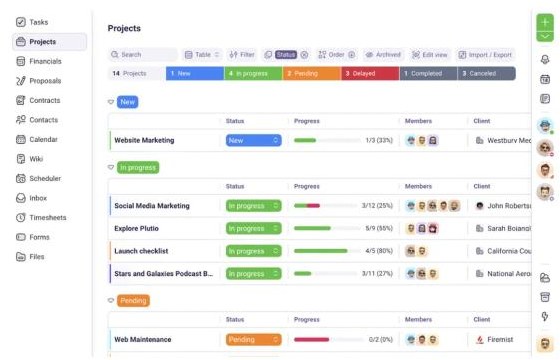
Plutio includes unlimited projects with custom statuses, tags and views, plus task management with Kanban boards, lists, calendars and Gantt charts, assignees, due dates and checklists. For a solo freelancer, that covers what most people use a separate project tool for.
The one caveat is collaboration. Core has no contributors, so if you bring in a subcontractor even occasionally, you would need Pro or keep a separate shared tool. If you currently use guest access in another app for that, my look at how ClickUp guests and permissions work for freelancers shows the kind of setup you would be replacing.
2. Invoicing: replace, if your accounting lives elsewhere
Plutio includes unlimited branded invoices and accepts payments through Stripe, PayPal or Square, according to its pricing page. Time logged in Plutio can be added to invoices, which removes a copy-paste step for hourly work.
What I did not find in Plutio’s plan listing is bookkeeping: bank feeds, reconciliation or tax reports. So Plutio can replace an invoicing-only tool, but if you use accounting software for your books, keep it. Plutio sends the bill; your accounting tool still records the business.
3. Proposals and contracts: replace
Plutio lists unlimited interactive proposals that clients sign electronically, with tracking for when they view and sign, and unlimited contracts with e-signatures built from templates or from scratch. For freelancers paying for a separate proposal tool and a separate signing tool, this is often the biggest saving in the audit.
4. Time tracking: replace
One-click time tracking that logs billable hours to projects and invoices is included on every plan. If your current time tracker exists mainly to feed invoices, Plutio does that job in the same place.
5. Scheduling: replace for client calls
Plutio includes scheduling with availability, buffer times and booking rules. For discovery calls and project check-ins, that can replace a separate booking app. If you run complex booking types or group events, test your exact setup during the trial before cancelling anything.
6. Forms: replace for intake
Intake forms, questionnaires and surveys are included, and you can embed them or share a link. For onboarding questionnaires and project briefs, that is enough. If you use advanced form logic for marketing funnels, compare carefully first.
7. Client portal: replace, with one decision about branding
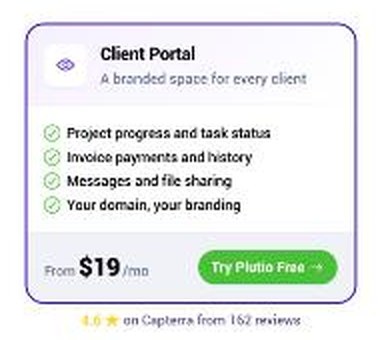
Every Plutio plan includes a client portal. According to Plutio’s client portal page, clients reach it through a unique link or your own custom domain without needing a Plutio account, and you choose per client what they can see: projects and tasks, shared files, invoices with payment buttons, and messages.
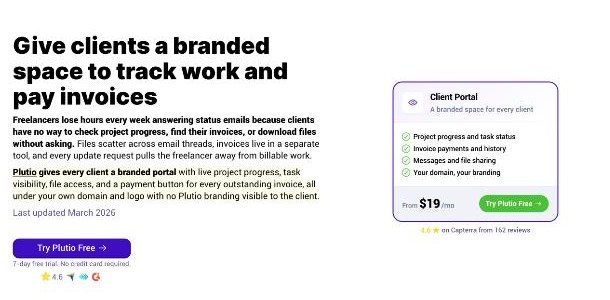
The branding decision is where the price changes. By default the portal runs under your Plutio workspace. With the $9 per month white-label add-on, the portal moves to your own domain, shows your logo and colors, and outgoing emails come from your domain. On Core that brings the monthly total to $28.
8. CRM: partly replace
Plutio’s own comparison counts a CRM among the tools it replaces, and the app includes contacts, an inbox and a calendar. For a freelancer whose “CRM” is a list of clients and conversations, that is enough. If you run a sales pipeline with many leads, the 9 active client limit on Core is the thing to watch, so check how many clients you work with in a typical month.
9. What Plutio does not try to replace
- Accounting and tax. As noted above, keep your books where they are.
- The payment processor itself. Plutio collects payments through Stripe, PayPal or Square, so you still need one of those accounts.
- Your email provider and website. Plutio has an inbox and embeddable forms, but your domain email and your portfolio site stay separate.
Running the numbers for a solo freelancer
Here is how I would do the audit on your own stack in fifteen minutes:
- List every subscription you pay for client work, with its monthly cost.
- Mark each one as “replace”, “replace with condition” or “keep”, using the categories above.
- Add up the “replace” column. If it is above $19 (or $28 with white-label), Core saves money on paper.
- Check the conditions: more than 9 active clients, or any collaborator, means Pro at $49 rather than Core.
- Count the switching time. Moving templates, contracts and client records takes hours, and that cost is real even when the subscription is cheaper.
If you are comparing Plutio with other freelancer suites, my notes on HoneyBook pricing against a tool stack and on Moxie as a freelancer’s front desk use the same “what does it replace” lens.
The 7-day trial: use it as the audit
Plutio’s trial is short, so it is best treated as a test of your audit rather than a tour. According to the pricing page, the trial includes every feature except single sign-on, with white-label free during the trial, but it is limited to 3 active clients, 3 contributors, 200 AI credits and 200 automation actions. No card is required to start.
In seven days I would do three things: send one real proposal and contract to a friendly client, run one project with time tracking through to an invoice, and set up the portal with your branding to see how it looks from the client’s side. If all three feel smoother than your current tools, you have your answer.
When I checked the official site, a banner advertised 15% off any plan with the code 15off4ever. Promotions change, so confirm it at checkout rather than relying on it.
When keeping separate apps is the better call
An all-in-one tool is not automatically the cheaper or calmer choice. Based on the limits above, I would stay with separate apps in a few situations:
- You already pay very little. If your current stack is a free scheduler, a free form tool and invoicing through your accounting software, the “replace” column may add up to less than $19. Plutio would then cost more, and the benefit becomes convenience rather than savings.
- You work with many small clients at once. Designers or writers who juggle a dozen small jobs a month will run into the 9 active client limit on Core, which turns the comparison into $49 a month for Pro.
- Your clients are already settled into another system. If long-term clients are used to a portal or a shared workspace elsewhere, moving them has a relationship cost that does not show up on any pricing page.
- One app does a specialist job you rely on. If a single tool, such as a form builder with complex logic or a booking app with group events, is central to how you sell, keep it and judge Plutio on the rest.
In those cases a smaller stack plus a good invoicing habit may serve you better. My guide to getting paid with Stripe Invoicing without a website covers that lighter route.
Verdict
For a solo freelancer with a handful of clients at a time, Plutio Core can replace project management, proposals, contracts, time tracking, scheduling, intake forms, the client portal and invoice delivery for $19 a month, or $28 with your own branding. It does not replace accounting, a payment processor or your website. The two limits that decide whether Core is enough are the 9 active clients and the lack of contributors; if either one pinches, Pro at $49 is the realistic price.
FAQ
How much does Plutio cost for freelancers?
Core is $19 a month or $190 a year, Pro is $49 a month or $490 a year, and Max is $199 a month or $1,990 a year, according to Plutio’s pricing page.
Is the client portal included on Plutio Core?
Yes. The client portal is included on every plan. White-label branding with your own domain is a $9 per month add-on on Core and Pro.
How many clients can I have on Plutio Core?
Core allows 9 active clients. Pro and Max allow unlimited active clients.
Can I invite a subcontractor on Plutio Core?
No. Core has no additional contributors. Pro includes 30 contributors and Max has unlimited contributors under a fair use policy.
Which payment methods does Plutio support for invoices?
Plutio’s pricing page says invoices can be paid through Stripe, PayPal or Square.
Does Plutio have a free trial?
Yes, a 7-day free trial with no credit card required, limited to 3 active clients, 3 contributors, 200 AI credits and 200 automation actions.