Most freelancers sell time, and the trouble with selling time is that every sale needs a proposal, a call and a custom quote. A productized offer fixes part of that: one clear package, one price, one checkout. The version I keep coming back to is a simple bundle of three pieces: a paid strategy call, a short mini-course that teaches the client the basics before the call, and a pack of templates they keep afterwards. Podia for freelancers is interesting here because it sells all three product types from one checkout, so I mapped that bundle onto Podia’s plans to see what it would actually take to build, and what it would cost.
Everything below comes from Podia’s own pricing and feature pages as they read today. Where Podia does not publish a detail, I leave it out.

Why a bundle instead of a single product
I have already looked at selling a single side product on Gumroad and selling coaching on its own through Payhip. Both work, but each covers one piece. A bundle solves a different freelancer problem: the client who is not ready for a full project but would pay for a structured first step.
Take a freelance designer who keeps getting the same early-stage inquiry: “We need a brand refresh but don’t know where to start.” The bundle could look like this:
- A mini-course of five short lessons on how to brief a designer, with a quiz at the end so the client arrives prepared.
- A 60-minute call booked after purchase, where you review their brief.
- A template pack: a brief template, a moodboard template and a feedback checklist they can reuse.
Whether the client goes on to hire you or not, they paid for your expertise, and if they do hire you, the project starts from a proper brief instead of a vague email. That is the setup I tested against Podia’s features.
Piece 1: The mini-course
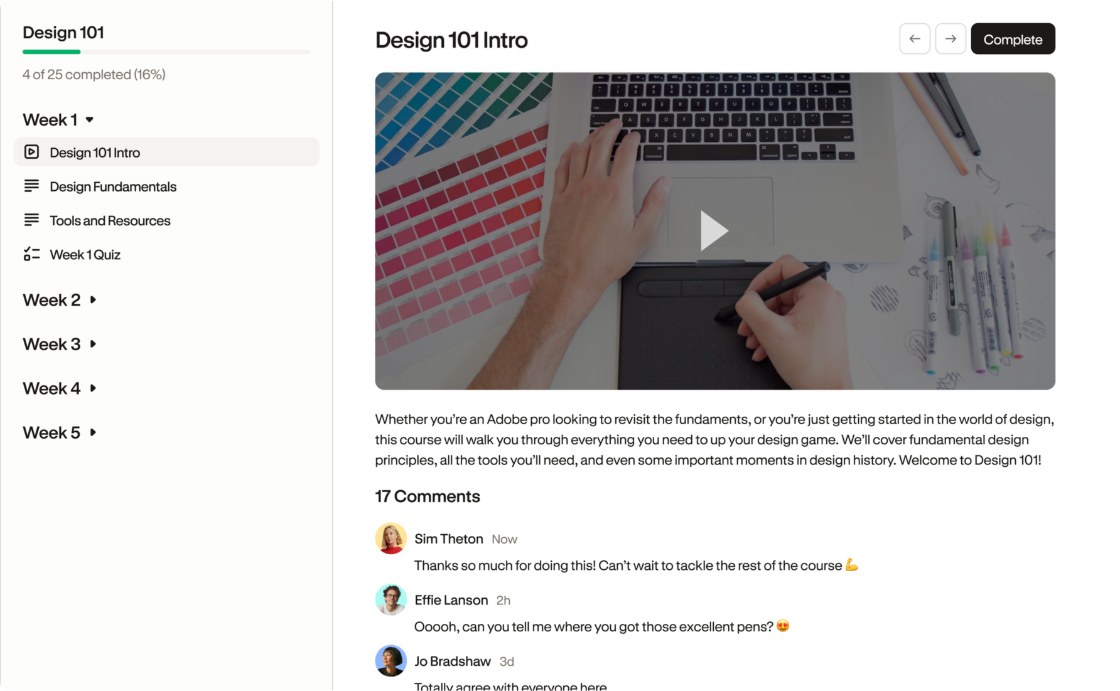
Podia’s course builder covers more than a freelancer needs for a five-lesson course. Lessons can mix video, audio, text, file downloads and embeds, so you can drop in a Loom recording or a Google Doc without re-uploading anything. The features that matter most for a “prepare before our call” course are these:
- Quiz lessons with multiple-choice or written answers. Podia says you can set a passing score students must reach to unlock the next lesson, and read what each student wrote. For a pre-call course, a written-answer quiz is the brief itself: you read their answers before the call.
- Per-student progress view, showing what each student has completed and when, plus every quiz attempt. You can see whether the client actually did the homework.
- Access duration limits, for example 90 days or a year, if you do not want the course to be part of your offer forever.
- Completion certificates, which are optional here but a nice touch for workshop-style offers.
One thing I would not over-build: a mini-course for clients is not a flagship course. Five lessons of five to ten minutes each is plenty. The point is to save time on the call, not to replace it.
Piece 2: The paid call
Podia sells coaching as a product, but it does not run its own calendar. Instead, it connects to the scheduler you already use. Its coaching page lists integrations with Calendly, Squarespace Scheduling, YouCanBookMe and SavvyCal. The flow Podia describes is: the client pays upfront, then gets access to your booking link to pick a time.
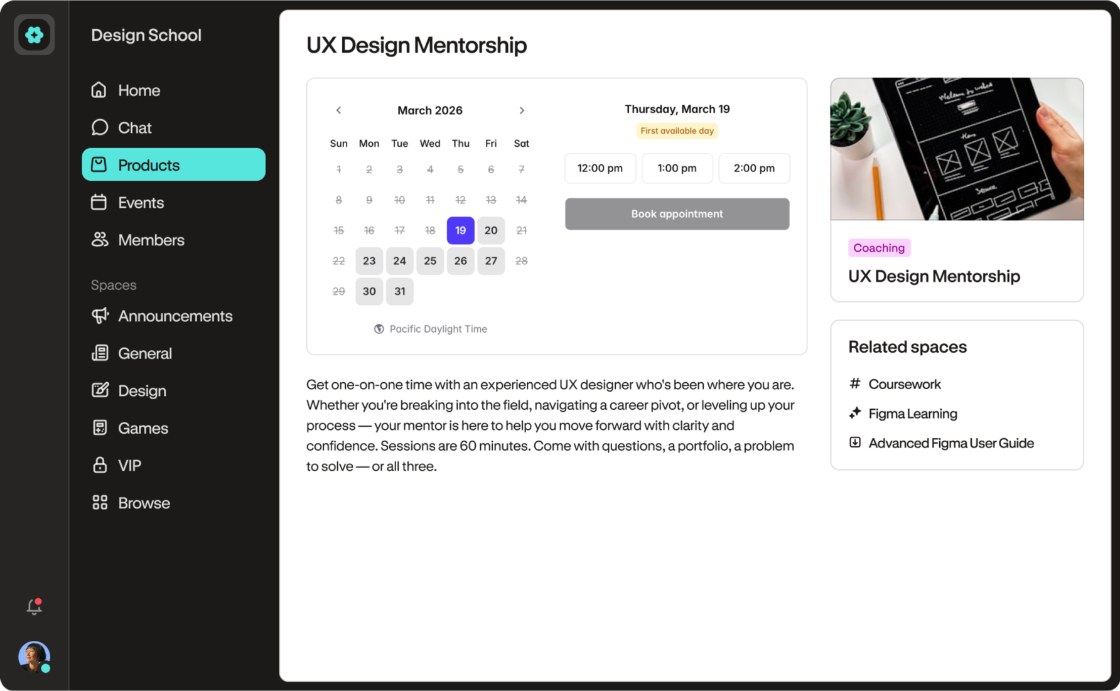
For freelancers this is a fair trade. You keep your existing availability rules, buffers and reminders in your scheduling tool, and Podia handles the sales page and the payment. If you do not use a scheduler yet, you will need one alongside Podia; I covered a free option in my look at taking paid consultations on Setmore’s free plan.
Piece 3: The template pack
Podia’s digital downloads accept almost any file type, including PDFs, ZIPs and design files, up to 5GB per file, with unlimited files per product. Buyers get an account where they can re-download their files later, which saves you the “can you resend the link?” emails.
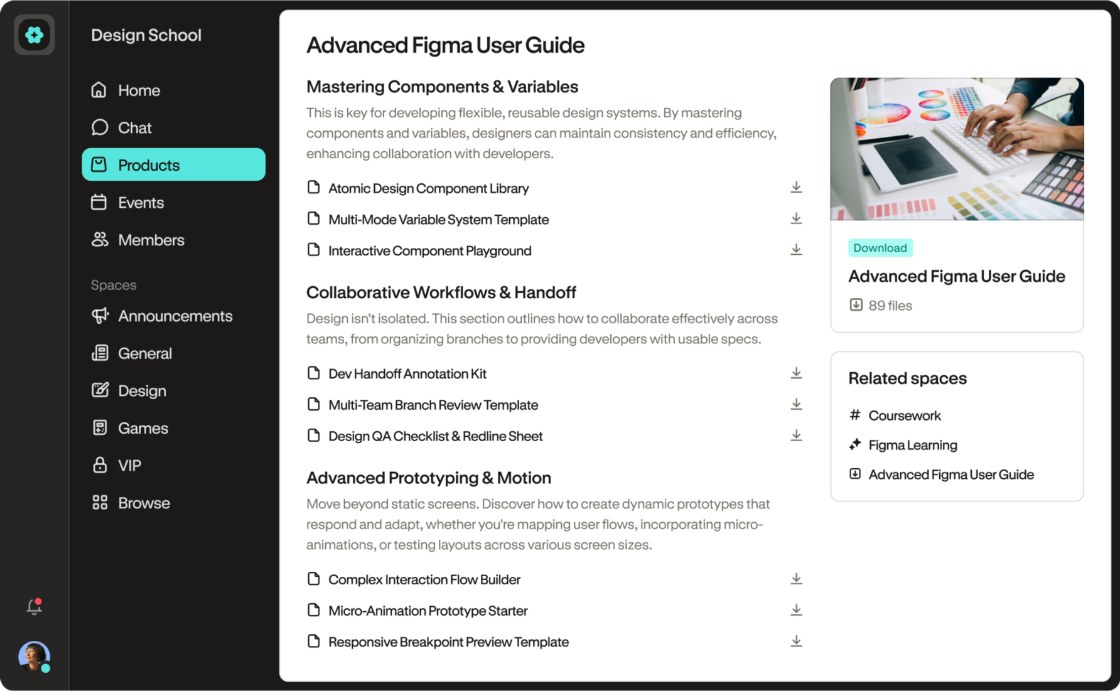
There is also a free delivery mode: a visitor enters only an email address and the file is emailed to them, with no account needed. That gives you a second use for the same template pack. Sell it inside the bundle, and give away one template on its own as a lead magnet that grows your email list.
Putting the bundle together
Podia lets you bundle coaching with courses, downloads, events or community access, and price the bundle however you like. Its coaching page also mentions including supporting products with a coaching purchase, such as prep materials or course access. So the whole offer can be sold as one product on one landing page, with one payment, and Podia grants access to the course and files while the client books the call.
Each product gets its own customizable landing page, and Podia includes a website builder, a blog and custom domain support on every plan. A freelancer who already has a portfolio site can simply link to the bundle’s sales page; one who does not could run the whole thing on Podia.
Podia pricing for a one-person business
Podia has three plans. Every plan includes the course, download, coaching, community and event features, the website, a custom domain, sales tax handling and built-in checkout. The differences are fees, limits and a few selling features.
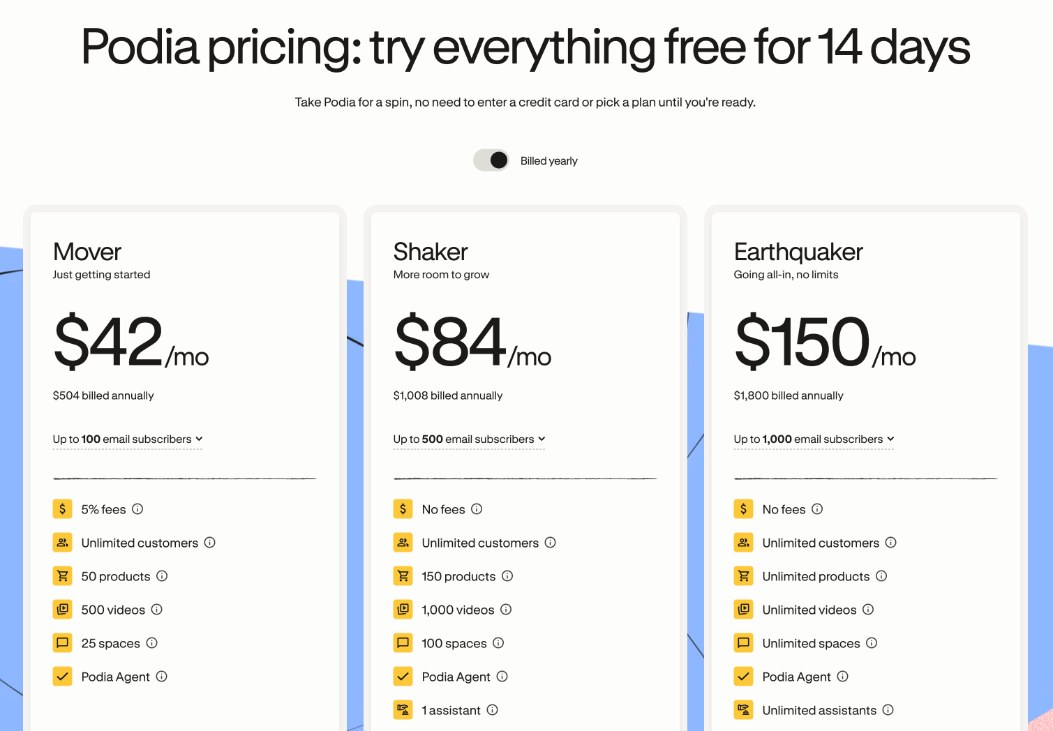
| Plan | Billed monthly | Billed yearly | Podia transaction fee | Email subscribers included | Products |
|---|---|---|---|---|---|
| Mover | $49/mo | $42/mo ($504/yr) | 5% | 100 | 50 |
| Shaker | $99/mo | $84/mo ($1,008/yr) | None | 500 | 150 |
| Earthquaker | $179/mo | $150/mo ($1,800/yr) | None | 1,000 | Unlimited |
Shaker and Earthquaker also add affiliate marketing, upsells, PayPal and Zapier, which Mover does not list. Whatever the plan, Stripe or PayPal charges its own processing fee; Podia’s FAQ quotes a standard 2.9% + 30¢, which may vary by location.
The sales figure where Mover stops being cheaper
Mover’s 5% fee is the number to watch. With monthly billing, Shaker costs $50 more than Mover. Five percent of $1,000 is $50, so once your Podia sales pass about $1,000 a month, Shaker is the cheaper plan. With yearly billing, the gap is $42 a month, so the crossover is about $840 a month in sales. Below those figures, Mover plus the fee costs less.
For most freelancers testing a first bundle, Mover is the sensible start. If you sell four bundles a month at $250, you are right at the monthly crossover, and the move to Shaker pays for itself while also unlocking upsells and PayPal.
What to check during the free trial
Podia offers a 14-day free trial with full access and, according to its pricing page, no need to enter a credit card or pick a plan until you are ready. Its refund policy is short: message Podia within 72 hours of your most recent payment for a refund, and there are no partial refunds on annual plans. So the trial is where you should test the bundle end to end:
- Build the bundle with all three pieces and buy it yourself with a test client email.
- Check that the booking link appears after payment and that your scheduler sends its own confirmation.
- Take the quiz as the client and make sure you can read the written answers.
- Look at how the template files arrive and how a buyer re-downloads them.
Who should skip Podia
- Freelancers selling only calls. If you only want paid consultations, a scheduler with payments is simpler and cheaper.
- Anyone with a large email list. Included subscribers stop at 100, 500 or 1,000 depending on the plan. Podia says you can add more, but if your list is big, price that in before you move.
- Freelancers who need their own calendar inside the platform. Coaching depends on an outside scheduler.
If you mainly want to sell one paid service at checkout, my earlier write-up on a paid audit offer inside Flodesk Checkout may fit better. Podia makes more sense when the offer has several parts that belong together.
My take
Podia is a good fit for a freelancer who wants to sell a structured first step instead of jumping straight to a custom project. The course quizzes double as a client brief, the coaching product handles payment before booking, and the template pack can work both as part of the bundle and as a lead magnet. Start on Mover, and move to Shaker once your monthly Podia sales pass roughly $840 to $1,000 depending on billing. You can try it on Podia’s website with the 14-day trial.
FAQ
Is Podia good for freelancers?
Yes, if you want to sell a packaged offer, such as a mini-course, a paid call and templates together. If you only sell calls or only one file, a simpler tool may be enough.
How much does Podia cost?
Mover costs $49/mo billed monthly or $42/mo billed yearly, Shaker $99/mo or $84/mo, and Earthquaker $179/mo or $150/mo. Mover adds a 5% Podia transaction fee.
Does Podia take a cut of sales?
Only on Mover, which charges 5%. Shaker and Earthquaker have no Podia fees. Stripe or PayPal still charge their own processing fees on every plan.
Can I sell coaching sessions on Podia?
Yes. You sell coaching as a product and connect Calendly, Squarespace Scheduling, YouCanBookMe or SavvyCal so clients can book after paying.
Does Podia have a free trial?
Yes, a 14-day free trial with access to all features. Podia says you do not need to enter a credit card or pick a plan until you are ready.