Disclosure: some links in this guide are partner links. If you sign up through them, this site may earn a commission at no extra cost to you. It does not change what TikTok charges you.
Most freelancers who try TikTok ads make the same first move: they tap the boost button under a video that did well, pay a few dollars, and watch the view count climb. Views feel like progress, but a designer, copywriter or video editor does not get paid for views. You get paid when a business owner sends you a brief. This guide looks at TikTok for Business from that narrower angle: how a solo freelancer can spend a small first budget on leads (messages and form submissions from people who might hire you) rather than on reach, and which parts of the platform actually matter for that job.
Everything below is based on TikTok’s own Business Help Center and sign-up pages as they read today. Where TikTok does not publish a number, I leave it out rather than guess.
What TikTok for Business actually includes
“TikTok for Business” is the umbrella name for TikTok’s advertising and marketing tools. For a freelancer, three pieces matter:
- Promote – the in-app boost tool. You pick one of your existing videos, choose a goal, a budget and a duration, and pay from your phone. It is built for speed.
- TikTok Ads Manager – the full advertising dashboard on the web. You build campaigns, ad groups and ads, choose an objective such as Lead generation, attach an Instant Form, and control targeting and budgets in detail.
- Creative tools and resources – the Creative Center and the Business Help Center, which explain formats, policies and set-up steps.
Creating an Ads Manager account costs nothing; you pay for the ads you run. The rest of this guide is about choosing between Promote and Ads Manager when your goal is client enquiries, and about the budget rules that shape that choice.
Promote vs Ads Manager: the honest split for a one-person business
TikTok describes Promote as an in-app advertising tool that boosts videos and LIVEs “with a few taps”. Its help page lists four things you can promote for: Boost account (views, followers, profile views), Get leads (TikTok messages, phone calls, form leads, or messages in other messaging apps), Get sales (website visits, conversions, product purchases) and Boost LIVE. You can start from a ready-made promotion pack with pre-set budget, duration and audience, or build a custom one.
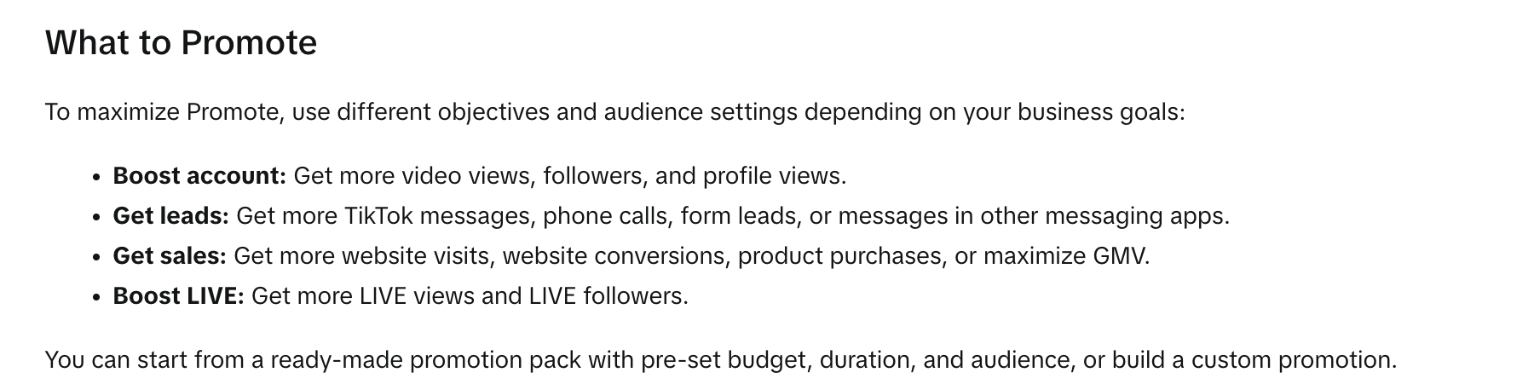
That “Get leads” goal is the detail most freelancers miss. The default habit is to boost for views, because that is what the button shows first. If your offer is a service, a lead goal (messages or a form) points the algorithm at people who take an action, not people who simply watch.
Ads Manager is the next step up. It gives you the full Lead generation objective, Instant Forms you design yourself, separate ad groups for different audiences, and reporting you can export. The trade-off is set-up time and stricter minimum budgets, which we will get to in a moment.
A simple rule of thumb:
- Use Promote when you have one video that already explains your service well and you want to test whether paid reach turns into DMs.
- Use Ads Manager when you want a proper qualifying form (budget, deadline, type of project), want to test two audiences side by side, or want leads to flow into a CRM.
Note TikTok’s own rules for Promote: you must be at least 18, and promoting a LIVE needs at least 1,000 followers. Promote campaigns must also follow TikTok’s advertising policies, not just the Community Guidelines.
Open a TikTok for Business account →
The budget floor that decides your first test
Here is the number that surprises people coming from boosting. In Ads Manager, TikTok sets minimum budgets at two levels. According to its help article on budgets:
- With a daily budget, the campaign budget must exceed $50 and each ad group budget must exceed $20.
- With a lifetime budget, the campaign must exceed $50, and each ad group needs at least the minimum daily budget multiplied by the number of scheduled days.
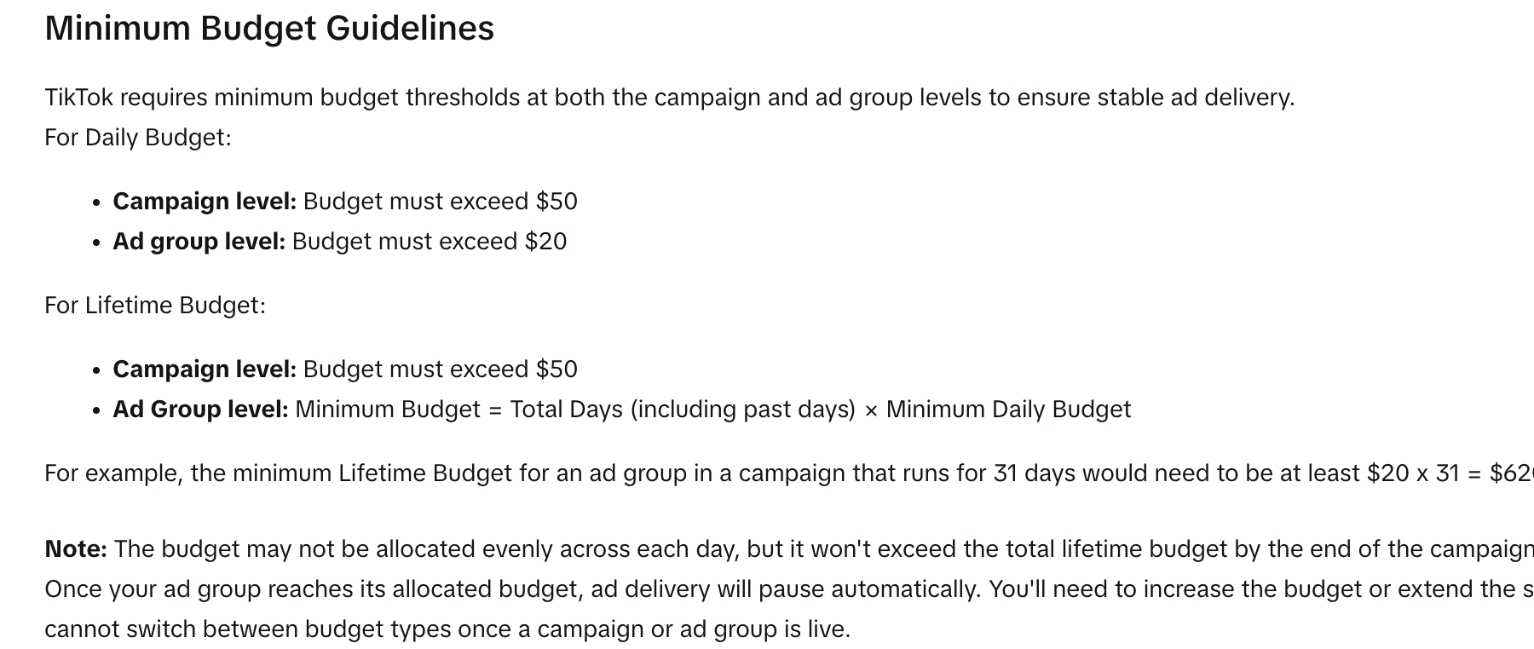
TikTok’s own example: an ad group in a campaign that runs 31 days needs a lifetime budget of at least $20 × 31 = $620. That is the hidden cost of “just leaving it on for a month”. For a freelancer, the practical reading is:
- A short, deliberate test (a few days, one ad group) keeps the floor manageable.
- Splitting a small budget across three or four ad groups is not possible on day one, because each ad group has its own minimum.
- Once a campaign is live you can raise or lower the amount, but you cannot switch between daily and lifetime budget types.
TikTok also advises against frequent changes: while a campaign is still in its learning phase, raise the budget by no more than 40% at a time; after it exits learning, by no more than 30%, and avoid adjusting more often than every two days. If you are the kind of freelancer who checks results every hour, write that rule on a sticky note.
Building a lead form that filters out tyre-kickers
The Lead generation objective in Ads Manager can send people to your own website or to an Instant Form that opens inside TikTok. TikTok’s help page lists the benefits as lower form friction, building customer and email lists, instant lead capture, real-time CRM sync, and multiple form templates.
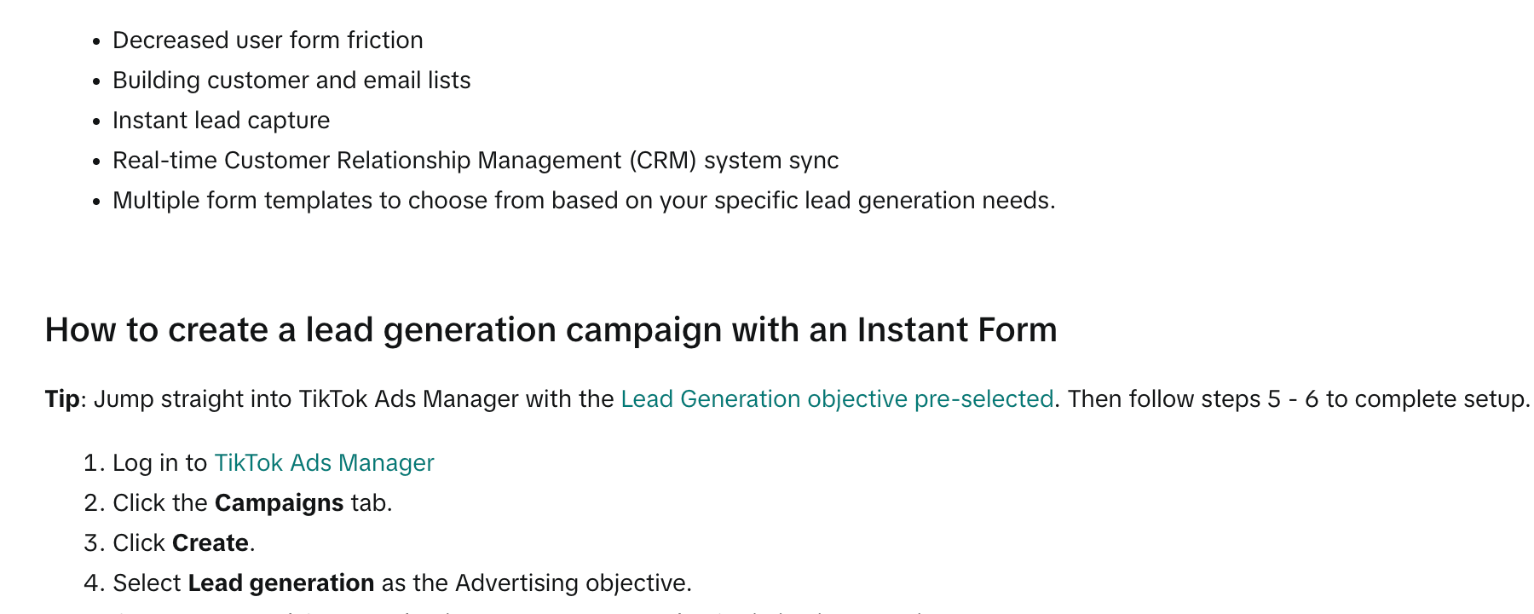
The set-up path, in TikTok’s words, is short: log in to Ads Manager, open the Campaigns tab, click Create, choose Lead generation, create an ad group with Instant Form as the optimization location, then create or attach a form at the ad level.
The part that matters is what goes in the form. Low friction cuts both ways: an easy form brings more submissions, and many of them will be people who were curious, not people with a budget. For freelance services, I would build the form around three qualifying questions:
- What do you need? A short multiple-choice list of your actual services (for example: logo, full brand kit, social templates). This stops “can you build my app” enquiries when you are a designer.
- When do you need it? Options such as “this month”, “next 1–3 months”, “just researching”. You can still reply to the last group, but later.
- What budget range are you working with? Ranges, not an open field. If your minimum project is $800, make the lowest option “under $800” so you can sort those out quickly.
If you already price with a quote calculator, the same logic applies here; I walked through that approach in Typeform for freelancers as a price-range filter. The TikTok form is not a replacement for your intake process, it is the top of it.
Where the leads go
Leads collected through Instant Forms can be accessed in Ads Manager, and TikTok supports CRM integrations. If your client list lives in a free CRM, set up the connection before you launch, so the first enquiry does not sit unread in a dashboard you rarely open. If you are still running your pipeline from a spreadsheet, my notes on moving a freelance lead spreadsheet into HubSpot’s free CRM cover the clean-up step first.
The new-advertiser ad credit, read carefully
The sign-up page you land on from TikTok’s partner links currently shows a “limited-time offer” of up to USD 6,000 in ad credits (in some countries it is shown in local currency). The headline number is a ceiling, not a gift. TikTok’s help article on its incentive program explains how it works.
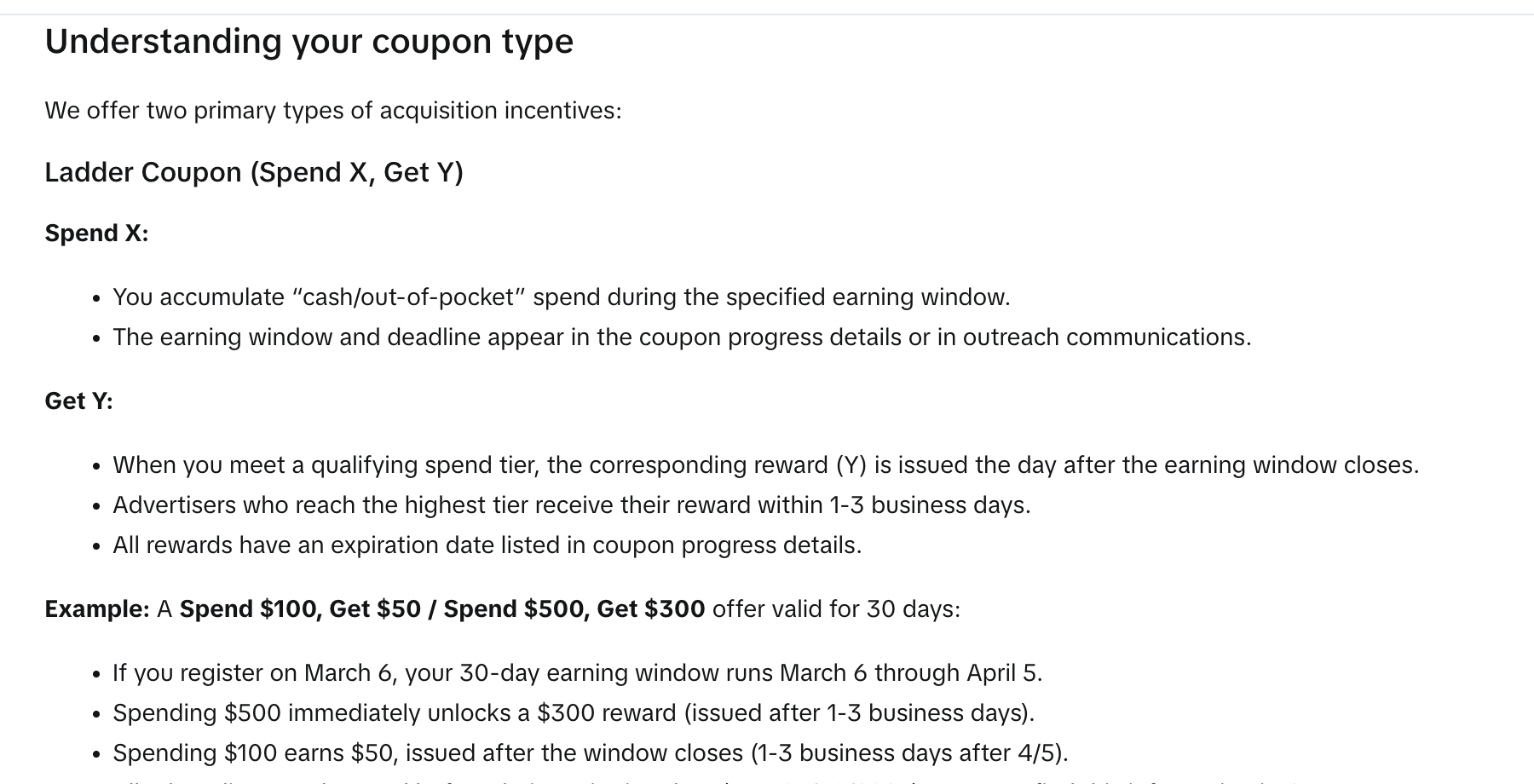
The key points from that page:
- Incentives are reserved for new advertisers. If you do not run a TikTok Shop, you may qualify by registering from official entry points such as getstarted.tiktok.com or ads.tiktok.com. If an offer is shown during registration, the coupon is issued when the account is created.
- One common type is a Ladder Coupon (Spend X, Get Y). You accumulate out-of-pocket spend during an earning window, and the reward for the tier you reach is issued after the window closes (top-tier rewards arrive within 1–3 business days).
- TikTok’s own example is “Spend $100, Get $50 / Spend $500, Get $300” over 30 days. Every reward has an expiry date.
- Incentives are not guaranteed, may vary by region, and accounts that look very similar to existing advertisers may not be eligible.
For a freelancer, the honest takeaway: the credit lowers the cost of your second test, not your first. You still have to spend real money to unlock it, and you then have to use it before it expires. Plan the follow-up test before you start, so the credit does not lapse while you are busy with client work. You can find your coupon in Ads Manager under Tools → Payments → Promotions.
See the current TikTok Ads sign-up offer →
A first-week plan for a freelancer’s lead test
This is the sequence I would follow with a small budget. It uses only the features described above.
- Pick one service and one video. The video should show the result of your work in the first two seconds (a before/after, a finished edit, a portfolio scroll) and say who it is for. A general “hire me” video is hard to target.
- Test with Promote first. Choose the Get leads goal, with TikTok messages as the action, and run a short promotion. Count conversations, not views.
- If DMs come in, move to Ads Manager. Create a Lead generation campaign with one ad group and an Instant Form using the three qualifying questions above. Respect the $50 campaign and $20 ad group daily minimums.
- Leave it alone for two days. TikTok’s own guidance is to avoid budget changes more often than every two days.
- Reply within hours. A form lead from TikTok is usually someone on their phone between other things. The faster you reply, the more likely the conversation continues.
- Judge cost per qualified lead. Divide spend by the number of form submissions that match your budget and timing answers. That is the only number that tells you whether TikTok is worth a second round.
If TikTok does not suit your service, LinkedIn is the usual alternative for B2B freelancers; I compared tools for that channel in where Taplio pricing fits in a freelancer’s LinkedIn client pipeline.
Who this route is not for
- Freelancers with no video of their work. TikTok ads are still TikTok videos. If you cannot show your output on screen, the ad has nothing to sell.
- Purely enterprise B2B offers. If your buyers are procurement teams with six-month cycles, the minimum budgets will burn before a single contract is signed.
- Anyone without time to reply. Paying for leads and answering them three days later is the most expensive way to use TikTok for Business.
Verdict
TikTok for Business is a reasonable channel for freelancers whose work looks good on a phone screen: designers, editors, photographers, social media managers, UGC creators. The mistake to avoid is buying views. Start with Promote’s Get leads goal, move to an Ads Manager lead form only when you see real conversations, respect the $50/$20 budget floors, and treat the new-advertiser credit as a discount on your second test, not as free money.
Start with TikTok for Business →
FAQ
Is TikTok for Business free?
Creating a TikTok Ads Manager account is free. You pay for the ads you run, and Ads Manager campaigns have minimum budgets (a daily campaign budget above $50 and a daily ad group budget above $20).
What is the difference between TikTok Promote and Ads Manager?
Promote is the in-app tool for boosting an existing video or LIVE in a few taps, with goals such as Boost account, Get leads, Get sales and Boost LIVE. Ads Manager is the full web dashboard with campaign objectives, ad groups, Instant Forms and detailed reporting.
Can freelancers collect leads without a website?
Yes. A Lead generation campaign in Ads Manager can use an in-app Instant Form, and Promote’s Get leads goal can drive TikTok messages, phone calls or form leads.
How does the TikTok new advertiser credit work?
Offers vary by region. A common type is a Ladder Coupon: you spend a set amount within an earning window and receive ad credit for the tier you reach after the window closes. Credits expire, and eligibility is limited to new advertisers.
Do I need 1,000 followers to use Promote?
Only for promoting a LIVE. To use Promote at all you must be at least 18 years old.