Disclosure: some links in this guide are partner links. If you sign up through them, I may earn a commission at no extra cost to you.
AgencyAnalytics is built for marketing agencies that run ads and SEO for clients, and most reviews judge it on that. I want to look at it from a different seat: the freelance web designer whose job “ends” at launch, but who keeps the client on a care plan and needs to show, every month, that the site is doing its job. That client doesn’t care about ad spend. They want to know if people are finding the site, if it’s fast, and if the contact form is bringing in leads.
This guide is the report I’d build in AgencyAnalytics for that kind of client, using only integrations and features listed on AgencyAnalytics’ own site, plus what it now costs after its recent pricing change.
Why website clients need a different report
Agency reports are usually built around campaigns: impressions, clicks, cost per conversion. A small business that paid you to build a site has a simpler set of questions, and if your report doesn’t answer them in the first screen, they stop opening it:
- Is anyone visiting? Sessions and where they came from.
- Can people find us on Google? Search clicks, top queries, top pages.
- Is the site healthy? Speed, accessibility and SEO checks.
- Are we getting enquiries? Form submissions, calls or orders.
Answer those four every month and your care plan stops looking like a cost and starts looking like the reason the site works. If you’re still shaping what your care plans include, I broke down three WordPress care plan tiers built from ManageWP pricing; a monthly report like this one slots neatly into the middle and top tiers.
The AgencyAnalytics integrations that cover a website client
AgencyAnalytics lists 90+ integrations. Most are ad platforms you won’t need for a website client. The ones that map to the four questions are:
| Client question | Integration | What it shows |
|---|---|---|
| Is anyone visiting? | Google Analytics (GA4), or Matomo or Microsoft Clarity | Sessions, sources, engaged visits, top pages |
| Can people find us? | Google Search Console, Bing Webmaster Tools | Top queries, top pages, average position, sitemap status |
| Is the site healthy? | Google Lighthouse, Google PageSpeed | Performance, accessibility, SEO and best-practice scores |
| Are we getting enquiries? | Gravity Forms, WooCommerce, Stripe, CallRail | Form submissions, orders, payments, calls |
| Local businesses | Google Business Profile | How the business listing performs |
The Search Console integration page lists top queries, sitemaps (crawler indexing, warnings and errors), top pages and average position. For a website client, the sitemap section is the most useful: it’s an early warning when a plugin update or redesign breaks indexing.
Step 1: Put site health first with the Lighthouse integration
This is the part most agency reports skip and the part a web designer should lead with, because it’s the work you actually do on a care plan. AgencyAnalytics’ Lighthouse integration reports on performance, accessibility and SEO metrics, and highlights which issues need addressing.
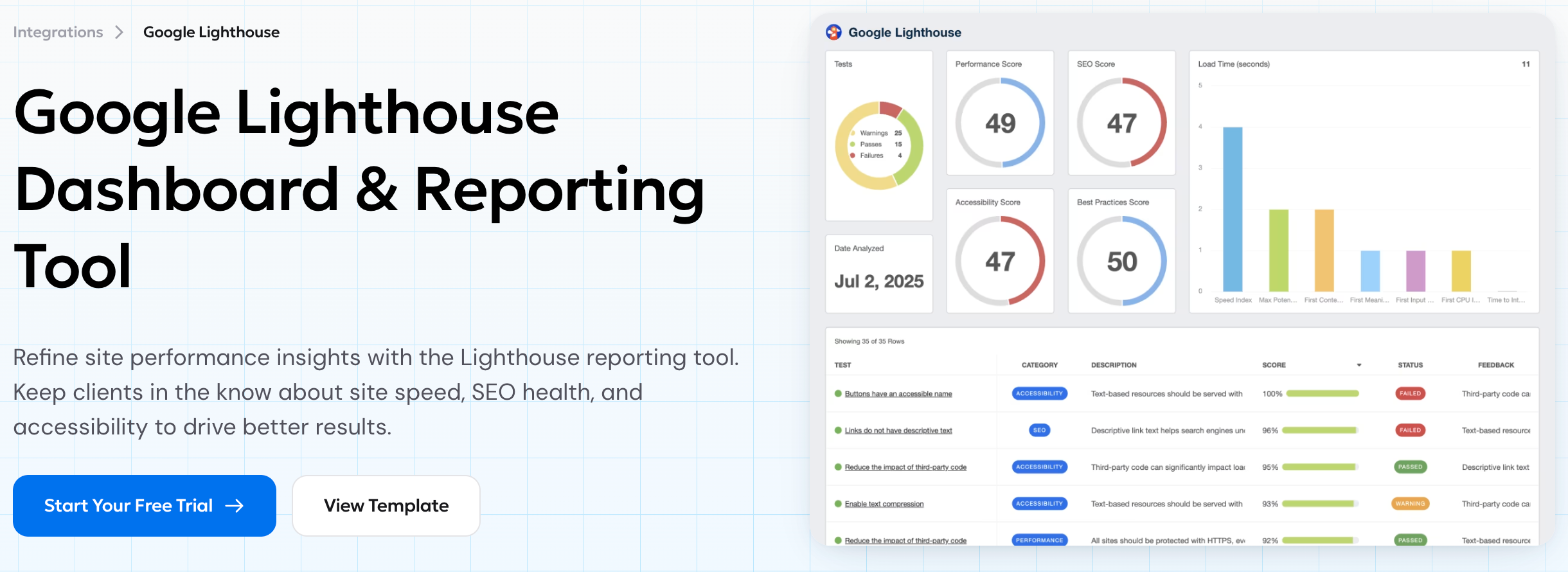
How I’d use it in the report:
- Show the four scores, then one line of context. “Performance dropped from 82 to 74 after the new slider. Fix scheduled this week.” That sentence is the value of your care plan in one line.
- Don’t chase 100. Clients will ask why the score isn’t perfect. Agree up front which score range is “healthy” for their site and report against that.
- Use the failed tests as your to-do list. The test table doubles as your maintenance plan for next month.
Step 2: Traffic and search, kept to one screen
For GA4 and Search Console, resist the urge to add every widget. One screen with sessions by source, top five pages, Search Console clicks and top queries is enough for a small business owner. AgencyAnalytics offers unlimited reports and dashboards per client, so you can keep a detailed dashboard for yourself and a short one for the client.
AgencyAnalytics also includes an AI layer, AgencyAI, on every client. The homepage shows it drafting a monthly report: you ask it to build the report from an analysis, and it adds an executive summary and sections one by one.
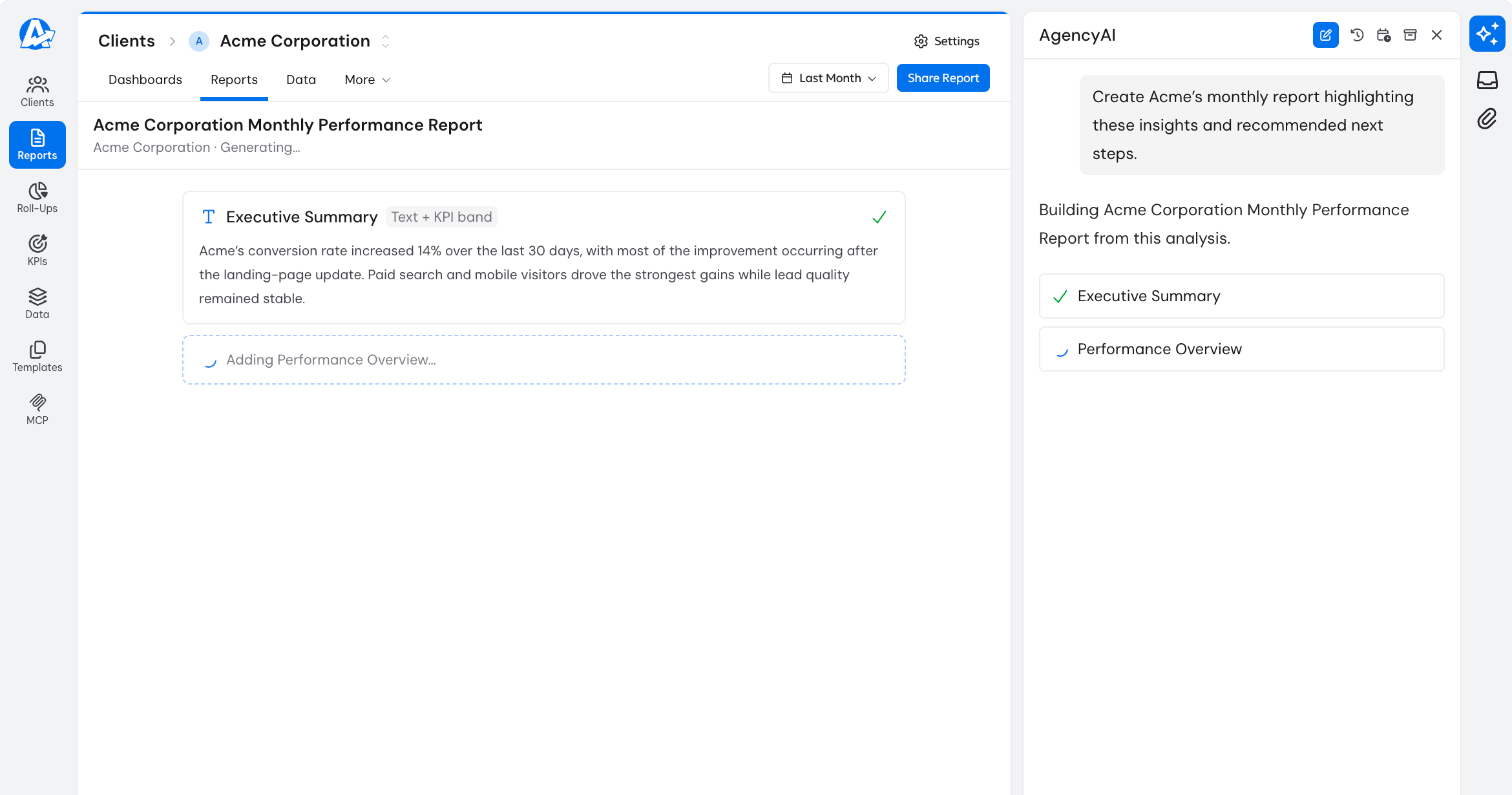
I’d use the AI summary as a first draft, then rewrite it in plain language. A client who reads “engaged sessions” will skim; a client who reads “about 40 more people a week are reaching your services page from Google” will reply.
Step 3: Prove leads, not just visits
The section clients care about most is the one most designers leave out. If the site uses Gravity Forms, AgencyAnalytics’ integration lets you monitor submission numbers for each active form and review the data submitted. For shops, the WooCommerce and Stripe integrations cover orders and payments, and CallRail covers phone calls if the client uses call tracking.
Two practical tips:
- Count, don’t show personal data. Report the number of enquiries per form, not the names and emails inside them. The client already has those in their inbox.
- Pair leads with the source. “12 enquiries, 8 of them after visiting from Google” ties your SEO and speed work to money.
Step 4: Give the client a portal instead of a PDF
Every AgencyAnalytics client includes a white-labeled client portal, where the client logs in and explores live dashboards. The features list also includes report scheduling, report approvals, a custom domain, custom email, and your own logo and colors.
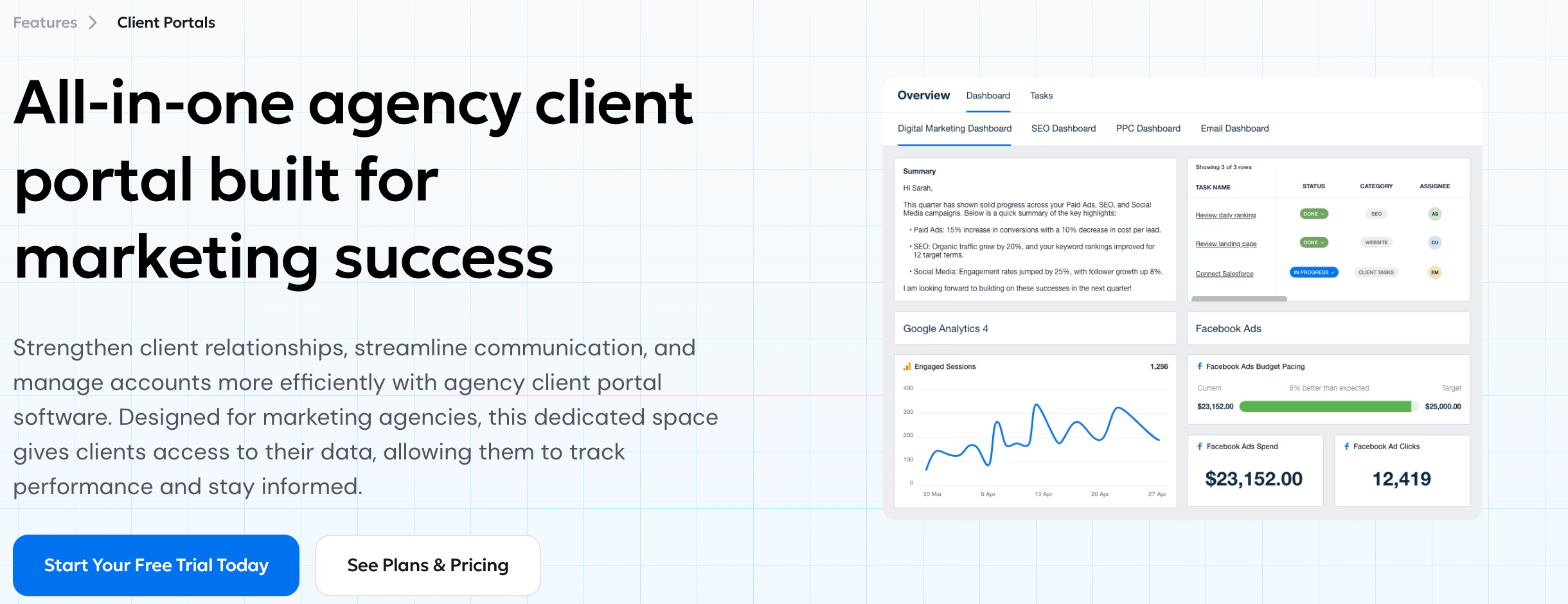
For a freelancer, the portal does one more job: it makes your service visible between invoices. I’d still send a short scheduled email report each month with the four headline numbers, and keep the portal for clients who like to dig in. Report approvals are handy if you want to check the AI summary before it goes out.
A newer option: asking Claude or ChatGPT about a client’s data
AgencyAnalytics now lists MCP access on every client. According to its MCP page, you can connect AgencyAnalytics to Claude, ChatGPT or another MCP-compatible AI tool through OAuth, and every query is scoped to a single client and runs on the same data as your dashboards.
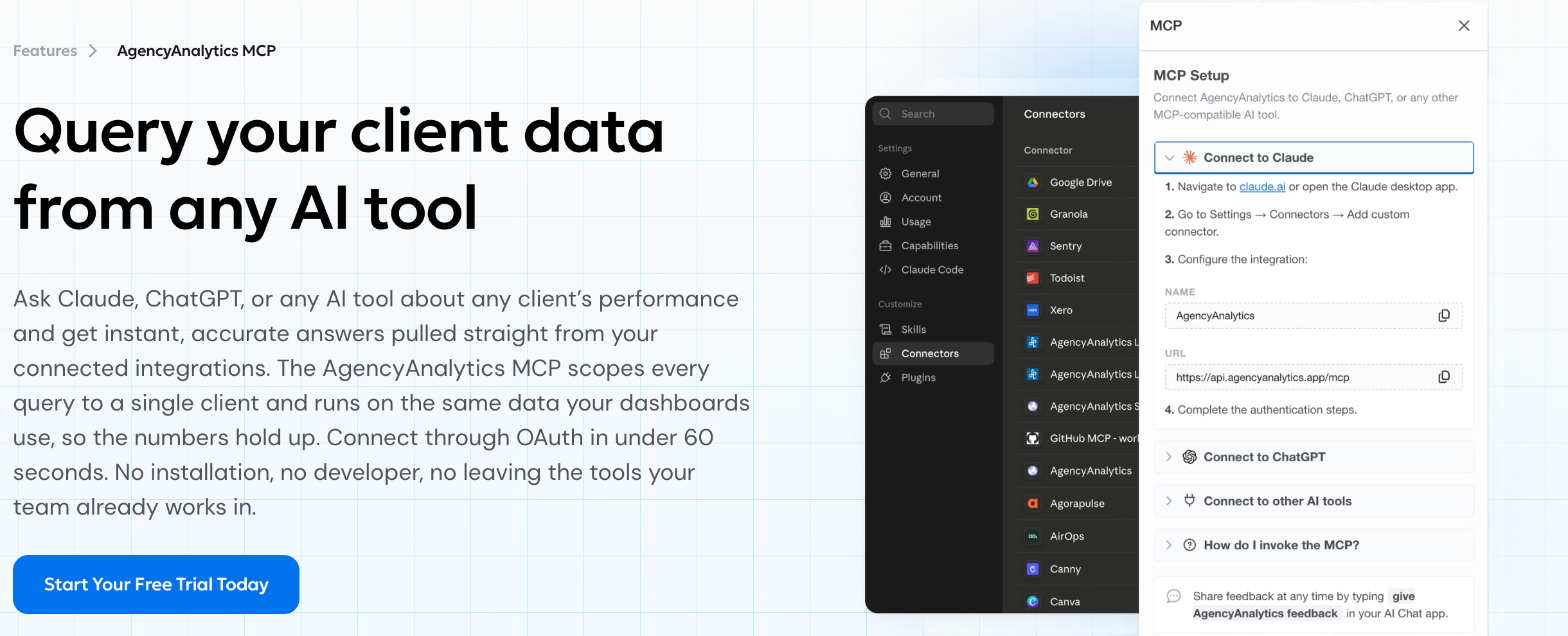
For a solo designer, this is useful before a client call: ask “what changed on this site’s traffic and forms last month?” and get an answer from the connected data rather than clicking through dashboards. I’d treat it as a prep tool, and still check any number before quoting it to a client.
What AgencyAnalytics costs per website client
AgencyAnalytics has moved to a single core plan priced per client. Its pricing page currently shows a banner saying there are no temporary Black Friday discounts because it lowered its price instead.
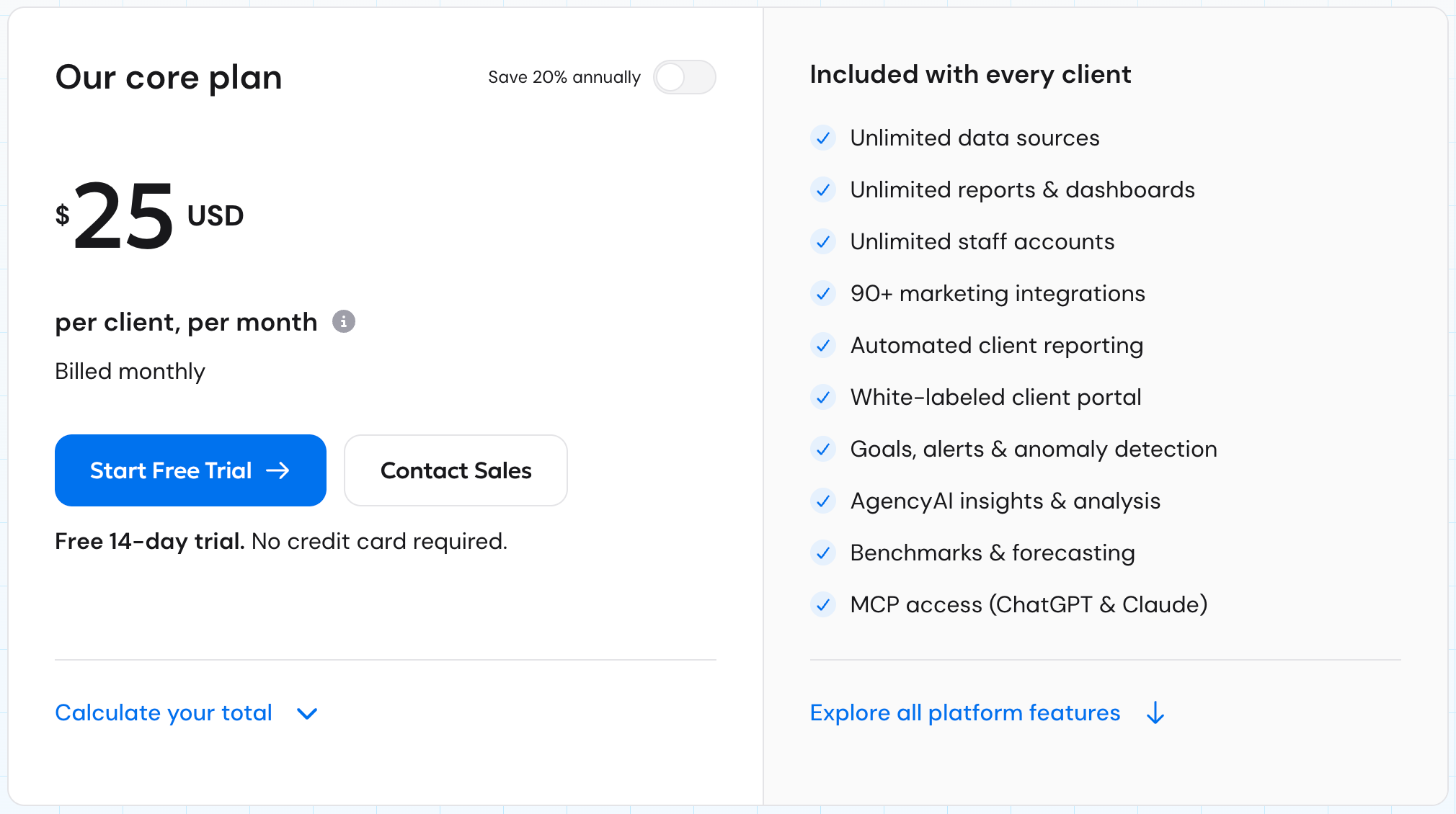
- $25 per client, per month billed monthly, with no commitment.
- $20 per client, per month billed annually, with a one-year commitment.
- Volume pricing for agencies managing 25+ clients, through sales.
- Add-ons: Rank Tracker at $41.67 per month per 500 keywords and AI Tracker at $20.83 per month per 250 credits, both billed annually.
- Trial and refunds: a free 14-day trial with no credit card required, and a 30-day money-back guarantee.
Every client includes unlimited data sources, reports, dashboards and staff accounts, so there’s no separate per-seat cost for a subcontractor who helps you.
How I’d price it into a care plan
At $25 a month per client (or $20 on annual billing), the tool cost is easy to pass through. A simple rule: only add the reporting tier to care plans priced high enough that the tool is a small share of the fee, and present the report as part of the plan rather than a line item. Clients pay for “a monthly report that shows your site is healthy and bringing enquiries”, not for software.
Pay monthly while you test whether clients actually read the reports. Switch to annual once you know which clients will stay on the reporting tier for a year, since annual billing is a one-year commitment.
When AgencyAnalytics isn’t worth it for a freelancer
- One or two clients who never open reports. A short email with three numbers from GA4 and Search Console does the job for free.
- You only need dashboards, not delivery. Google’s Looker Studio is free and connects to GA4 and Search Console. You give up the white-labeled portal, scheduling, approvals and AI summaries, but you keep the money.
- Your maintenance tool already reports. Some WordPress management tools include client reports for uptime, updates and backups. Check what you already pay for before adding another per-client cost.
It becomes worth it when you have several care plan clients, want one place to see all of them, and want reports to go out on schedule without you building them each month.
FAQ
How much does AgencyAnalytics cost?
The core plan is $25 per client per month billed monthly, or $20 per client per month billed annually. Agencies with 25 or more clients can ask for volume pricing.
Does AgencyAnalytics have a free trial?
Yes, a 14-day free trial with no credit card required. It also offers a 30-day money-back guarantee if you continue on a paid plan.
Can AgencyAnalytics report on website speed?
Yes. It has Google Lighthouse and Google PageSpeed integrations, which report on performance, accessibility and SEO checks.
Does AgencyAnalytics work with WordPress form plugins?
It has a Gravity Forms integration that shows submission numbers and submitted data for each form, plus WooCommerce for store orders.
What is a “client” in AgencyAnalytics pricing?
AgencyAnalytics defines a client (formerly a “campaign”) as one business relationship you manage. Each client can connect many integrations and have any number of reports.
My take
AgencyAnalytics is marketed to agencies running ads, but its per-client pricing and Lighthouse, Search Console, GA4 and Gravity Forms integrations make it a good fit for freelance web designers with care plan clients. Lead with site health, keep traffic to one screen, prove enquiries, and let the portal show your work between invoices. Start the 14-day trial with your two most engaged clients and see if they read the reports before you roll it out to everyone.