Disclosure: some links on this page may be affiliate links. If you sign up through them I may earn a commission at no extra cost to you.
Most freelancers do not lose deals because their work is weak. They lose them in the gap between a good discovery call and a proposal that arrives three days later as a PDF attachment, gets forwarded to someone who was not on the call, and sits unsigned. Better Proposals is built to close that gap: you send a web-based proposal the client can read on any device, sign online, and pay right after signing.
Instead of a feature tour, this article builds one reusable freelance proposal template inside Better Proposals, section by section. At each step I note which plan the feature needs, because the Starter plan that most solo freelancers look at first has a few gaps worth knowing before you design around them.
Try Better Proposals free for 14 days (no credit card required).
Before You Build: What Better Proposals Includes on Every Plan
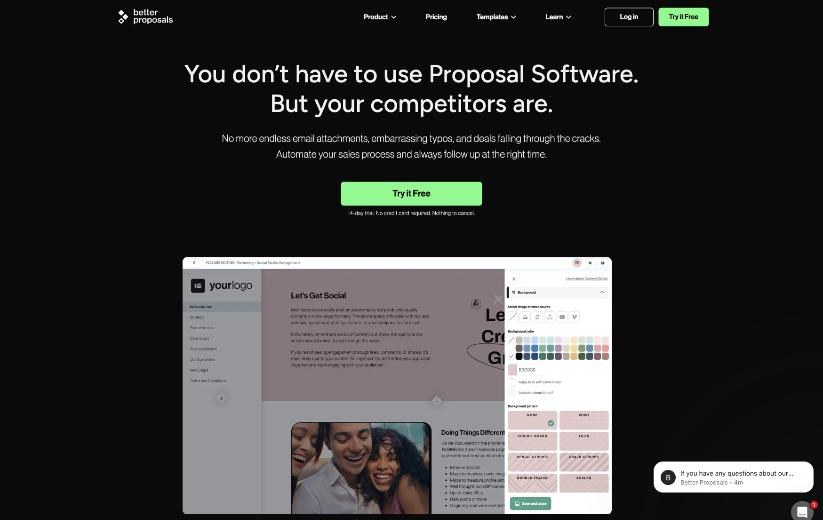
According to the pricing page, every plan, including Starter, comes with:
- every feature of the editor;
- unlimited templates and unlimited use of the content library;
- brand customization (logo, colors, fonts);
- the ability to send any type of document, not only proposals;
- open tracking and live notifications;
- payments, so the client can pay after signing;
- legally binding digital signatures.
That is enough to build a complete freelance proposal template on Starter. The differences between plans show up in volume, branding polish and a few workflow features, which I will flag as we go.
Section 1: The Cover Page
The cover is what the client sees when they open the link, so it should answer one question: is this for me? Put the client’s company name, the project name and your name on it. Use a single strong image or a plain background in your brand color.
Better Proposals supports default merge tags on every plan, which is how you avoid retyping the client’s name and company in every document. Custom merge tags, which let you define your own fields (for example, “project start date” or “package name”), need Premium or above. On Starter, keep the cover simple and use the default tags.
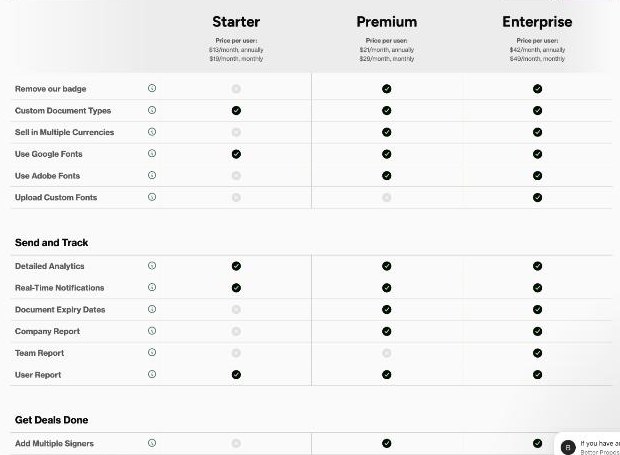
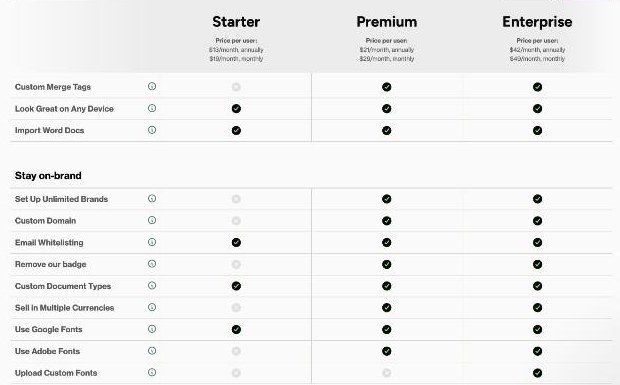
Plan note: Starter shows a Better Proposals badge on your documents. Removing it requires Premium. For many solo freelancers this is a cosmetic issue; for brand-heavy designers it may not be.
Section 2: “What I Heard on Our Call”
This is the section that wins deals, and it is the one most templates skip. Write three to five short bullet points that restate the client’s problem in their own words from the discovery call. Then one sentence on what success looks like for them.
Do not save this section in the content library as finished text, because it must be rewritten for every client. Instead, save a skeleton block with prompts like “Problem 1”, “Problem 2” and “What success looks like”. The content library is unlimited on every plan, so you lose nothing by storing several skeletons for different project types.
Section 3: Scope and Deliverables
This is where the content library pays for itself. Write each of your standard deliverables once as its own block: “Homepage design (up to two revision rounds)”, “Monthly SEO report”, “Brand style guide”. When you build a proposal, you drop in the blocks you need instead of copying from old documents.
Two rules keep this section from causing scope creep later:
- Each deliverable block includes the number of revisions and what is out of scope.
- Each block ends with what you need from the client (access, content, feedback within a set number of days).
If you already have this content in Word documents, Better Proposals lets you import Word docs on every plan, which saves rebuilding from scratch.
Section 4: Timeline
Keep it to a short table: phase, what happens, how long it takes. Avoid fixed calendar dates in the template; use “Week 1–2” style ranges so the template stays valid. Add one line stating that the timeline starts after the signed proposal and first payment are received.
Section 5: The Pricing Table
Better Proposals includes interactive pricing tables on every plan. For freelancers, the most useful pattern is a core package plus optional add-ons the client can tick. For example, a website project might include the build as the core line, with optional extras for copywriting, a maintenance retainer or extra revision rounds.
Optional add-ons do two things: they give the client a sense of control, and they raise your average project value without a separate sales conversation.
Plan note: selling in multiple currencies requires Premium or above. If you invoice clients in different currencies, check this before you commit to Starter.
Section 6: Terms
Store your standard terms as one content library block: payment schedule, what happens if the project pauses, ownership of files after final payment, and cancellation. Keep them short and plain. If you work with very different client types, save two versions rather than one long, conditional block.
I am not a lawyer, and this is not legal advice. Have your terms reviewed once by someone qualified in your country, then reuse them.
Section 7: Signature and Payment
The end of the document is where Better Proposals earns its price. The client signs online with a legally binding digital signature, and with a payment integration connected they can pay the deposit right after signing. That turns “I’ll send you an invoice” into one continuous step.
If the project has two decision makers, such as two co-founders, note that adding multiple signers requires Premium. On Starter, one person signs.
Section 8: After the Signature
On Premium, Better Proposals adds custom onboarding flows and forms, so the client can fill in an onboarding questionnaire straight from the signed document. On Starter, add a short “What happens next” section instead: when you will send the kickoff email, what you need from them, and a link to a form you host elsewhere.
The Send Limit Is the Number to Plan Around
Here is the detail that matters most for a freelancer choosing a plan. Starter includes 1 user seat and a monthly send limit of 10 documents. Premium raises that to 50 sends per month with unlimited seats, and Enterprise is unlimited.
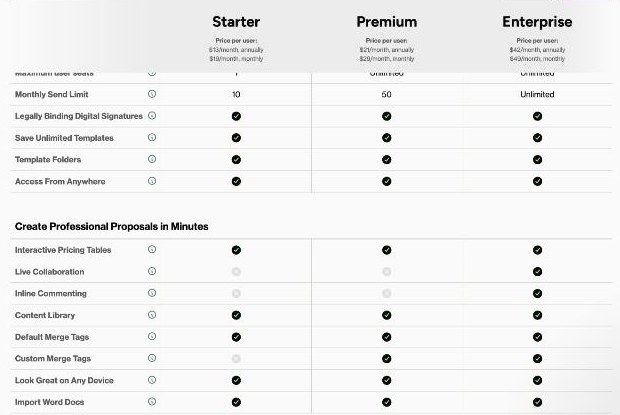
Since every plan lets you send any type of document, not just proposals, think about everything you might send through it: proposals, contracts, change requests and renewal quotes. A freelancer who sends three or four proposals a month plus a couple of contracts fits comfortably on Starter. One who quotes many small jobs, or uses Better Proposals for every change request, can reach 10 quickly.
Better Proposals Pricing
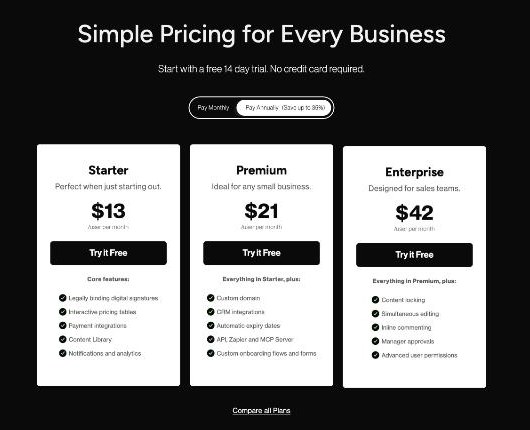
| Plan | Billed annually | Billed monthly | Seats | Sends per month |
|---|---|---|---|---|
| Starter | $13 per user/month | $19 per user/month | 1 | 10 |
| Premium | $21 per user/month | $29 per user/month | Unlimited | 50 |
| Enterprise | $42 per user/month | $49 per user/month | Unlimited | Unlimited |
Premium adds a custom domain, CRM integrations, automatic expiry dates, API, Zapier and MCP Server access, and custom onboarding flows and forms. There are also two optional extras: Nudge, a follow-up feature, at $10 per user per month, and custom template design by the Better Proposals team from $1,495. Every plan starts with a 14-day free trial with no credit card required.
Starter or Premium? A Quick Decision List
Stay on Starter if:
- you send 10 or fewer documents a month;
- one person signs on the client side;
- you bill in a single currency;
- the Better Proposals badge does not bother you.
Move to Premium if:
- you regularly send more than 10 documents a month;
- you need proposals to expire automatically so old prices do not get signed months later;
- you want your own domain on proposal links and no badge;
- you want signed proposals to trigger actions in your CRM or through Zapier;
- clients often have two signers, or you invoice in several currencies.
Better Proposals Versus Other Tools I Have Covered
If you want a broader document workflow with heavier contract features, compare it with my notes on PandaDoc for freelancer proposals. If all you need is a signature on a document you already wrote, a free e-signature plan may be enough; see SignWell’s free plan for freelancers. Better Proposals sits between the two: more design and sales focus than a signing tool, without trying to be your whole back office.
My Take
Better Proposals is a good fit for a freelancer who wins work through proposals and wants them to look as professional as the work itself. The Starter plan already covers the parts that move deals forward: a reusable template, interactive pricing with optional add-ons, e-signatures and payment on signing. Its real limits are the 10 monthly sends, a single signer and the badge.
Build the template above during the 14-day trial, send it to one real client, and count how many documents you send in a normal month. That number will tell you whether Starter is enough or Premium is worth the extra $8 per month on annual billing.
Start your Better Proposals trial
FAQ
How much does Better Proposals cost?
Starter is $13 per user per month billed annually or $19 billed monthly. Premium is $21 annually or $29 monthly, and Enterprise is $42 annually or $49 monthly, all per user per month.
How many proposals can I send on the Starter plan?
Starter has a monthly send limit of 10 documents and 1 user seat. Premium allows 50 sends per month and Enterprise is unlimited.
Is there a free trial?
Yes. Better Proposals offers a 14-day free trial with no credit card required.
Can clients pay after signing?
Yes. Taking payments and legally binding digital signatures are included on every plan, so clients can sign and pay in one flow once a payment integration is connected.
Can I remove the Better Proposals branding?
Removing the Better Proposals badge and using a custom domain require the Premium plan or higher.
Do proposals expire automatically?
Document expiry dates are available on Premium and Enterprise, not on Starter.