Disclosure: some links in this guide are partner links. If you sign up through them, this site may earn a commission at no extra cost to you. It does not change what Pastel charges you.
Every freelance web build ends the same way: the site is live on staging, the client starts reviewing, and feedback arrives in five places at once. A screenshot in email, a voice note, “the button on the second page” in a chat message. Pastel website feedback tools were built to fix the first half of that problem by letting clients pin comments directly on the live page. What is new is the second half: Pastel now runs an MCP server, so an AI coding agent such as Claude Code or Cursor can read those pinned comments, change your code, reply to the client and mark the comment resolved.
This guide covers that workflow from a solo freelancer’s point of view: which Pastel plan fits a one-person studio, how to connect the agent, which comments to hand over and which to keep, and the settings that stop an agent from talking to your client in ways you did not intend. All product details come from Pastel’s pricing page, its features and agents pages, and its help centre.
What Pastel does before any AI is involved
Pastel turns a website into a “canvas” that people can comment on. According to its FAQ, Pastel does not copy your site. It layers comments on the live website through its own proxy, and it works with WordPress, React, Angular or any other framework. One canvas covers a whole website, not a single page: you turn commenting off to browse to another page, then turn it back on.
For freelancers, the detail that matters most is on the reviewer side. Pastel allows unlimited reviewers, comments and views, and clients can comment as guests without creating an account. A guest can leave comments and replies. A user on your plan can also create and edit canvases and export comments.
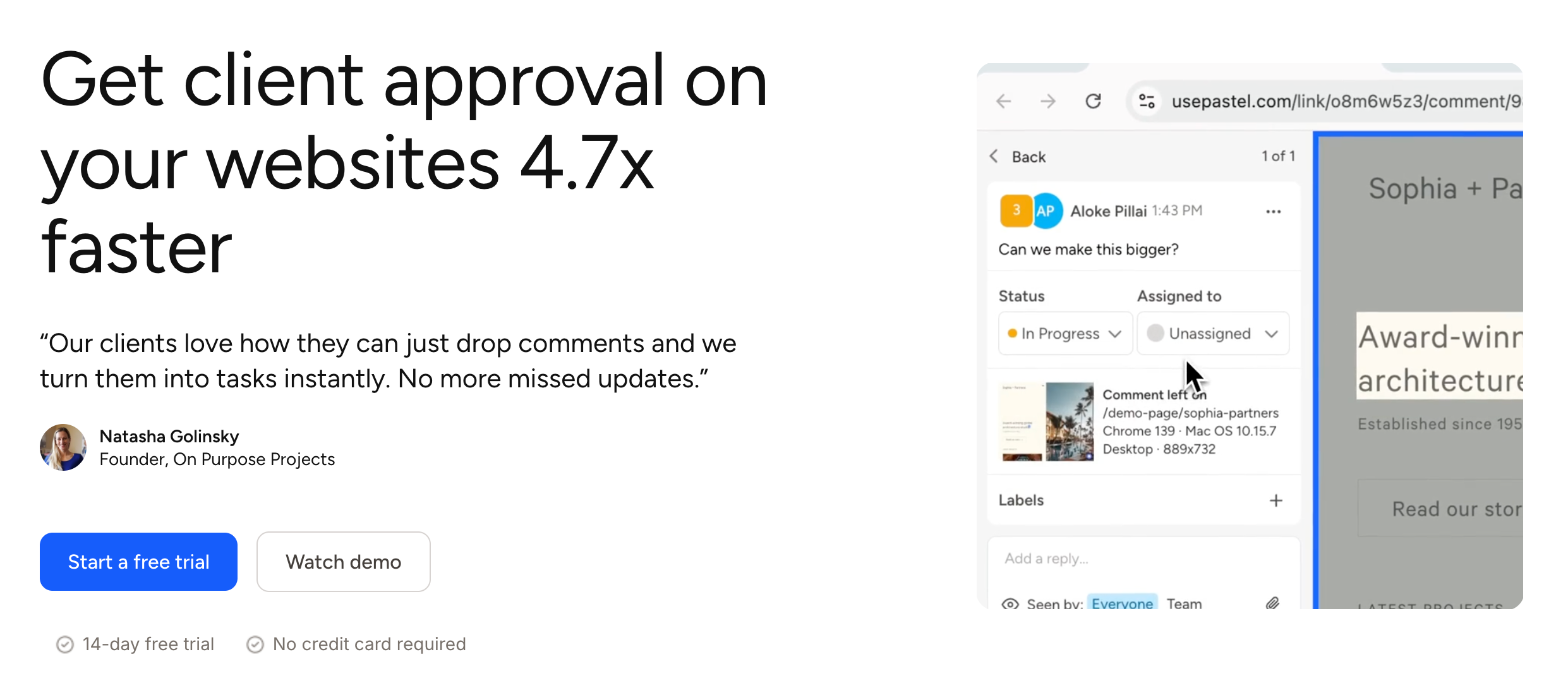
Each comment also carries context. In Pastel’s own product image, a comment shows the page it was left on and the browser, operating system and viewport size. That is the information you usually have to ask a client for. Comments can be assigned, labelled, given deadlines and moved through statuses, and you can export every comment, status and assignment to CSV.
Pastel pricing for a one-person studio
On Pastel’s pricing page (monthly view), the plans are:
- Free: $0, 1 user, 1 canvas. It already includes in-line file attachments, CSV export, comment labels, assigning comments, mentions, pausing comments, project folders, feedback deadlines and reminders, the responsive tester and approvals.
- Pro: $35/mo, 2 users, 3 canvases, plus 100GB of video storage.
- Team: from $119/mo, starts at 5 users, unlimited canvases, $24 per additional user, 500GB of video storage, webhook export and project management integrations (Trello, Asana, Jira, ClickUp, Monday and Zapier).
- Enterprise: $450/mo billed at $5,400/year, from 10 users, with SOC 2 report, SAML SSO and custom legal terms.
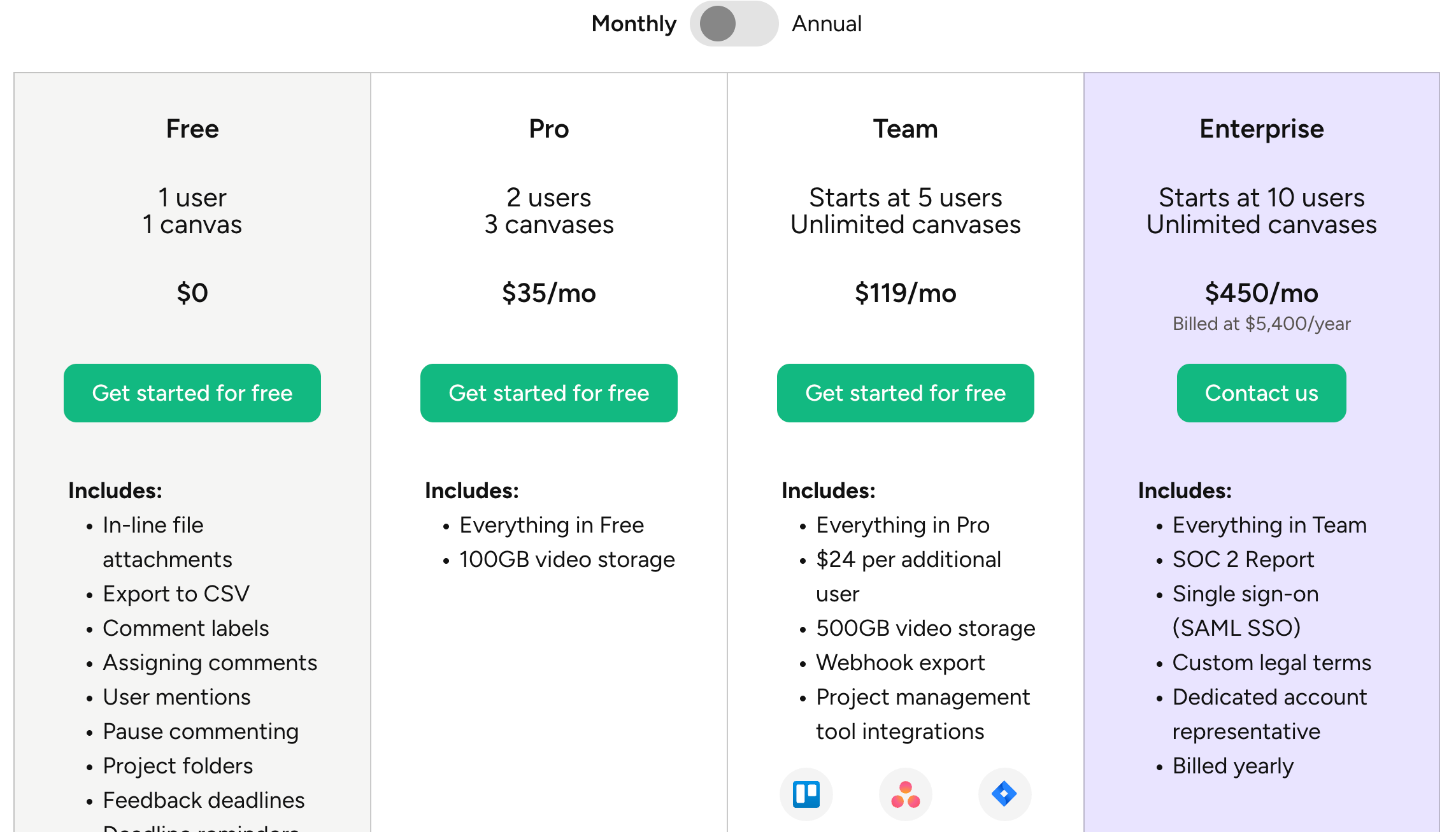
The Free plan is more generous than it looks for a freelancer, because Pastel’s FAQ says you can have one active canvas at a time and archive canvases to start a new one, then unarchive them later. If you deliver one site at a time, Free covers the whole review cycle. Pro makes sense once you regularly have two or three client sites in review at the same moment, or you work with a subcontractor who needs their own login. Team is built for agencies.
Pastel offers a 14-day free trial of its paid plans with no credit card required, so you can test the agent workflow on a real project before deciding.
What the Pastel MCP server lets an agent do
Pastel’s help centre describes the MCP server in plain terms. It runs at https://api.usepastel.com/mcp, and any agent that supports MCP can connect, including Claude, ChatGPT and Cursor. Once connected, you can ask for things in normal language: list your canvases, summarise unresolved comments on a canvas grouped by page, fix a specific comment, assign comments to someone, or create a canvas for a staging URL.
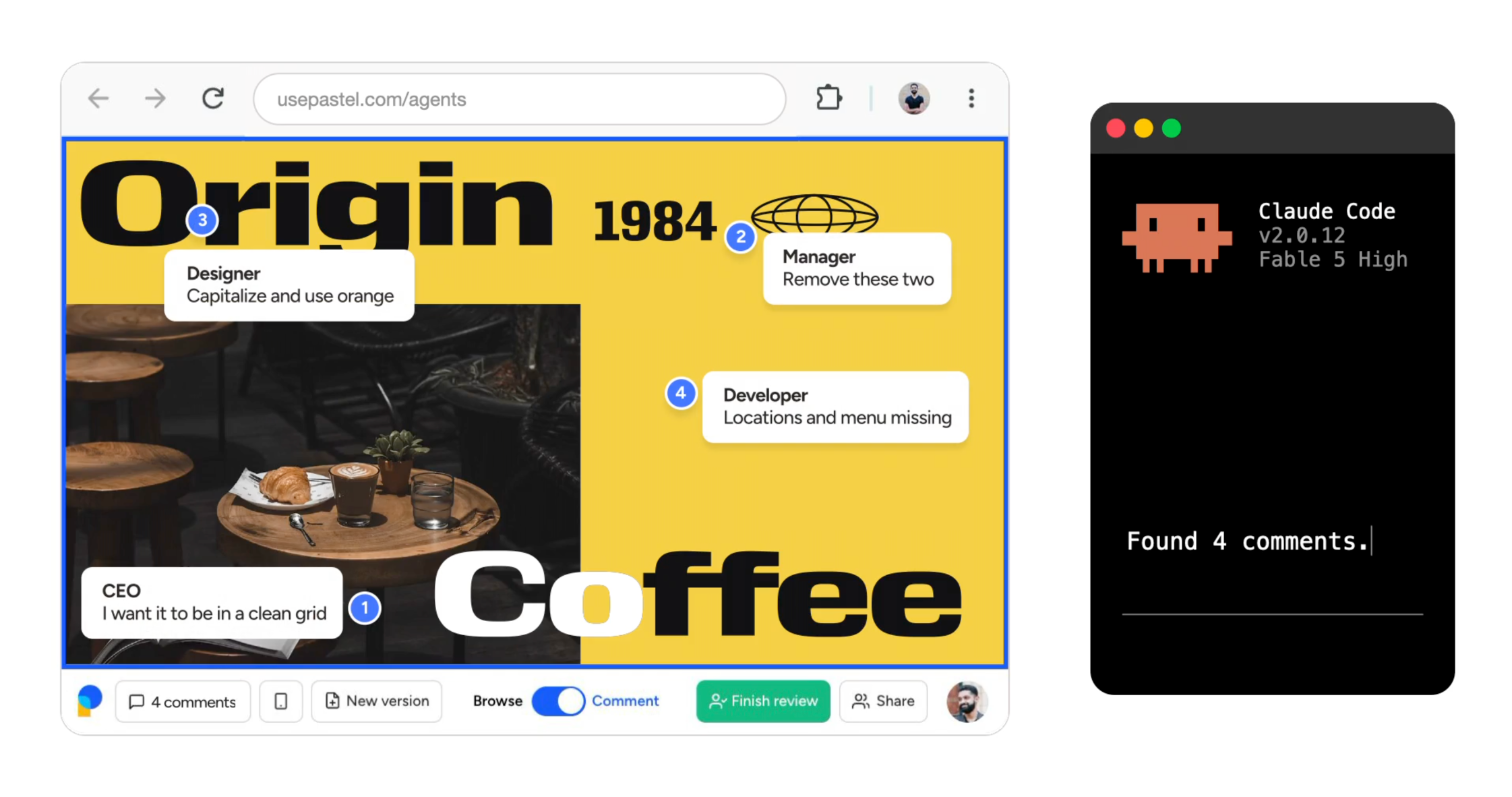
The server exposes 19 tools. The read tools list canvases and comments, fetch a comment in full with replies and metadata, list labels and mentionable users, and view image attachments and the screenshots captured with a comment. The write tools create and update canvases, share a canvas by email, reply to comments, edit the agent’s own replies, change a comment’s status or assignee, and upload canvas assets and reply attachments.
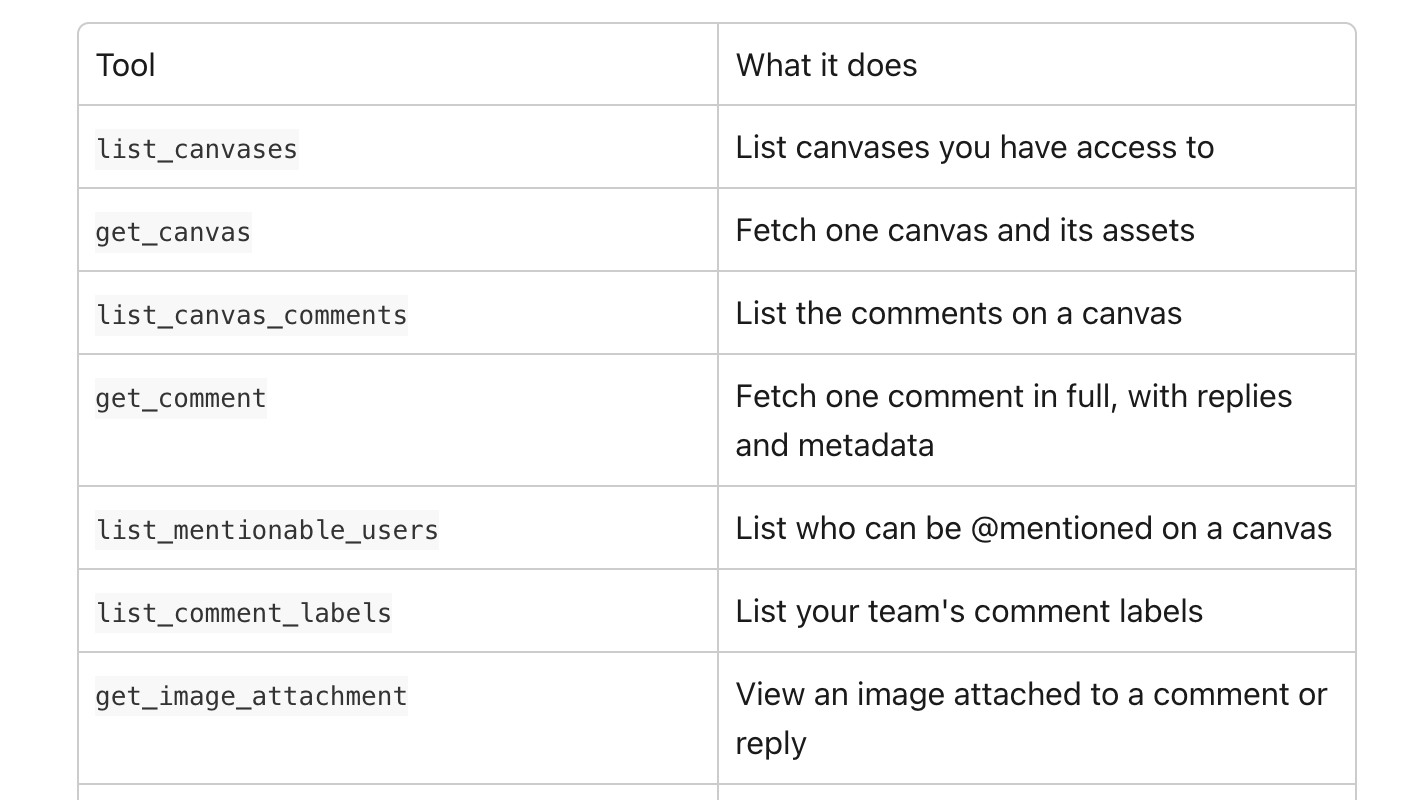
The most useful part for coding is what Pastel calls its built-in investigation guide. Whenever an agent views a comment, Pastel sends step-by-step instructions on how to find what the comment refers to. For website canvases, that means which page to open, which element the comment is pinned to and where the screenshot is. The guide then tells the agent to find the root cause in your codebase, fix it, reply explaining the change and resolve the comment. You do not have to write any of that into your prompt.
Connecting Claude or Cursor in a few minutes
Pastel’s help centre has a separate page for each agent. The short versions:
Claude.ai and the Claude desktop app
- Go to Customize, then Connectors, then Add and “Add custom connector”.
- Name it Pastel and enter the MCP server URL above.
- Click Add, then Connect, and complete the sign-in to approve access.
Claude Code in the terminal
Pastel documents two options with the same tools. For the MCP route, run claude mcp add --transport http pastel https://api.usepastel.com/mcp, then claude mcp login pastel and complete the browser sign-in. Alternatively, install Pastel’s CLI with npm install -g @usepastel/cli, run pastel skills install so the agent knows how to use it, then pastel login.
Cursor
Go to Customize, then MCPs, then New MCP server, paste the Pastel block into mcp.json, save, and click Authenticate. If you already have other servers configured, add the Pastel entry alongside them rather than replacing the file.
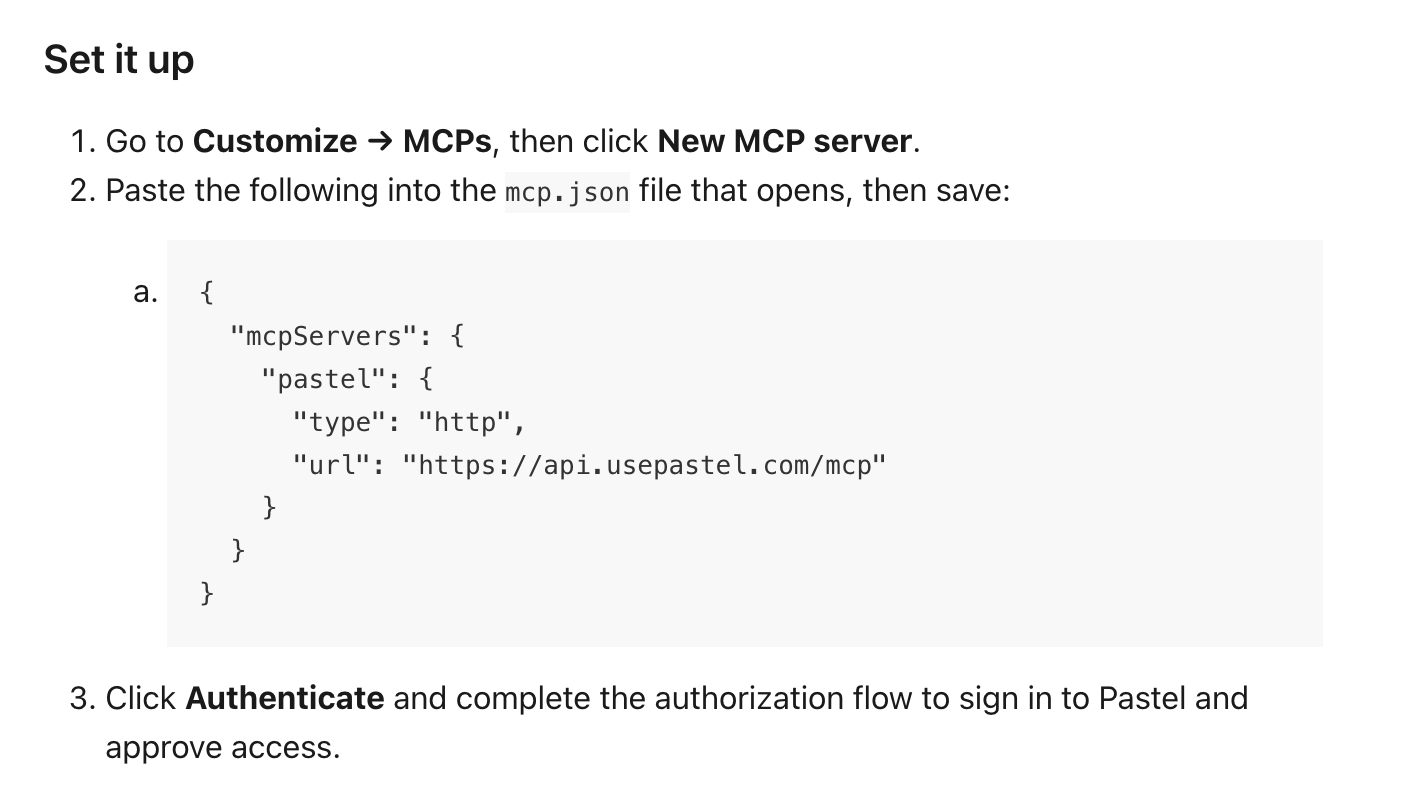
To check it worked, start a new chat and ask the agent to list your Pastel canvases. Pastel notes that agents usually only pick up new tools at the start of a conversation, so if it says it has no access, open a fresh chat before troubleshooting anything else.
A review round, run end to end
Here is how I would structure one feedback round on a client site with this setup. The agent works in your local copy of the project; you stay the person who decides what ships.
- Create the canvas on staging and invite the client. Do this yourself rather than asking the agent to share it. Pastel notes that its share tool sends real email invitations, and that agents are instructed to confirm the recipient list first. Doing it by hand removes the question.
- Set a feedback deadline. Deadlines and reminders are on every plan, including Free. A round with an end date is easier to batch.
- Pause comments when the round closes. Pausing commenting stops new feedback arriving while you work, so the agent is not chasing a moving list.
- Ask the agent for a triage summary first. For example: “Summarise the unresolved comments on the staging canvas, grouped by page.” Read it before any code changes.
- Hand over the mechanical fixes. Pastel’s own example prompt asks the agent to fix the comments that are clearly CSS issues and leave the rest with a reply explaining why. That is a good boundary.
- Review the diff, then deploy to staging. Nothing should reach the client’s site without you looking at the change.
- Reopen comments for the next round and let the client check the fixes on the live page.
Which comments to hand to the agent, and which to keep
Good candidates: spacing, colours, font sizes, broken links, typos, missing alt text, a button that wraps on mobile. These have a clear correct answer and are easy to verify in a diff.
Keep for yourself: anything about direction (“can this feel more premium?”), content the client has not supplied yet, scope questions (“can we add a booking page?”) and anything that touches pricing or legal copy. Those comments are really conversations, and a polite automated reply is the wrong answer to a conversation about scope. If you track scope in a client portal, as in this site’s guide to running client work through Assembly, move those requests there and reply on Pastel with a link.
Guardrails before you let an agent reply to clients
The agent acts as you. Pastel says it can see and change exactly the canvases and comments you can, and nothing more. In practice, that means a reply from the agent appears to your client as a reply from your account. A few rules keep that safe:
- Tell the agent how to sign its replies. Something like “Start each reply with ‘Fixed:’ and one sentence describing the change” keeps client-facing text short and consistent.
- Do not let it resolve comments it skipped. Ask it to reply and leave those open, so the client can see they were read.
- Remember what it cannot edit. Agents can edit their own replies, but not replies written by you or your client.
- Do not repoint a canvas casually. Pastel warns that changing a website canvas’s URL re-verifies the page and rewrites the URL on every existing comment.
- Disconnect when the project ends. Connected agents are listed in the MCP section of Pastel’s integration settings, and disconnecting takes effect immediately.
Where this workflow falls short
- It only pays off if the agent has your code. Pastel says so directly: the real advantage appears when the agent also has access to your codebase, as in Cursor, Claude Code or Codex. If you build in a hosted page builder with no local code, the MCP connection is mostly a way to summarise and organise comments.
- Uploading local builds is not here yet. Pastel’s agents page lists agent uploads of local pages and designs as coming soon, so for now the client reviews a deployed URL.
- Guests can be mentioned, not assigned. Only members of your team can have comments assigned. For a solo freelancer, that rarely matters.
- Uploads are capped at 110MB per file for canvas assets and reply attachments, and videos take roughly their own length to process.
None of these are reasons to avoid Pastel. They are reasons to keep your expectations specific: this is a faster path from a clear, pinned comment to a reviewed fix, not a way to hand the client relationship to software. When the fixes are approved and you are packaging final files, a delivery tool takes over; this site compared options in its WeTransfer plan picker for client deliveries.
FAQ
Do my clients need a Pastel account to leave feedback?
No. Pastel allows unlimited guest reviewers, and guests can leave comments and replies without an account. Only users on your plan can create canvases and export comments.
Is Pastel’s Free plan enough for a solo freelancer?
Often, yes. Free includes 1 user and 1 active canvas, and you can archive a canvas to start another, then unarchive it later. If you regularly have several client sites in review at the same time, Pro at $35/mo gives 2 users and 3 canvases.
Does Pastel copy my client’s website?
No. Pastel’s FAQ says it layers comments on the live website using its own proxy technology rather than making a copy, and it works with any framework, including WordPress.
Which AI agents work with Pastel?
Pastel’s MCP server works with Claude (Claude.ai, the desktop app and Claude Code), ChatGPT and Codex, Cursor, and any other agent that supports MCP. Pastel’s help centre has setup steps for each.
Can the agent change things without me asking?
Pastel says your agent only makes changes when you run it, and it acts with your permissions. You can disconnect it at any time from the MCP section of your integration settings.
Is there a free trial of the paid plans?
Yes. Pastel offers 14 days of free access to its paid plans, with no credit card required.
Verdict
Pastel was already a sensible way to get website feedback out of email and into one place, and its Free plan covers a freelancer who delivers one site at a time. The MCP server adds a meaningful shortcut for anyone who builds in code: a pinned comment arrives with the page, element and screenshot attached, and an agent can turn it into a fix and a reply in one pass. Keep yourself in charge of triage, scope and the final diff, and it shortens the slowest part of a project, the revision rounds, without taking the client conversation out of your hands.
Plans, limits and setup steps were checked on Pastel’s official pricing page, agents page and help centre in November 2026. Confirm the current details before you buy.