
Disclosure: some links in this guide are partner links. If you sign up through them, this site may earn a commission at no extra cost to you. It does not change what Tella charges you.
Most freelance projects end with a call. You share your screen, click through the finished website or dashboard or automation, explain where things live, and the client nods along. Two weeks later they email to ask how to change the footer, because nobody remembers a call. This guide is about replacing that final call with a recorded handoff built in the Tella screen recorder: one video per deliverable, split into chapters, with a button for the next step and a way to see whether the client actually watched it.
It is not a general Tella review. It is one workflow, the end-of-project handoff, checked against what Tella’s official pricing page and feature pages list today, including where the cheaper plan stops being enough.
Why a handoff video beats a handoff call
A call is good for questions and bad for reference. A handoff video is the opposite, which is why the two work best in sequence: send the video first, then hold a short call only for what the video did not answer.
- It stays useful after you leave. When the client’s new marketing hire needs to update the pricing page six months later, the answer is a link, not an email to you.
- It protects your scope. “Here is exactly what was delivered and how to use it” is a clear end point, and makes it easier to quote anything new as new work.
- It respects time zones. If you work across borders, nobody has to be awake at the same time to close a project.
Tella fits this job because it was built for recorded walkthroughs: screen plus camera, a transcript-based editor, and a hosted share page with chapters. If you already use Loom for day-to-day async updates, the comparison is fair; I looked at where Loom works for small teams in Loom Async Video for Small Teams. The difference for handoffs is mostly in editing and the share page, covered below.
Tella pricing for a solo freelancer
Tella has no permanent free plan on its pricing page. There is a 7-day free trial, then three plans. Prices are per user per month:
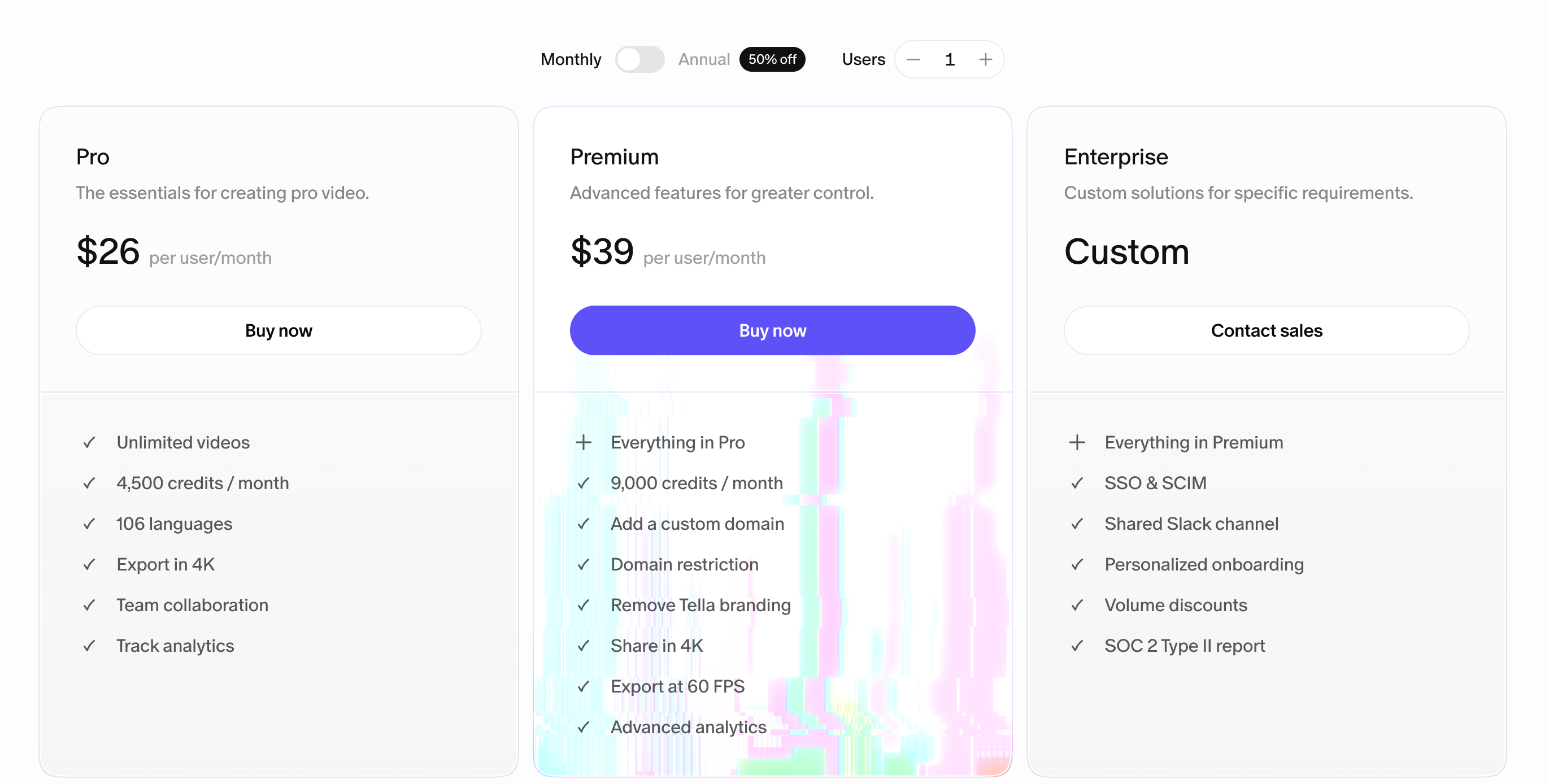
- Pro: $13 per month billed annually, or $26 billed monthly. Unlimited videos, 4,500 credits a month, 106 languages, 4K export, team collaboration and analytics.
- Premium: $19 per month billed annually, or $39 billed monthly. Everything in Pro plus 9,000 credits, a custom domain, domain restriction, Tella branding removed, sharing in 4K, 60 FPS export and advanced analytics.
- Enterprise: custom pricing, with SSO and SCIM, a shared Slack channel and the SOC 2 Type II report.
The annual toggle is labeled 50% off, and the numbers match. For a freelancer who hands off a project or two a month, the realistic choice is Pro on annual billing at $156 a year, unless the analytics detail in the next sections matters to you.
What credits are for
Credits confuse people, so it is worth being precise. According to Tella’s pricing FAQ, credits pay for two AI features only: the Tella Agent, an AI editor you instruct by chat inside the editor, and Auto Capture (in beta), where an AI agent records a web page for you. Recording, editing by hand and sharing do not use credits. Included credits reset each month and do not roll over. If you need more, one-time top-ups start at 25,000 credits for $25, and purchased credits never expire. The 7-day trial includes 4,500 credits for the Agent; Auto Capture needs a paid plan.
The handoff workflow, step by step
This is the routine I would set up for a typical small project, such as a WordPress site, a Notion workspace or a set of automations.
1. Plan the chapters before you record
Write five or six chapter titles that match the questions the client will ask later: “Logging in and finding your way”, “Editing a page”, “Adding a blog post”, “Forms and where submissions go”, “What to do if something breaks”, “What is not included”. Keep the last one. It is the chapter that prevents scope arguments.
2. Record with screen and camera
Tella records screen, webcam, microphone and system audio, from native macOS and Windows apps or a Chrome extension. It also has a teleprompter if you prefer to read a script. Seeing your face for a few seconds at the start makes the video feel like a personal handover rather than documentation.
One practical rule: never show passwords or recovery codes on screen. Say where credentials are stored and send them through your usual secure channel. A handoff video tends to get forwarded inside the client’s company.
3. Edit by transcript, not by timeline
This is where Tella saves the most time. The editor lets you edit the video by editing its transcript, and includes an AI mistakes finder, silence removal and filler-word removal, each a one-click action.
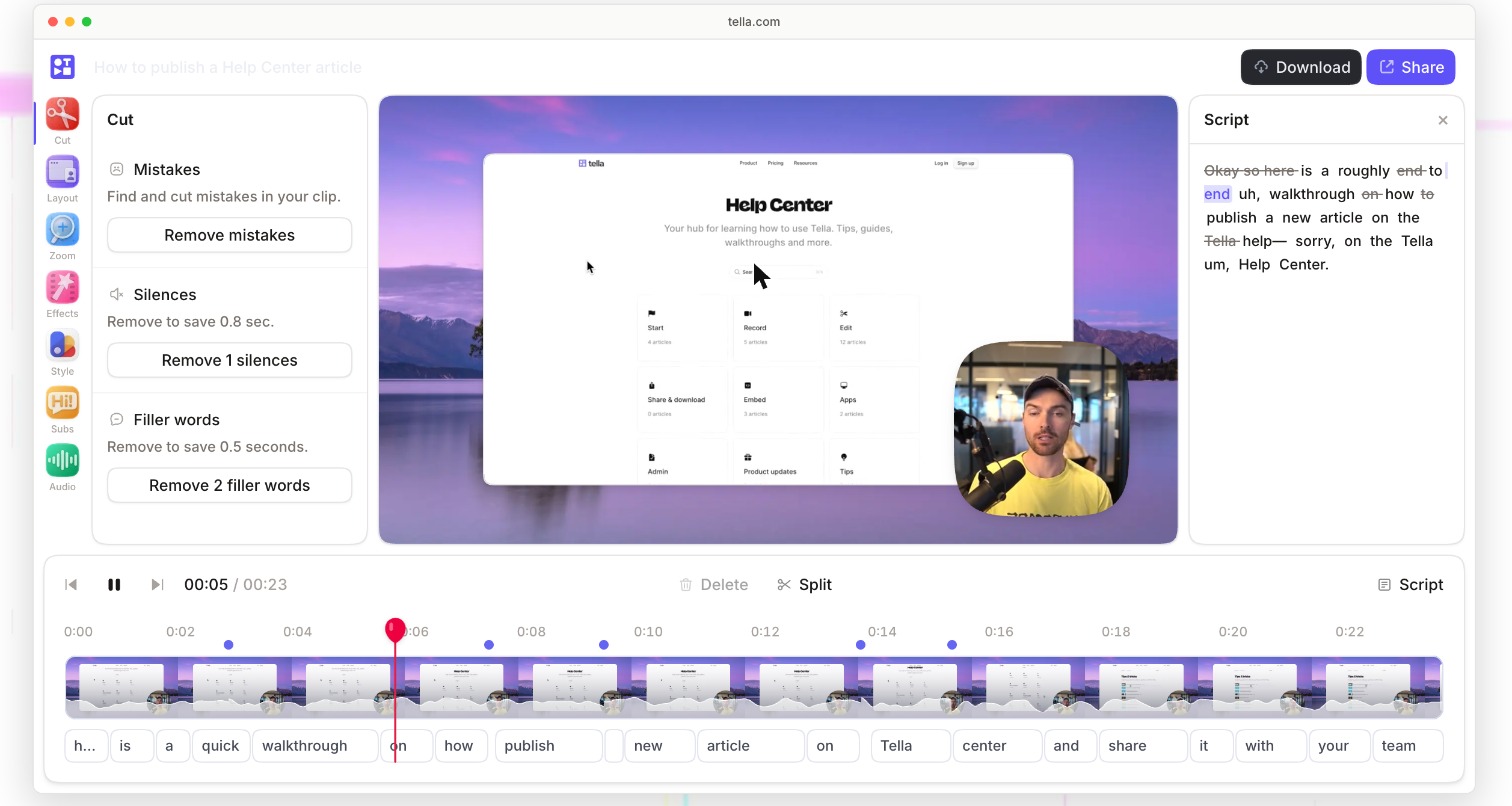
For a 15-minute walkthrough, cutting the “um, so, where was that setting” moments is the difference between a video the client finishes and one they abandon at minute four. Layouts, zooms and subtitles are also available if you want them; for a handoff, I would add subtitles and leave the rest simple.
4. Or ask the Agent to do the first pass
If you have credits, the Tella Agent can do that cleanup from a single instruction, such as cutting mistakes, filler words and long pauses and adding zooms when you click through a dashboard. Tella says the agent asks for details when an edit is ambiguous rather than guessing.
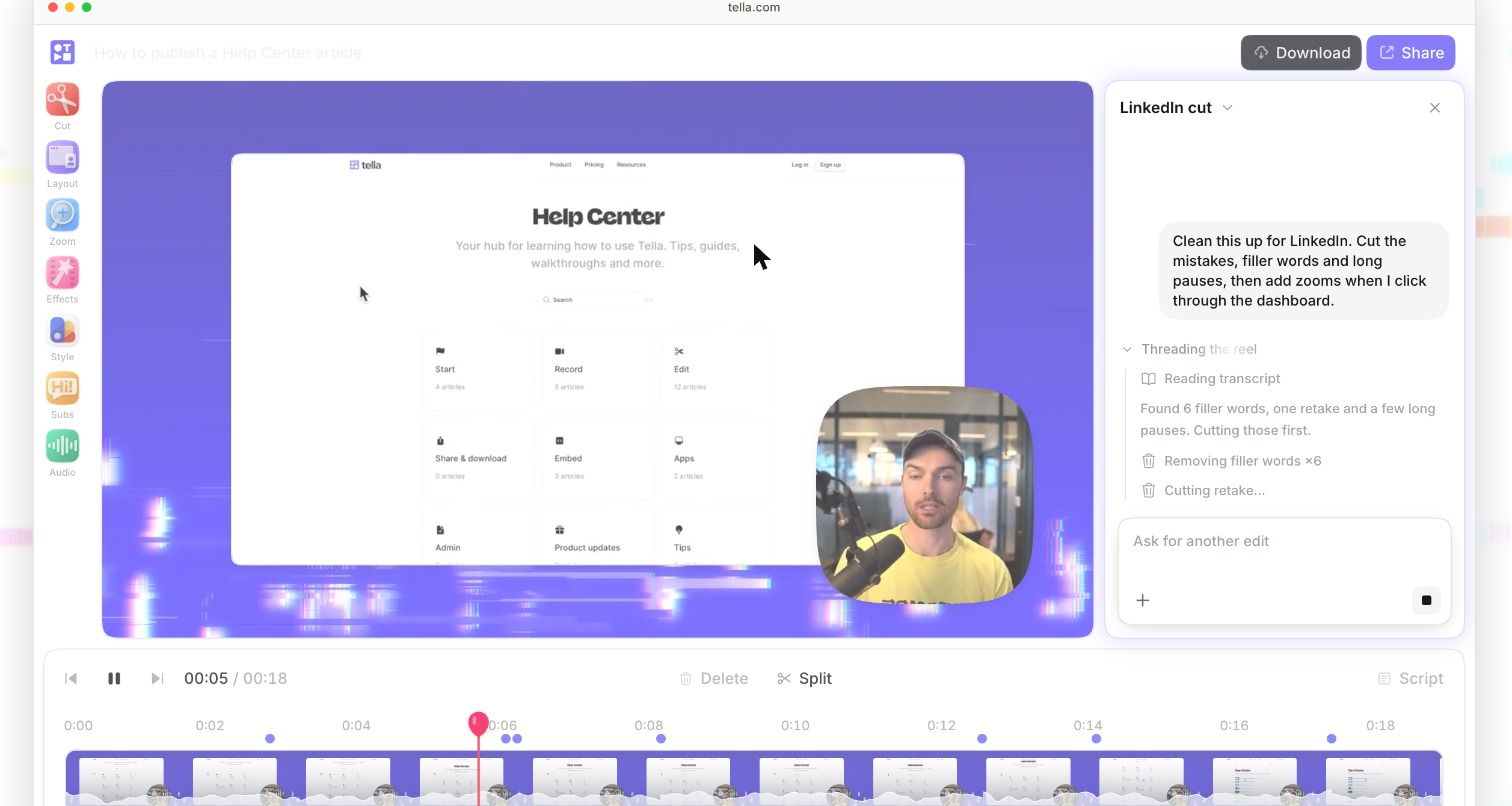
Treat the agent’s output as a draft. Watch the result once at 1.5× speed before sending, especially around any chapter where you explain something the client must not misunderstand.
5. Share one link with chapters and a next step
The share page is where Tella earns its place in a handoff. The hosted video is ready the moment editing ends, with chapters and call-to-action buttons. Titles, descriptions and chapters can be AI-generated and edited by hand, and viewers can leave comments and reactions and change playback speed.
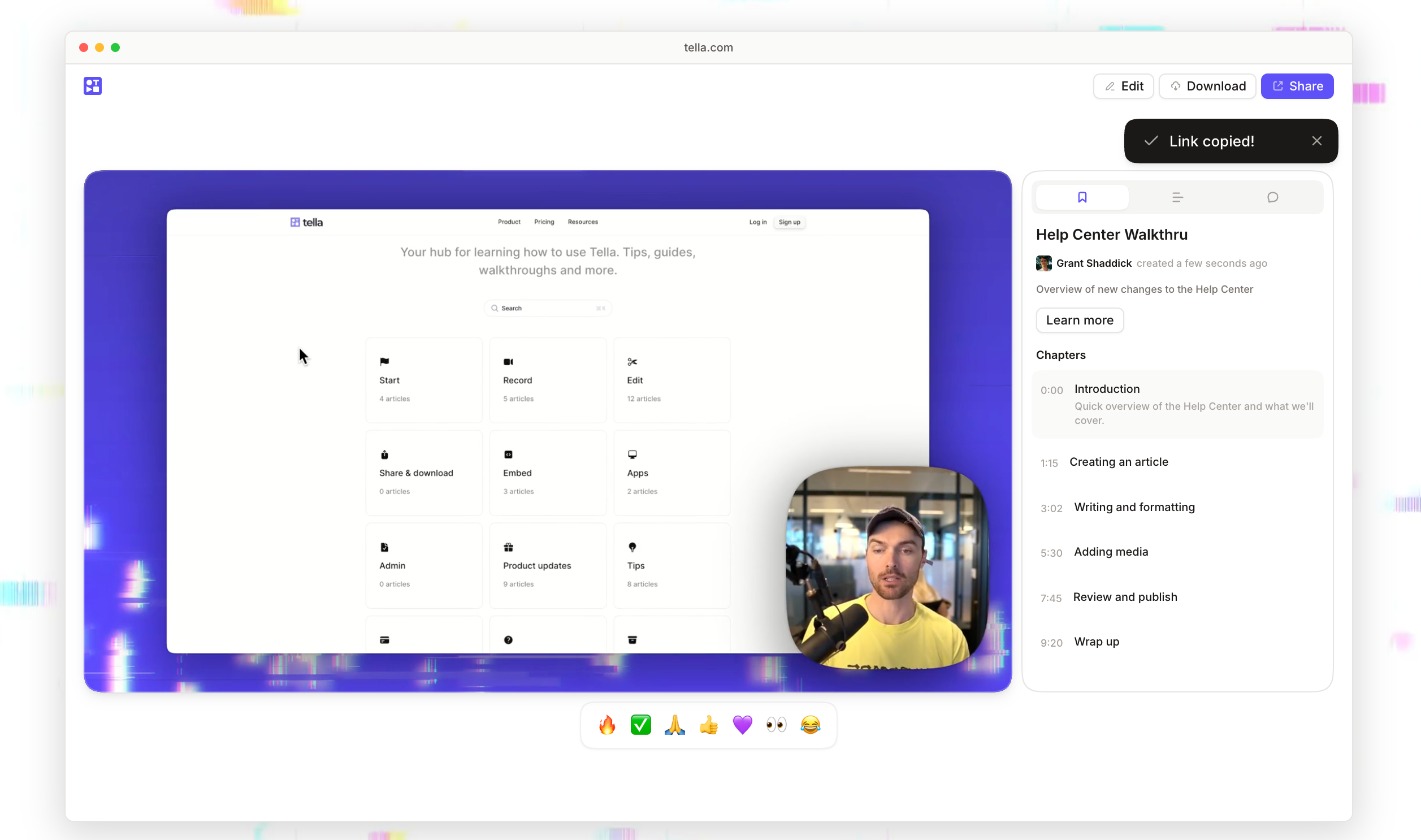
Use the call-to-action button for the one thing you want after a handoff. For most freelancers that is either booking a maintenance retainer or leaving a testimonial. Pick one; two buttons dilute both. Tella’s pricing table lists unlimited video expiry on every plan, so the link does not time out by itself.
Did the client actually watch it? Pro vs Premium analytics
A handoff video only helps if it is watched, and this is where the two paid plans differ in a way that matters for client work.
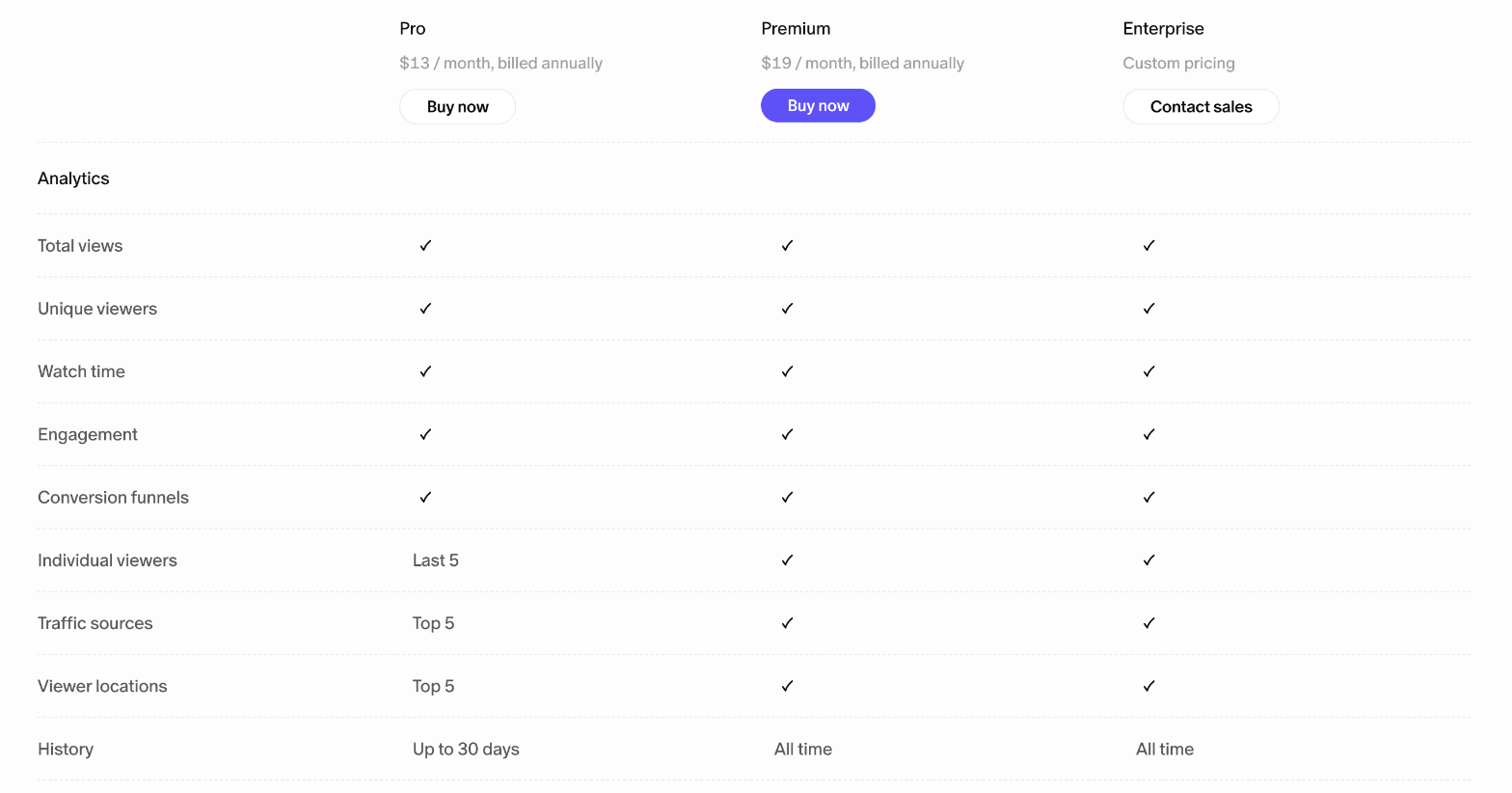
Both plans show total views, unique viewers, watch time, engagement and conversion funnels. The differences:
- Individual viewers: Pro shows the last 5; Premium shows all of them.
- Traffic sources and viewer locations: top 5 on Pro; complete on Premium.
- History: up to 30 days on Pro; all time on Premium.
For a single client contact, Pro is enough: you send the link, check within a week whether it was watched and how far, and follow up on the chapters they skipped. The 30-day window becomes a problem only if you want to prove, months later, that a client saw a specific instruction. If you work with larger clients where several people should watch the handoff, Premium’s full viewer list is the practical reason to upgrade, more than the custom domain.
Give the client a copy they own
A hosted link is convenient, but the client’s records should not depend on your subscription. Tella’s plans include video export (up to 4K, and 60 FPS on Premium), audio export, subtitle export and raw recordings export. I would export the final MP4 and the subtitle file and put both in the client’s delivery folder alongside the project files. If you send large files through a transfer service, I compared plans for that job in the WeTransfer plan picker for client deliveries.
Tella also lists AI document generation, which creates docs from your videos. For a handoff, a written version of the walkthrough is a useful second format for clients who prefer to skim. Check it against the video, though: any step you corrected verbally should be correct in the doc too.
Branding: when Premium is worth it
Premium removes Tella branding and adds a custom domain and domain restriction. For most solo freelancers, the client cares about the content, not the URL. Premium starts to make sense if you sell handoff videos as part of a productized package and want the share page to look like part of your own brand, or if a client asks that only people with their company email can view a video, which is what domain restriction is for.
If neither applies, keep the $6 a month (annual) or $13 a month (monthly) difference and stay on Pro.
Where Tella is not the right tool
- You need a free plan. Tella offers a 7-day trial, not a free tier. If you record one handoff a quarter, paying monthly only in the months you need it may be the cheaper route; Tella says you can cancel at any time and the subscription stops at the end of the billing period.
- Your clients need a password-protected portal. A video link is not a client portal. If you want files, invoices and messages in one login, a portal tool is the better home for the handoff video; I covered one option in Assembly for freelancers.
- You only ever do live calls. If clients insist on a live handover, record the call with your meeting tool instead and skip the second subscription.
Verdict
For freelancers who end projects with a walkthrough, the Tella screen recorder turns a forgettable call into a reference the client will use: transcript editing removes the rambling, chapters make it navigable, a single call-to-action button asks for the retainer or testimonial, and analytics tell you whether it was watched. Pro at $13 a month on annual billing covers a solo freelancer; Premium is worth it mainly for full viewer lists and all-time history on larger client accounts, or if branded share pages are part of what you sell.
FAQ
How much does Tella cost?
Tella’s pricing page lists Pro at $13 per user per month billed annually ($26 monthly) and Premium at $19 per user per month billed annually ($39 monthly). Enterprise pricing is custom.
Does Tella have a free plan?
No permanent free plan is listed. Tella offers a 7-day free trial, which includes 4,500 credits for the Tella Agent.
What are Tella credits used for?
Credits pay for the Tella Agent (AI editing by chat) and Auto Capture (beta). Recording and manual editing do not use credits. Pro includes 4,500 credits per user per month and Premium 9,000.
Can I see who watched my Tella video?
Yes. Pro shows the last 5 individual viewers with up to 30 days of history. Premium shows all individual viewers with all-time history.
Do Tella videos expire?
Tella’s plan comparison lists unlimited video expiry on Pro, Premium and Enterprise.
Can I download my Tella videos?
Yes. Plans include video export up to 4K, plus audio, subtitle and raw recording exports. 60 FPS export is a Premium feature.