
Disclosure: some links in this guide are partner links. If you sign up through them, this site may earn a commission at no extra cost to you. It does not change what Webflow charges you.
If you build client websites on Webflow and host them in your own Freelancer or Agency Workspace, the new Webflow site plan pricing reaches you later than everyone else. Webflow’s help center lists November 16, 2026 as the date when the updated Site plans start applying to existing sites in Freelancer and Agency Workspaces. For most freelancers, that means the hosting line on a client invoice may no longer match what Webflow bills at the next renewal.
This guide is not a general Webflow review. It is a short, practical walk through one job: working out what each client site will cost after the change, deciding whether to lock in the old price, and choosing who should pay Webflow from now on. Every number below comes from Webflow’s pricing page and its help center article on the May 2026 plan update.
What changed, and when it reaches you
Webflow announced the update in May. It merged the old CMS and Business Site plans into a single plan called Premium, adjusted prices and limits across the paid Site plans, added a Team plan for larger organizations, and added AI credits to all Workspace plans. The rollout happens in three stages:
- May 13, 2026: new Site plan purchases use the new plans and prices.
- June 29, 2026: the changes reach existing sites, except sites in Freelancer or Agency Workspaces and sites on legacy pricing from 2022 or earlier.
- November 16, 2026: the changes reach existing sites in Freelancer or Agency Workspaces and sites on legacy discounts from 2022 or earlier. Webflow says customers in this group were notified about the timeline.
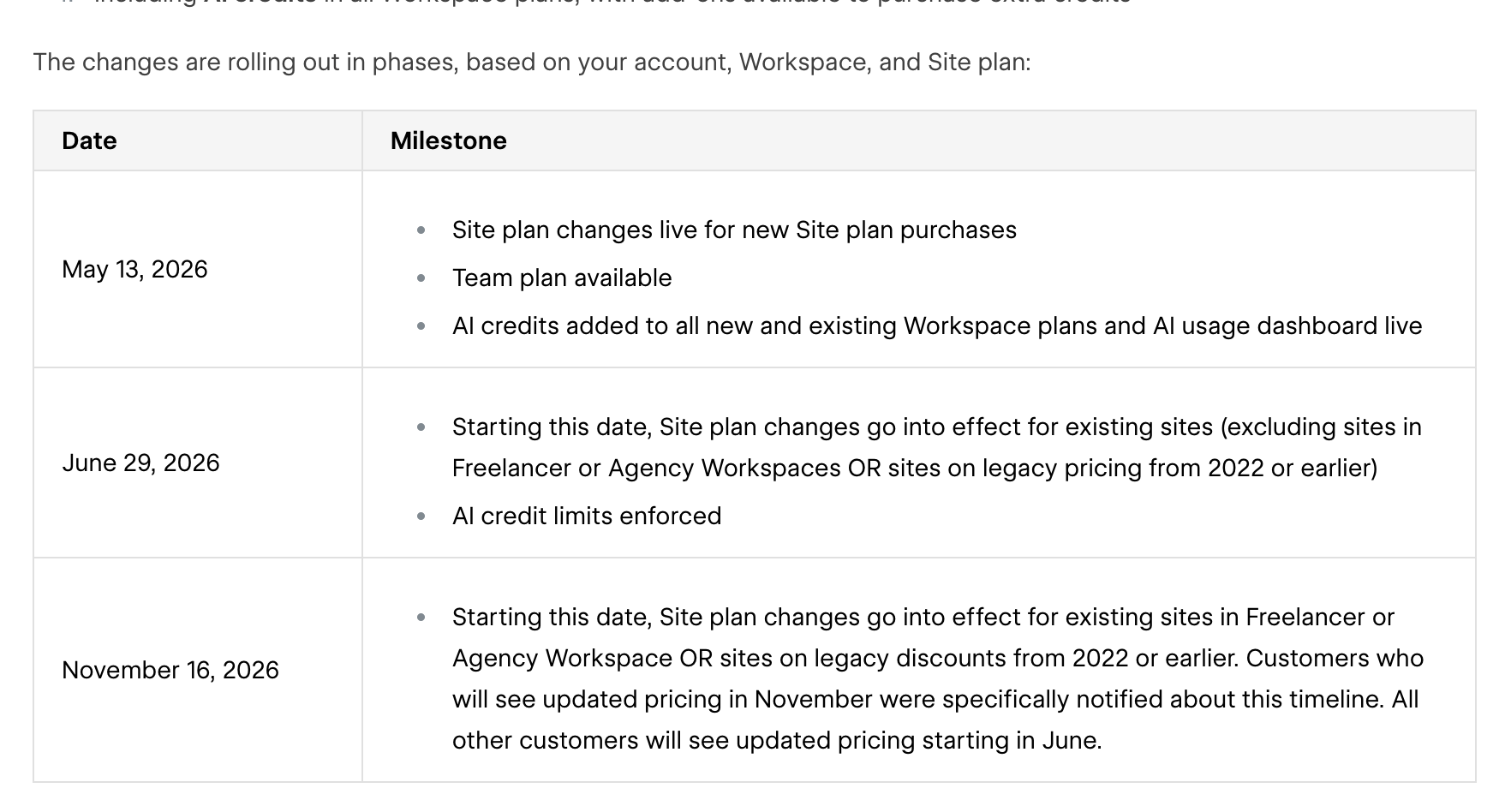
One detail matters more than the date. Webflow says existing sites do not change before the date that applies to them, and on or after that date the new price applies at the next renewal or when you make a billable change. A billable change means upgrading or downgrading the base Site plan, or switching between monthly and yearly billing. So a client site on yearly billing that renewed in September keeps its current price until next September, unless you touch the plan.
The new Site plans in one view
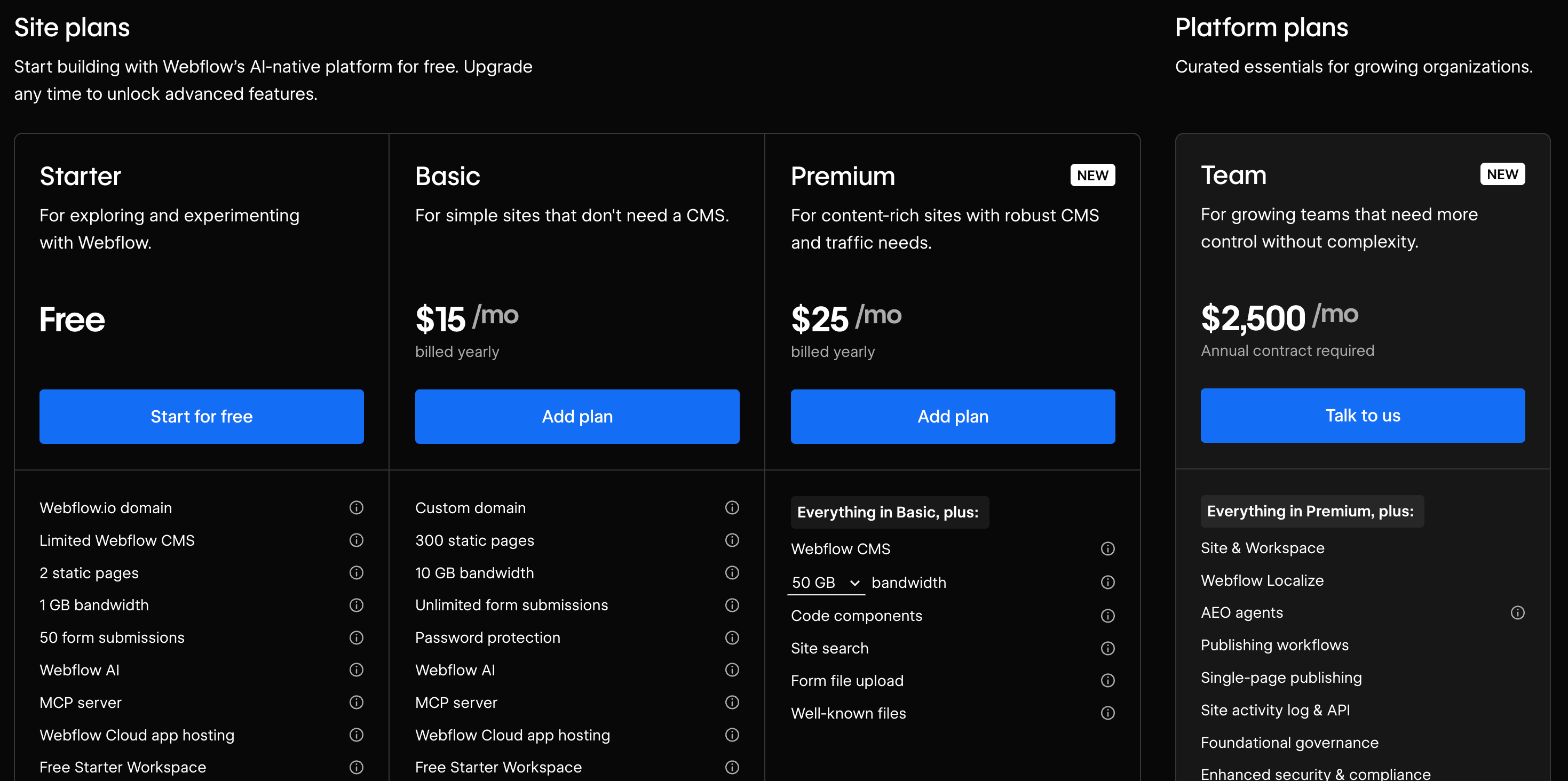
Webflow’s pricing page now shows three self-serve Site plans plus the Team plan:
- Starter: free, on a webflow.io domain, with 2 static pages, 1 GB bandwidth and 50 form submissions.
- Basic: $15 a month billed yearly, for simple sites without a CMS. Custom domain, 300 static pages, 10 GB bandwidth, unlimited form submissions and password protection.
- Premium: $25 a month billed yearly, for content-rich sites. Everything in Basic plus the Webflow CMS, 50 GB bandwidth with larger tiers available, code components, site search, form file upload and well-known files.
- Team: listed at $2,500 a month with an annual contract, aimed at organizations, not typical freelance clients.
Webflow notes that all prices are in USD, per site, plus applicable taxes.
Step 1: Sort your client sites into three groups
Open your Workspace and list every hosted client site with its current plan, billing cycle and renewal date. Then sort them by what the help center says will happen to each old plan.
Group A: Basic sites
Basic rises to $15 a month on yearly billing or $25 a month on monthly billing. The static page limit doubles from 150 to 300. For a five-page brochure site, the page limit change will not matter, so this is a straight price increase to pass on or absorb.
Group B: CMS sites
CMS sites are moved to Premium at renewal. The price becomes $25 a month yearly or $39 a month monthly. In return the limits go up a lot: CMS items from 2,000 to 20,000, CMS Collections from 20 to 40, and static pages from 150 to 300. Webflow Cloud limits also rise, and file form upload, well-known files and faster search indexing are included. For a client with a blog or a portfolio collection, this is more room than they are likely to use, but the bill goes up.
Group C: Business sites
Business sites also move to Premium, and here the base price goes down, to $25 a month yearly or $39 a month monthly. The catch is bandwidth. Business included 100 GB; Premium includes 50 GB. Webflow says that if a site used more than 50 GB in the past two billing months, bandwidth add-ons are added to the Site plan to cover the usage. CMS item limits rise from 10,000 to 20,000, and any CMS items add-on is removed because the new limit covers it.
Step 2: Check bandwidth on every Business site
Group C is where quotes go wrong, because a lower plan price can still produce a higher bill. Webflow’s own help article shows three worked examples. The one that matters most for freelancers is this:
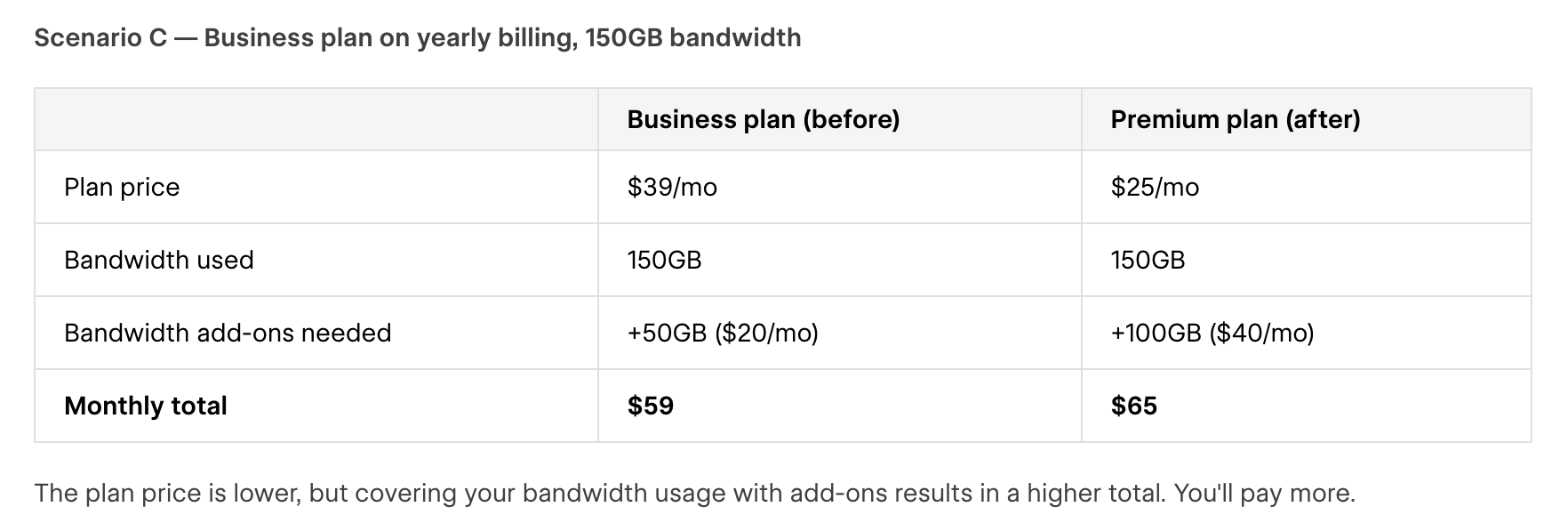
Webflow’s other two examples show the range. A Business site on monthly billing under 50 GB drops from $49 to $39 a month. A yearly Business site using 500 GB ends up at the same $199 a month total either way. So for each Business site, look at bandwidth used over the last two billing months in the site’s usage panel, then run it through the pricing change calculator Webflow links from its help article. Do not quote from memory.
Step 3: Decide whether to lock in the current price
The help center includes a line freelancers should read twice: if you switch from monthly to yearly billing before the Site plan changes go into effect for your account, you can lock in your current plan for one more year.
For a client site on monthly billing in Group A or B, that can be worth doing before November 16. It does two things. It keeps the old plan price for another year, and it gives you twelve months to talk to the client about the new cost instead of surprising them on the next invoice. Two cautions:
- Get the client’s agreement first. Yearly billing is a larger single charge. If the client pays through client payments (more on that below), they will see it on their card.
- Do not use it for sites that are about to be retired or rebuilt. A year of prepaid hosting on a site that moves in three months is money the client will ask about.
For Business sites in Group C that will be cheaper on Premium, locking in the old plan works against the client. Let those move.
Step 4: Re-quote hosting in plain language
Most freelance clients do not know what a Site plan or a Workspace is. They know a hosting line on an invoice. When the number changes, explain it in three sentences: what changed, what it costs now, and what they get for it. For example:
Webflow has updated its hosting plans. From your next renewal, your site moves to the Premium plan at $25 a month on yearly billing. The new plan raises your blog limit from 2,000 to 20,000 posts and adds file uploads to forms.
If you bundle hosting into a monthly retainer, this is also a good moment to separate it. A retainer that hides Webflow’s price inside your fee means every future price change comes out of your margin.
Step 5: Move billing to the client with client payments
Webflow’s client payments feature, available on Freelancer and Agency Workspace plans, lets a client add their own card to pay for their site’s costs, including new Site plans, bandwidth overages and add-ons such as Analyze, Optimize and Localization. You keep managing the site’s design and hosting in your Workspace, and the client can only cancel or upgrade their Site plan. If you are in Webflow’s Certified Partner program, Webflow says your partner code is applied automatically to new Site plans using client payments.
There is one step to plan around. For existing paid plans, Webflow’s instructions say to downgrade the site to the Starter plan temporarily, then enable client payments from the Plans page. Webflow advises coordinating the timing with the client to minimize downtime. Because a downgrade is a billable change, check how it interacts with the pricing timeline for that site before you do it, and pick a quiet hour.
Step 6: Or hand the site over completely
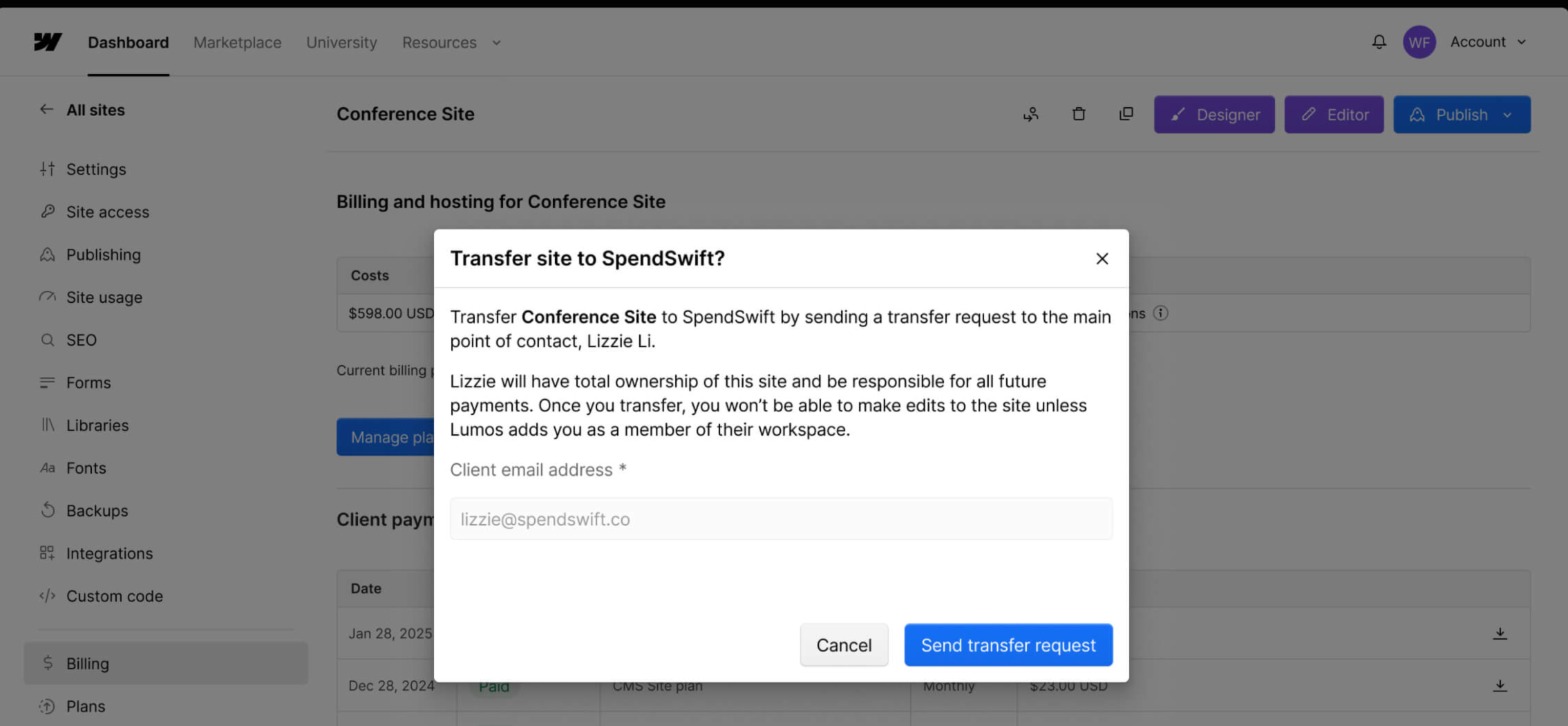
Some clients would rather own everything. Webflow supports transferring a site with an active plan from your Freelancer or Agency Workspace to the client’s Workspace. Once client payments is set up for the site, you go to Site settings, then Billing, then Transfer site, and send the request to the client’s email.
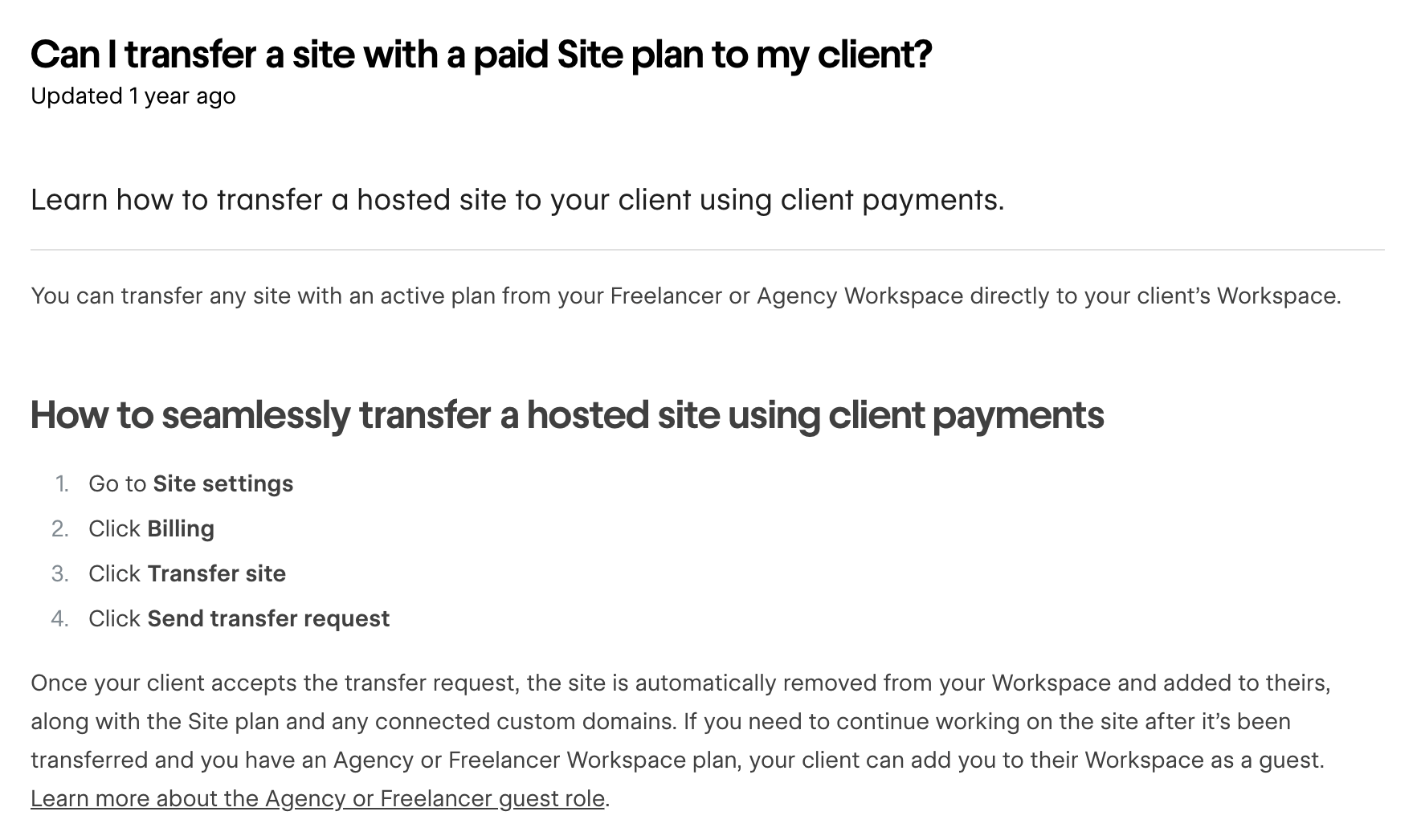
When the client accepts, Webflow removes the site from your Workspace and adds it to theirs, along with the Site plan and any connected custom domains. The client is prompted to reauthorize Webflow apps so integrations keep working. If you still need to work on the site and you have a Freelancer or Agency Workspace plan, the client can add you to their Workspace as a guest.
Transfer or keep it? A quick rule
- Keep the site in your Workspace with client payments if you are on a care plan and make changes every month.
- Transfer it if the project is finished, the client has an in-house person, or you no longer want to answer for hosting costs.
Either way, write down who owns the domain registration. A Webflow transfer moves connected custom domains in Webflow, but the registrar account is a separate thing.
What I’d send clients this week
- A one-line note that Webflow is changing its hosting plans and that you are checking their site.
- For monthly-billed Basic and CMS sites: an offer to switch to yearly billing before November 16 to keep the current price for another year.
- For Business sites: the result of the bandwidth check and the new monthly figure from Webflow’s calculator.
- For every client: a choice between paying Webflow directly through client payments or taking full ownership through a transfer.
If you are rethinking how you deliver sites more broadly, two related guides may help: whether a Gamma portfolio website can replace your freelance site, and how to turn client website feedback into code changes with Pastel.
FAQ
When does the new Webflow site plan pricing apply to freelancer client sites?
Webflow’s help center lists November 16, 2026 for existing sites in Freelancer or Agency Workspaces. The new price applies at the site’s next renewal on or after that date, or when you make a billable change.
How much do Webflow Basic and Premium cost now?
Basic is $15 a month on yearly billing or $25 on monthly billing. Premium is $25 a month on yearly billing or $39 on monthly billing. Prices are in USD per site, plus taxes.
What happens to CMS and Business sites?
Both are moved to the Premium plan at renewal. CMS sites pay more but get higher limits. Business sites get a lower base price, but Premium includes 50 GB of bandwidth instead of 100 GB, so heavy-traffic sites may pay more once bandwidth add-ons are included.
Can I keep the old price?
Webflow says switching from monthly to yearly billing before the changes take effect for your account locks in your current plan for one more year.
Can my client pay Webflow directly?
Yes. With client payments on a Freelancer or Agency Workspace plan, the client adds their card and pays for Site plans and add-ons while you keep managing the site.
Do Ecommerce plans change?
Webflow says nothing is changing for Ecommerce Site plans at this time.