Disclosure: some links on this page may be affiliate links. If you sign up through them I may earn a commission at no extra cost to you.
There is a moment that catches out a lot of freelancers. You join a client’s kickoff call, your note-taking app sends its bot to the waiting room, and the client’s project manager says: “Sorry, we can’t let third-party recorders into our meetings.” Sometimes they say it politely. Sometimes the bot is simply never admitted, and you spend the first two minutes of the call explaining what it is.
Legal, finance, healthcare and enterprise clients increasingly have a written policy about this. The bot is a visible participant, it shows up in the attendee list, and someone has to approve it. For an outside contractor, that is a bad first impression and an awkward conversation to have before you have even started the work.
Krisp takes a different route. It sits between your microphone and whatever meeting app you are using, so it captures and transcribes from your own device rather than joining the call as a guest. Nothing appears in the participant list. It started life as a noise-cancellation tool and has grown into a voice AI product that also writes meeting notes and smooths accents in real time.
This article looks at Krisp from one angle: as a freelancer’s note-taking setup for client calls where a recorder bot is unwelcome. What it does, what it costs, what it stores, and the consent question you still have to handle yourself.
How Krisp captures a call without joining it
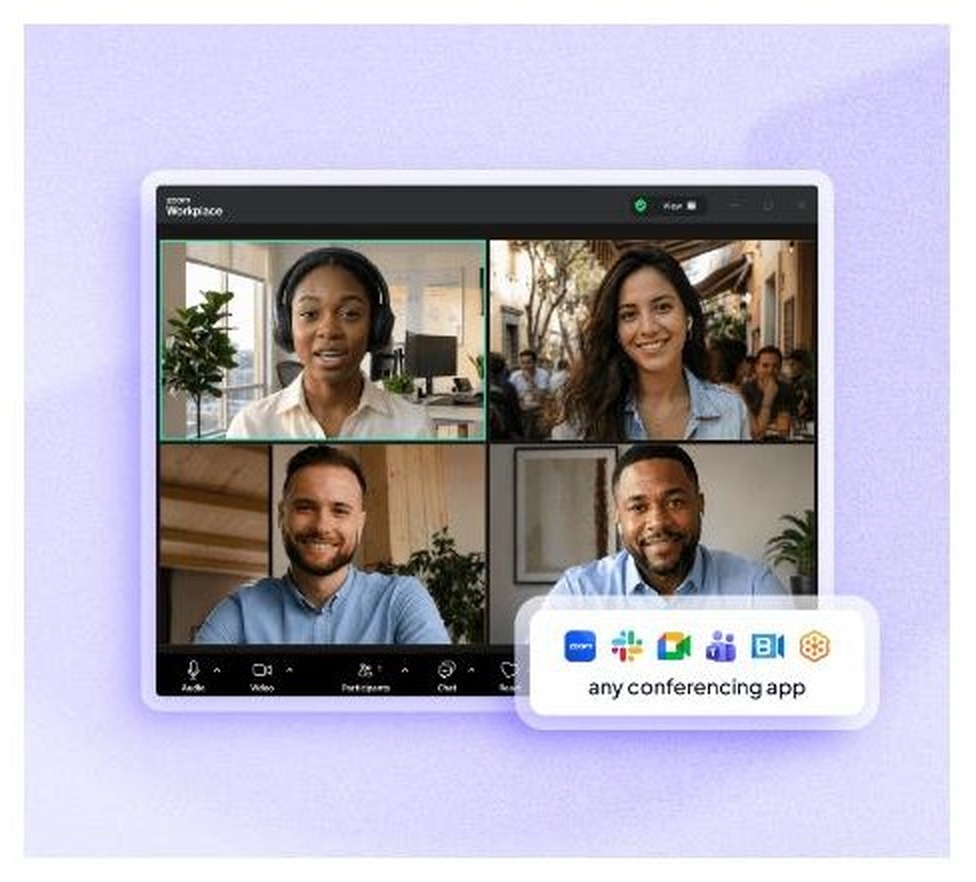
Krisp installs as a virtual microphone and speaker on your computer. Your meeting app sees “Krisp Microphone” instead of your headset, and Krisp processes the audio in between. Because it works at the audio-device level rather than through a meeting platform’s API, Krisp says it works with any conferencing app — its pages name Zoom, Google Meet, Microsoft Teams, Slack huddles and Webex, and the same approach covers whatever your client happens to use.
That design has a second consequence worth noting: it also captures in-person conversations. If you meet a client in their office with a laptop open, the same note-taker works. Krisp also lists an optional bot mode for Zoom if you ever want the visible-participant behaviour instead, but the default is bot-free.
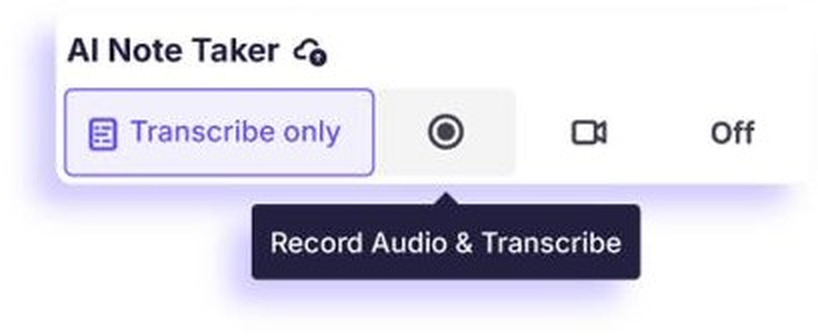
The AI Note Taker has four settings: transcribe only, record audio and transcribe, screen recording, or off. Starting with “transcribe only” is the least intrusive option and, in my view, the right default for client work — you get a searchable record of what was agreed without holding an audio file of someone’s voice.
What you get out of a call
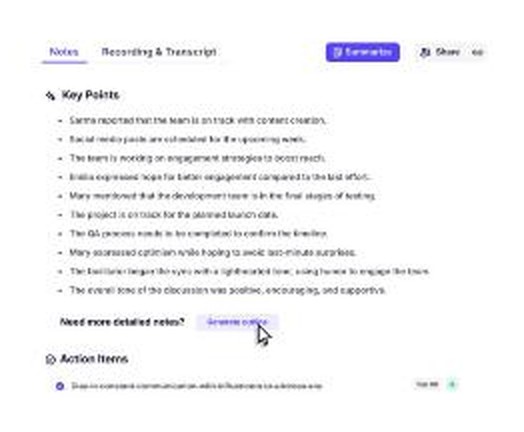
After the call, Krisp produces a transcript, a summary with key points, and a list of action items. There is also an AI chat you can ask questions of, which is useful when a client said something specific about scope forty minutes in and you cannot remember the wording.
Transcripts and summaries are available in 16 languages, which the pricing page lists as English, French, German, Italian, Dutch, Polish, Portuguese, Russian, Spanish, Hindi, Danish, Swedish, Norwegian, Czech, Ukrainian and Korean. One detail matters for privacy-sensitive work: Krisp says English is transcribed on your device, while the other languages are transcribed on Krisp’s servers. If you work in English with clients who care about where audio goes, that distinction is worth mentioning when they ask.
There is also a custom vocabulary feature that holds up to 750 terms. Load it with your clients’ product names, your industry jargon and the surnames you keep seeing mangled, and the transcripts get noticeably more useful.
The original feature: noise cancellation
Krisp’s first product removes background noise from your side of the call — and, on the listener side, from theirs. For freelancers this is not a luxury feature. If you work from home, a café or a coworking desk, the difference between sounding like a professional and sounding like someone in a train station is a real commercial factor on a discovery call.
Here is the official demo of that side of the product:
One limitation to plan around: Krisp’s homepage FAQ says the mobile app does not have noise cancellation yet. If you take client calls from your phone while walking, this is a desktop tool.
The third pillar is accent conversion, which adjusts how accents sound in real time. Krisp lists speaker-side support for Indian, Filipino, South African and Latin American accents. Whether you want it is a personal decision, and it is not one I would push on anyone. Mentioning it because it is a headline feature of the paid plans and affects which tier you need.
What Krisp costs
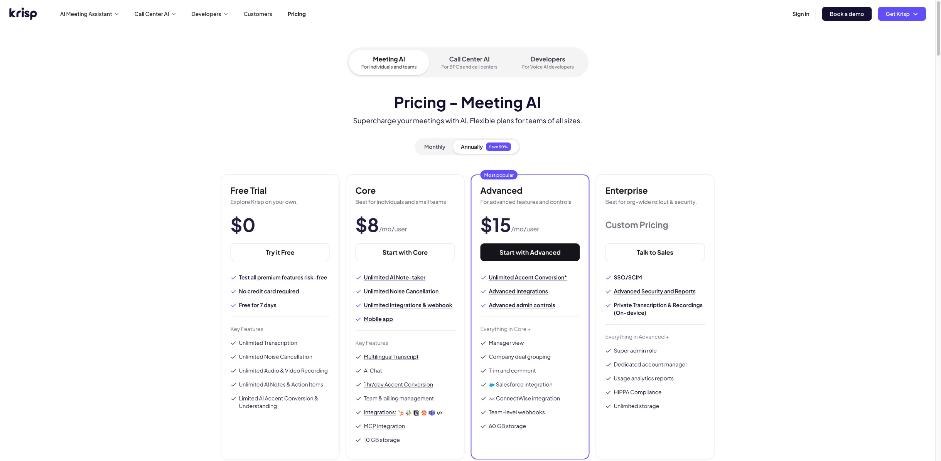
Free trial: $0 for 7 days, no credit card required. Transcription, noise cancellation, audio and video recording and AI notes are unlimited during the trial; accent conversion is limited.
Core — $16/month, or $8/month billed annually, per user. This is the freelancer tier. It covers unlimited bot-free AI note-taking, unlimited transcription, unlimited audio and video recording, in-person meeting notes, unlimited noise cancellation, multilingual transcripts, AI chat, the mobile app, an outbound phone call recorder, 10 GB of storage and 24/7 support. Integrations named on the page include HubSpot, Slack, Notion, Zapier and Microsoft Teams, plus an API. Accent conversion is capped at 1 hour a day.
Advanced — $30/month, or $15/month billed annually, per user. Adds unlimited listener-side accent conversion and 4 hours a day on the speaker side, Salesforce and ConnectWise integrations, admin controls, a manager view, team webhooks, 60 GB of storage and priority support. This tier is built for teams, not solo contractors.
Enterprise — custom. SSO and SCIM, SOC 2 report access, HIPAA compliance, a choice of data centre, on-device private transcription and recordings, and unlimited storage.
Two notes on the free question. The pricing page shows only a 7-day trial — there is no permanent free tier listed. Krisp’s help center still has an article describing a Free plan with 60 minutes a day of noise cancellation and two meeting notes a day, but that article is undated and contradicts the current pricing page. Assume the trial is what you get, and treat any free tier you find as a bonus.
The other note: the pricing page’s own comparison table marks AI summaries and action items as “Unlimited” on Core but “Custom” on Advanced, which contradicts the plan cards above it, and its FAQ mentions “Business” and “Pro” plans that are not listed anywhere. If a specific limit matters to your decision, ask support and get it in writing before you pay.
Will it run on your machine?
Krisp’s system requirements are stricter than most freelance software, so check before you buy:
- macOS 14 Sonoma or newer, on an Intel Core i5 or Apple silicon.
- Windows 10 64-bit (1903 or later) or Windows 11, on an Intel i5 or Ryzen 5, with .NET 4.6.2.
- 8 GB of RAM recommended on both.
- There is no Linux or ChromeOS desktop app.
- There are iOS and Android apps and a Chrome extension, but, again, mobile does not do noise cancellation yet.
If you are on an older Mac that cannot run Sonoma, this is a hard stop rather than a degraded experience.
The part you still have to handle: consent
Bot-free capture solves an etiquette problem. It does not solve the legal one. Recording or transcribing a conversation without telling the other participants is, depending on where you and they are sitting, somewhere between rude and illegal.
Krisp gives you a setting under Privacy & Consent called “Notify others you’re using Krisp,” which sends a notice to participants. The company’s own help documentation warns that some platforms may block that notice and advises telling participants another way. It does not give guidance on consent laws, and neither will I — I’m not a lawyer, and the rules differ by country and by state.
What I would do as a freelancer is simple and takes five seconds: say it out loud at the start. “I take AI notes on client calls so nothing gets lost — happy to turn it off if you’d rather.” Most clients say yes immediately and several ask you to share the summary afterwards. Put the same line in your onboarding email so it is on record before the first call.
On storage: Krisp’s security page says the Meeting Assistant stores data such as transcripts and recordings in Krisp Cloud, with encryption in transit and at rest, and the company lists SOC 2, GDPR, HIPAA and PCI-DSS on its homepage. Retention periods are not stated on the pages I read. If a client asks how long you keep their call data, that is a question for Krisp’s trust centre rather than a number you should guess at.
Krisp or something else?
It depends which problem you actually have.
- Your clients block bots, or you want notes from in-person meetings: Krisp’s device-level capture is the differentiator. This is the case where it wins outright.
- You just want a free record of what was agreed and bots are fine: a dedicated meeting recorder may cover you for nothing. I wrote about that option in using Fathom’s free plan as your client call record.
- You mostly need transcripts of recordings you already have: a transcription service is cheaper and better suited. That workflow is covered in my piece on Otter.ai transcription for interviews you already recorded.
- Your real problem is background noise, not notes: Krisp’s noise cancellation alone justifies Core at $8 a month annually if you work anywhere other than a quiet room.
Who should skip Krisp
- Freelancers on Linux, ChromeOS, or a Mac too old for macOS 14.
- Anyone who takes most client calls on a phone, since mobile lacks noise cancellation.
- People who need a permanent free tier — the price list offers a 7-day trial.
- Anyone handling non-English calls under a strict data-residency promise, since only English transcription happens on-device.
Verdict
For a freelancer whose clients are cautious about recorders, Krisp solves a problem that most meeting-notes tools create. Nothing joins the call, nothing appears in the participant list, and the same setup covers in-person meetings and whatever conferencing app the client prefers. At $8 a month billed annually, the Core plan is also doing double duty as the noise-cancellation tool that keeps you sounding professional from a kitchen table.
Check the system requirements before you commit, start on transcribe-only, and say the consent line out loud on the first call. Do those three things and it slots quietly into client work, which is exactly what you want from a tool nobody else can see.
Start Krisp’s 7-day free trial
FAQ
Does Krisp join the call as a participant?
No. Krisp captures audio on your own device, so nothing appears in the meeting’s participant list. There is an optional bot mode for Zoom if you want a visible participant instead.
How much does Krisp cost for one freelancer?
Core costs $16 per month billed monthly, or $8 per month billed annually, per user. A 7-day free trial is available with no credit card.
Does Krisp work with Zoom, Google Meet and Teams?
Yes. Because it works as a virtual microphone and speaker, Krisp says it works with any conferencing app, and its pages name Zoom, Google Meet, Microsoft Teams, Slack huddles and Webex.
Is my call audio sent to Krisp’s servers?
Krisp says English transcription happens on your device, while the other 15 supported languages are transcribed on its servers. The Meeting Assistant stores data such as transcripts and recordings in Krisp Cloud.
Does Krisp tell other people on the call that it is running?
There is an optional setting to notify participants, but Krisp warns that some platforms may block the notice. Tell people yourself at the start of the call.
Does Krisp work on Linux?
No. The desktop app supports macOS 14 or newer and Windows 10 64-bit or Windows 11. There is no Linux or ChromeOS app.