Disclosure: some links on this page may be affiliate links. If you sign up through them I may earn a commission at no extra cost to you.
“Commission-free” is the line that gets freelancers to look at Contra, and it is true: Contra does not take a percentage of what you earn. But a payment still has to travel from your client’s card to your bank account, and several parties touch it on the way. Some of those fees land on the client, some land on you, and one of them disappears if you pay for Pro.
So instead of another feature tour, this piece follows a single client payment through Contra, step by step, and puts a number on each stop. The goal is to answer the questions I would ask before moving clients there: what are the real Contra fees on a typical project, who pays which part, and when does Contra Pro pay for itself? Every fee below comes from Contra’s own pricing page and its Help Center fees overview as I read them today.
What Contra is, in one paragraph
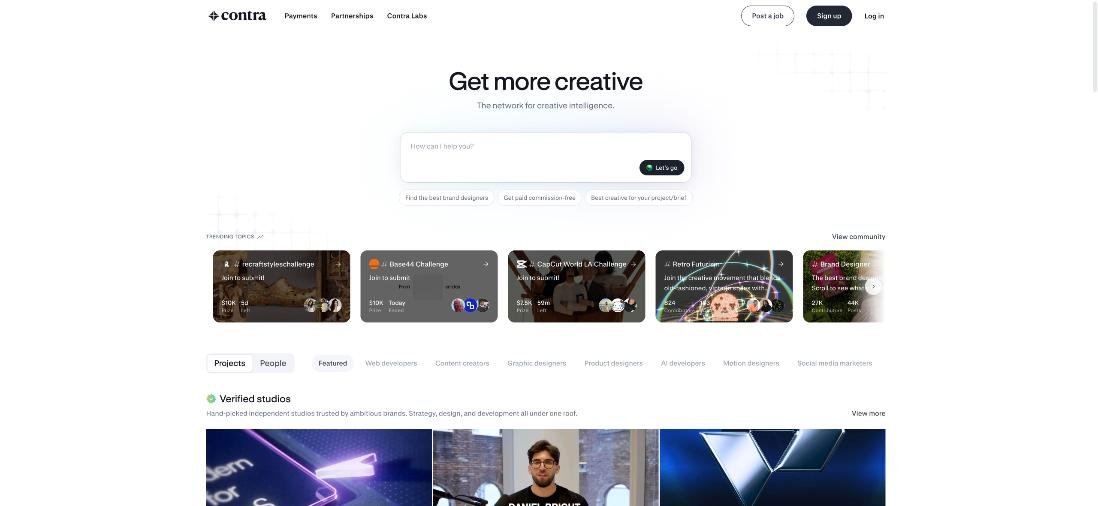
Contra describes itself as a commission-free network for creative independents. Freelancers get a profile and portfolio, can be discovered by companies, apply to jobs, sign contracts, send invoices and get paid inside the platform. Companies can post jobs, discover contractors and approve invoices. You can join for free; Pro is a paid membership. The money part is what this article is about, because that is where “commission-free” needs a footnote.
Contra fees at a glance: Free vs Pro
Here is the pricing table as Contra shows it today, reduced to the rows that cost money.
| Item | Free plan | Pro |
|---|---|---|
| Commission on your earnings | None | None |
| Client payment (platform) fee | $15 per payment under $500, $29 per payment of $500 or more | No fees |
| Digital product fees | 5%, minimum $3, capped at $29 | No fees |
| Standard payouts | Free | Free |
| Faster payouts | 2% fee | Free |
| Crypto payouts | 2% fee | 1% fee |
| Job opportunities | Limited | Unlimited |
| Discoverability | Standard | Boosted in Discover and jobs |
| Price | $0 | $199 per year, or $29 per month |
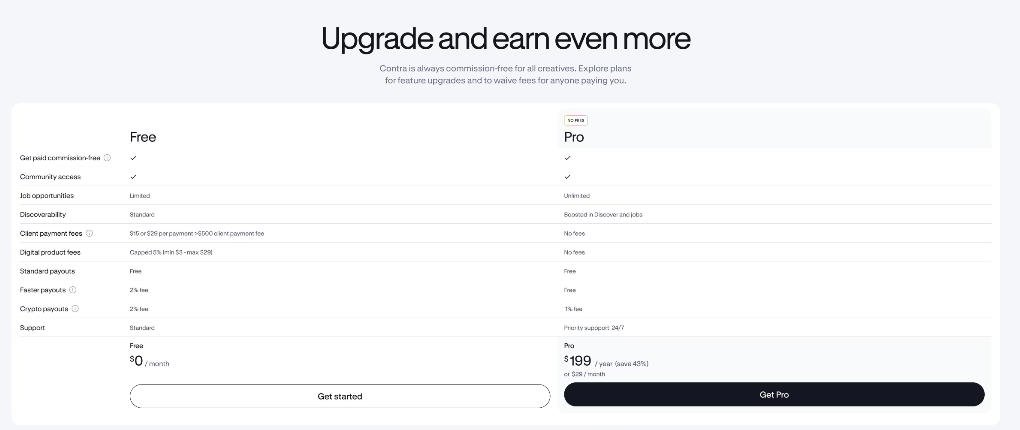
Underneath the table, Contra adds an important sentence: the pricing does not include payment processing fees charged by third-party providers. Those are the fees that make up most of the journey below.
Stop 1: the client pays, and a card processor takes its cut
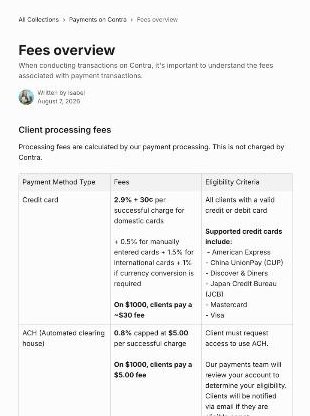
Contra’s Help Center lists client processing fees by payment method and is clear that these are calculated by the payment processor, not charged by Contra:
- Credit card: 2.9% + 30¢ per successful charge for domestic cards, plus 0.5% for manually entered cards, 1.5% for international cards and 1% if currency conversion is required. Contra’s example: on $1,000, clients pay about $30.
- ACH (US bank debit): 0.8% capped at $5.00. Clients must request access and be approved.
- SEPA (euro bank debit): 0.5% + 30¢, capped at $6.00 per charge. Also by request.
- Contra Wallet balance: 1.5% flat, mainly for independents and studios that both hire and get hired.
- Crypto wallet: 2% if the independent is on the Free plan, 1% if they are on Pro.
Why should a freelancer care about a fee the client pays? Because the client sees a total that is higher than your invoice, and that difference is where awkward conversations start. If your client is international and pays by card, the card stack can reach 2.9% + 1.5% + 1% + 30¢. On a $2,000 invoice that is roughly $108 on top of your price. A US client who qualifies for ACH would pay $5 instead. Telling a regular client about the bank-payment option is a small favour that makes Contra look cheaper to them.
Stop 2: Contra’s own platform fee, unless you are on Pro
This is the fee that “commission-free” does not mention. Contra’s fees overview says platform fees scale with the payment size and are capped at $29 per transaction:
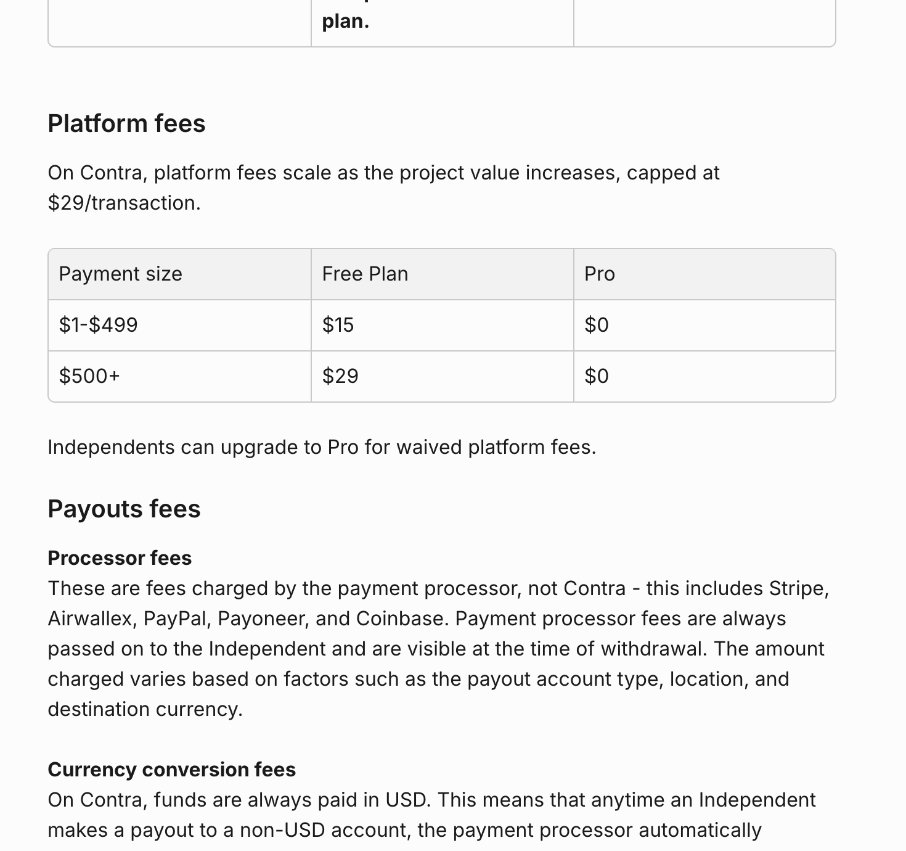
On the Free plan, a payment between $1 and $499 carries a $15 platform fee, and a payment of $500 or more carries $29. On Pro both are $0. The pricing page lists this under “client payment fees” and says Pro waives fees “for anyone paying you”, so on the Free plan this is a cost your client sees on the payment.
Two things follow from the flat structure:
- Small invoices are hit hardest. $15 on a $150 invoice is 10% on top. $29 on a $5,000 invoice is under 0.6%.
- The number of payments matters more than the project value. A $2,000 project paid in one go costs $29 in platform fees on Free. The same project split into four $500 milestones costs $116.
If you have read my Upwork service fee worksheet, this is the opposite shape. Upwork’s freelancer fee is a percentage of what you earn, so bigger contracts pay more. Contra’s platform fee is per payment and capped, so bigger, fewer payments pay less.
Stop 3: the payout to your bank, PayPal or Payoneer
Once the money is in your Contra balance, you withdraw it. Contra says standard payouts are free on both plans, but its fees overview is equally clear that processor fees for payouts (Stripe, Airwallex, PayPal, Payoneer and Coinbase) are always passed on to the independent and shown at the time of withdrawal. Funds on Contra are held in USD, so any payout to a non-USD account also goes through currency conversion.
A few examples from Contra’s own tables:
- Local bank transfers carry a small fixed fee that varies by country. For example, US ACH for a US person is $0.00, UK GBP is $0.50, India INR is $1.25, Vietnam VND is $2.00 and Japan JPY is $8.25. SWIFT is also supported, with fees from US $15 to $25+ per payout.
- Currency conversion is 0.40% for a list of major currencies (including AUD, CAD, EUR, GBP, INR, JPY, PHP and MXN) and 1.00% for all other currencies.
- PayPal charges 2% when withdrawing to a linked PayPal account.
- Payoneer charges $3 plus a 1-2% fee.
- Faster payouts cost 2% on Free and are free on Pro. Crypto payouts cost 2% on Free and 1% on Pro.
For a freelancer outside the US, this stop is where the method you choose matters most. Taking $2,000 to a Vietnamese bank account in VND means the $2.00 local fee plus 1.00% conversion, about $22 in total. Taking the same $2,000 through PayPal costs 2%, or $40, before PayPal’s own currency handling. If you already compare withdrawal routes, my breakdown of Payoneer fees for freelancers covers that side of the decision in more detail.
The whole journey: one $2,000 project, two ways
Putting the three stops together, here is the same $2,000 project for an international client paying by card, with the freelancer withdrawing to a local VND bank account. These are calculations from Contra’s published rates, not a receipt, and processor fees can vary with the details of each payment.
| Step | Free plan, one payment | Free plan, four $500 milestones | Pro, four $500 milestones |
|---|---|---|---|
| Card processing (client, international card: 4.4% + 30¢ per charge) | about $88 | about $89 | about $89 |
| Contra platform fee (client) | $29 | $116 | $0 |
| Local VND payout fee (freelancer) | $2 | $2 if withdrawn once | $2 if withdrawn once |
| Currency conversion, 1% (freelancer) | $20 | $20 | $20 |
| Freelancer receives, before local taxes | about $1,978 | about $1,978 | about $1,978 |
| Client pays in total | about $2,117 | about $2,205 | about $2,089 |
The interesting result is the last two rows. What you receive barely changes between plans, because the platform fee sits on the client’s side. What changes is how expensive you look. On the Free plan with milestone billing, the client pays about $116 more than they would if you were on Pro. Pro is effectively a way of making yourself cheaper to hire without lowering your rate.
When does Contra Pro pay for itself?
Pro costs $199 a year, or $29 a month. Using the platform fees alone:
- With payments of $500 or more, $199 ÷ $29 is about 6.9, so seven or more payments of $500+ a year covers the annual plan.
- With smaller payments, $199 ÷ $15 is about 13.3, so 14 or more payments under $500 a year covers it.
- On the monthly plan, one $500+ payment a month is already break-even, since $29 equals one platform fee.
Then add the extras. Faster payouts go from 2% to free, crypto payouts from 2% to 1%, and digital product sales go from up to 5% (min $3, max $29) to no fee. Pro also lists unlimited job opportunities, boosted placement in Discover and jobs, and priority support.
My own rule of thumb: if you bill clients through Contra at least once a month, Pro is worth pricing out. If Contra is mainly a portfolio and you invoice twice a year, stay on Free and keep invoices large.
Five ways to keep Contra fees down
- Bill in fewer, larger payments on the Free plan. The platform fee is per payment, not per dollar.
- Avoid payments just under $500 on Free if you can bundle. Two $450 invoices cost $30 in platform fees; one $900 invoice costs $29.
- Point eligible clients to ACH or SEPA. Capped at $5 and $6 per charge instead of a card percentage.
- Withdraw less often and to a local bank account where available, instead of a percentage-based route.
- Put the fee in your proposal. If the client will see a processing or platform fee, say so up front. A surprise fee feels worse than a known one.
Who should not use Contra for payments
- Freelancers whose clients insist on paying through their own procurement or by bank wire to a company account. Contra only helps if the client pays inside Contra.
- People who send many small invoices on the Free plan and do not want to upgrade. A $15 fee on every $100 to $300 invoice adds up quickly for your clients.
- Anyone who needs to hold or receive funds in a currency other than USD. Contra holds funds in USD, so non-USD payouts always go through conversion. A multi-currency account may suit that better; I looked at one option in my Wise Business guide for overseas clients.
Verdict
Contra’s “commission-free” claim is accurate: it does not take a cut of your earnings. But “commission-free” and “fee-free” are not the same thing. On the Free plan, every payment carries a flat $15 or $29 platform fee for your client, card payments carry normal processor fees, and your withdrawal carries payout and conversion fees. Pro removes the platform fee and cheapens faster and crypto payouts, and it pays for itself at roughly seven $500+ payments a year. If you bill monthly through Contra, Pro is an easy call. If you bill rarely, stay free and bill in fewer, larger payments.
FAQ
Does Contra take a commission from freelancers?
No. Contra says it is commission-free for all creatives. Fees on the platform are flat platform fees per payment on the Free plan, plus third-party processing and payout fees.
What are Contra’s platform fees on the Free plan?
Contra’s fees overview lists $15 per payment for $1 to $499 and $29 per payment for $500 or more. On Pro, both are $0.
How much does Contra Pro cost?
$199 per year or $29 per month, according to Contra’s pricing page today.
Who pays the card processing fee?
Contra’s fees overview lists card, ACH, SEPA, wallet and crypto fees as client processing fees calculated by the payment processor. On a $1,000 card payment, Contra’s example is about $30.
How much does it cost to withdraw from Contra?
Standard payouts are free from Contra, but processor fees apply and depend on the method and country, for example $0.50 to a UK GBP account or $2.00 to a Vietnamese VND account, plus 0.40% or 1.00% currency conversion. PayPal withdrawals cost 2%, and Payoneer charges $3 plus 1-2%.