Disclosure: some links on this page may be affiliate links. If you sign up through them I may earn a commission at no extra cost to you.
A surprising amount of freelance work is not the work itself. It is explaining the work. “The button moved because the client’s brand guide asked for it.” “Here is where the form breaks on mobile.” “Click this, then this, then you will see the invoice.” Every one of those messages starts as a long email and ends as a call, because words are a slow way to describe a screen.
That is the angle of this piece. Not a feature list, but a narrow question: can CleanShot X for freelancers replace a good share of those explaining-emails with annotated screenshots and short recordings, and which version of it (the one-time license or the Pro subscription) does a solo freelancer actually need? Everything about pricing and features below comes from CleanShot’s own website as of today.
The real problem: client communication that runs on paragraphs
Most freelancers I know already take screenshots with the built-in macOS shortcut. The screenshot is not the bottleneck. The bottleneck is everything around it: opening it in Preview to add an arrow, blurring an email address that should not be shared, uploading it somewhere, copying a link, and then writing three sentences to explain what the arrow points at.
Multiply that by a week of client updates, bug reports and “how do I do this” questions, and it adds up to real hours. Worse, a lot of it still turns into a meeting, because the client did not understand the paragraph.
A capture tool earns its place in a freelancer’s stack only if it removes those steps. So instead of asking “is CleanShot good?”, I looked at four freelance jobs and what CleanShot offers for each.
Job 1: The progress update a client actually reads
A weekly update usually says “finished the header, started on the pricing page, waiting for copy on the about page.” Clients skim that. What they read is a picture.
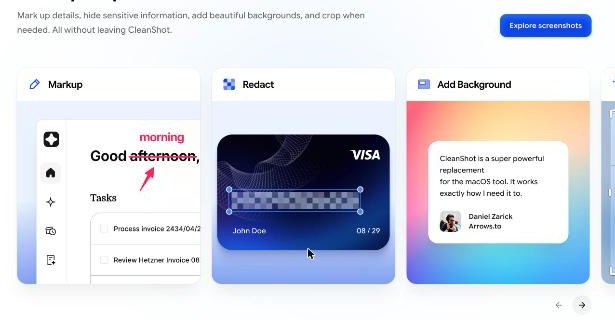
CleanShot’s markup tools cover the basics you need to turn a screenshot into an update: markup (arrows, text, shapes), highlight text, spotlight to dim everything except the part you are talking about, and “outline steps”, which numbers the points on a screenshot so you can refer to them in one short list. There is also a background tool that adds padding, a background and shadow, which sounds cosmetic but makes a screenshot look like a deliverable rather than a scrap.
My suggested format for a client update built this way:
- One screenshot per finished item, with numbered steps on anything the client needs to check.
- One sentence under each image.
- A final line listing what you are waiting for from them.
That is often shorter to write than the paragraph version, and it leaves much less room for “can we jump on a call to go through it?”
Job 2: Hiding what the client should not see
Freelancers screenshot dashboards full of other people’s data: other clients’ names in a project list, customer emails in a CRM, revenue figures in an analytics account, card details in a payment screen. Sending those unredacted is the kind of mistake that loses a client.
CleanShot has a dedicated redact tool, shown on its homepage pixelating card details, and the site describes being able to “hide sensitive information” without leaving the app. For freelancers who handle client accounts, this is the feature I would test first, because a capture tool that makes redaction one click away is one that you will actually use every time.
There is a second, quieter privacy feature worth knowing: hide desktop icons. If your desktop is covered in files named after other clients, a full-screen recording broadcasts all of them. CleanShot can hide them while you capture.
Job 3: The two-minute recording instead of the 30-minute call
Some things are easier to show than to explain: how to update a page in the CMS you just built, how to approve a design in Figma, why a bug only happens after a specific click. This is where screen recording replaces meetings.
CleanShot’s recording features, according to its site, include highlighting every click, showing keystrokes on screen, capturing your voice and system audio in sync, and exporting as MP4 or GIF. CleanShot 5.0 added Studio Mode, an editor built into the app that adds animated zooms to specific parts of a recording, lets you trim mistakes, and generates “smart zooms” automatically.
For client handover, the combination of click highlights and keystrokes matters more than any visual polish. Clients rewatch a tutorial when they get stuck, and seeing exactly where you clicked is the part that helps them. A GIF is useful for very short loops, like “this is where the menu is”, that you want to drop straight into an email or a project tool without the client pressing play.
Long pages and long threads
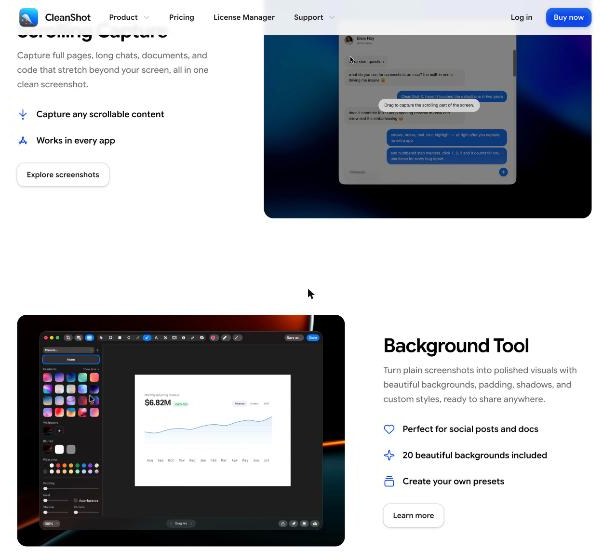
One more capture type is unusually useful for freelance work: scrolling capture. CleanShot can capture full pages, long chats, documents and code that extend beyond the screen in one screenshot. When a client asks “what did we agree on?”, a single image of the whole message thread or the full landing page is much easier to send than six cropped pieces. I have written before about the “we agreed on that” problem with calls; for written agreements, a scrolling capture does the same job.
Job 4: Sharing without filling the client’s inbox
Attaching ten images to an email works, but it is clumsy, and recordings are often too large to attach. CleanShot Cloud solves this by uploading a screenshot or recording and giving you a link. The site describes one-click upload and sharing, comments directly on screenshots and recordings so feedback stays attached to the work, and automatic transcripts for recordings.
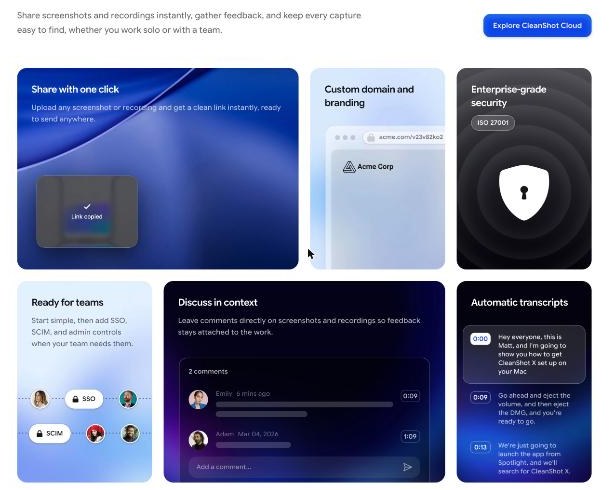
Comments in context are the feature that could change how you collect feedback. Instead of a client replying to your email with “the second thing looks off”, they comment on the second thing. That is the same idea as a review board, which I covered for visual work in Milanote boards clients can open without an account; CleanShot brings it to plain screenshots and recordings.
Whether you need the Cloud features beyond the basics depends on the plan question, which is next.
CleanShot Basic vs Pro: which one a freelancer needs
CleanShot’s pricing page offers two setups, and both include the full Mac app. The difference is updates and the Cloud.
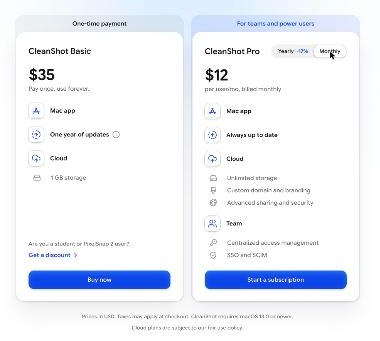
| CleanShot Basic | CleanShot Pro | |
|---|---|---|
| Price | $35, pay once | $10 per user/month billed annually, or $12 billed monthly |
| Mac app | All app features included | All app features included |
| Updates | 1 year, optional renewal at $19 per year | Always up to date |
| Cloud storage | 1 GB | Unlimited (subject to fair use policy) |
| Custom domain and branding | No | Yes |
| Password protection, file access control | No | Yes |
| Team management, SSO, SCIM | No | Yes |
Prices are in USD and taxes may apply at checkout, according to the pricing page.
When Basic is enough
For most solo freelancers, I think Basic is the right starting point. You get every capture, annotation and recording feature, because both plans include the full Mac app. The 1 GB of Cloud storage is fine if you use Cloud for occasional links and send most screenshots as images. If you mostly share recordings through your own channels, such as a project management tool or a shared drive, the Cloud limit matters even less.
The thing to plan for is updates. Basic includes one year of updates; after that, renewal is optional at $19 per year. If you skip renewal, you keep the version you have. Given how often macOS changes, I would budget for the renewal if you rely on the app daily.
When Pro is worth it
Pro makes sense in three freelance situations:
- You send many recordings through Cloud links. Video fills 1 GB quickly; Pro’s storage is unlimited, subject to fair use.
- You want shared links on your own domain with your branding. For a freelancer who positions as a studio, links on your own domain look more professional than a third-party link.
- You share sensitive material. Password protection and file access control are Pro features. If you send recordings of client admin areas, that may be reason enough.
Team management, SSO and SCIM are agency features. A solo freelancer does not need them.
The Setapp route
CleanShot is also available through Setapp, alongside a large catalogue of other Mac apps, and CleanShot’s FAQ notes that Setapp has a 7-day free trial. If you already pay for several small Mac utilities, my Setapp membership audit for a one-person Mac business walks through when one membership beats separate licenses. If CleanShot is the only app you want, the $35 license is the simpler choice.
Check current CleanShot X pricing on the official site
Things to check before you buy
It is Mac only
CleanShot requires macOS 13.0 or newer, and the FAQ says there is no Windows version and no plans to release one. If you split your work between a Mac and a Windows PC, this tool will only cover half of it.
There is no free trial, but there is a refund window
CleanShot does not offer a trial version. It does offer a 30-day money-back guarantee, so the practical approach is to buy, use it on real client work for two or three weeks, and ask for a refund if it does not save you time. The other way to try it first is the Setapp 7-day trial.
Discounts that may apply to you
The pricing page lists a 30% discount for students with a university-issued email address, and 20% off for existing PixelSnap 2 customers.
Moving to a new Mac
According to the FAQ, you activate the app on your new Mac with your license key and the old machine is automatically deactivated. If you need it on more than one Mac at the same time, you can add seats through the License Manager.
Who should skip CleanShot X
- Freelancers on Windows or Linux. There is no version for you.
- People who rarely explain things visually. If your clients only want finished files, the built-in macOS screenshot tool is enough.
- Freelancers who already pay for a recording platform with comments and transcripts. You may only need CleanShot for screenshots, and Basic without heavy Cloud use is the honest choice.
A one-week test plan
If you buy it, here is how I would judge whether it pays for itself within the refund window:
- Days 1 to 2: set your capture shortcuts and default save location, and turn on hiding desktop icons for recordings.
- Days 3 to 4: send every client update as annotated screenshots with numbered steps instead of paragraphs.
- Day 5: replace one planned call with a two-minute recording with click highlights and keystrokes.
- End of week: count the calls you avoided and the follow-up questions you did not get. If the number is zero, ask for the refund.
Verdict
CleanShot X for freelancers is less about better screenshots and more about fewer explanations. The redaction, numbered steps, click highlights and scrolling capture are the features that turn a paragraph-heavy client relationship into a visual one. For a solo freelancer, the $35 Basic license with an annual $19 update renewal covers almost everything. Move to Pro only when Cloud storage, your own branded links or password-protected sharing become real needs.
See CleanShot X on the official website
FAQ
How much does CleanShot X cost?
On the official pricing page, CleanShot Basic is a one-time $35 payment with one year of updates and an optional $19 yearly renewal. CleanShot Pro is $10 per user per month billed annually, or $12 billed monthly. Prices are in USD and taxes may apply.
Is there a free trial of CleanShot X?
No. CleanShot offers a 30-day money-back guarantee instead. CleanShot is also available through Setapp, which has a 7-day free trial.
Do I need CleanShot Cloud to use the app?
No. CleanShot’s FAQ says a license comes with a free Cloud account, but Cloud is only used for uploading and is not required for any other feature.
Does CleanShot X work on Windows?
No. It requires macOS 13.0 or newer, and the FAQ says there are no plans for a Windows version.
Can CleanShot X blur sensitive information in screenshots?
Yes. CleanShot includes a redact tool for hiding sensitive information, alongside markup, spotlight, crop and background tools.
What happens when the Basic license’s year of updates ends?
You keep using the version you have. Renewing for further updates is optional and costs $19 per year, according to the pricing page.