
Disclosure: some links in this guide are partner links. If you sign up through them, I may earn a commission at no extra cost to you.
Relume used to be easy to explain to other freelancers: an AI sitemap and wireframe tool plus a big component library you copied into Webflow or Figma. That is no longer the whole story. Relume pricing now comes as two separate price lists on the same page, one called Publish and one called Export, and they are billed in different ways. One charges per website you host, the other per person who designs.
For a freelance web designer, that split decides how you quote a client project. Do you build the site in Relume and host it there, passing a monthly fee to the client? Or do you use Relume to plan and design, then export to Webflow, Figma or React and host somewhere else? I went through both price lists, the FAQ and the product pages so I could answer that for my own client work.
What Relume does now
Relume describes itself as an AI website builder for simple marketing sites. You drop in an old website, a document or a few notes, and it generates a sitemap, wireframes built from its component system, copy and a style guide. From there, the homepage offers a choice: publish with Relume, or export to your own tools. In its own words, you can “host client sites on Relume and go live in one click”, or take the work into Figma, Webflow and React.

The planning flow is the same on both paths. The Export page breaks it into three steps: a sitemap that scopes every page and section, wireframes built from real components with copy included, and a style guide that sets colours, type and spacing once for every page.
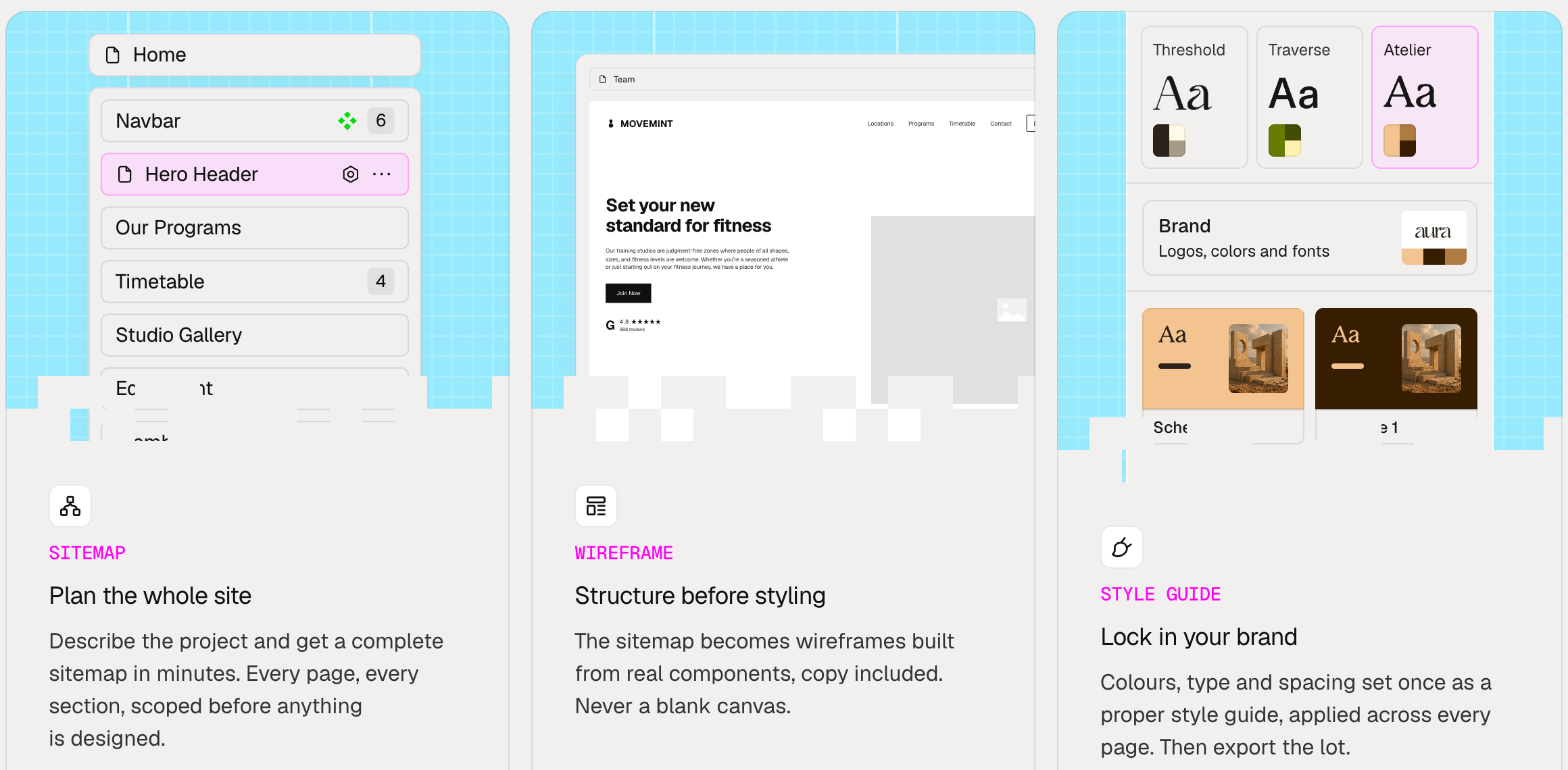
For client work, this is where Relume has always been strongest. A sitemap the client can comment on before any design starts saves a lot of “can we add one more page” conversations later.
Relume pricing for the Publish path
The Publish tab is built around hosting. It has two hosting levels plus an optional AI upgrade.
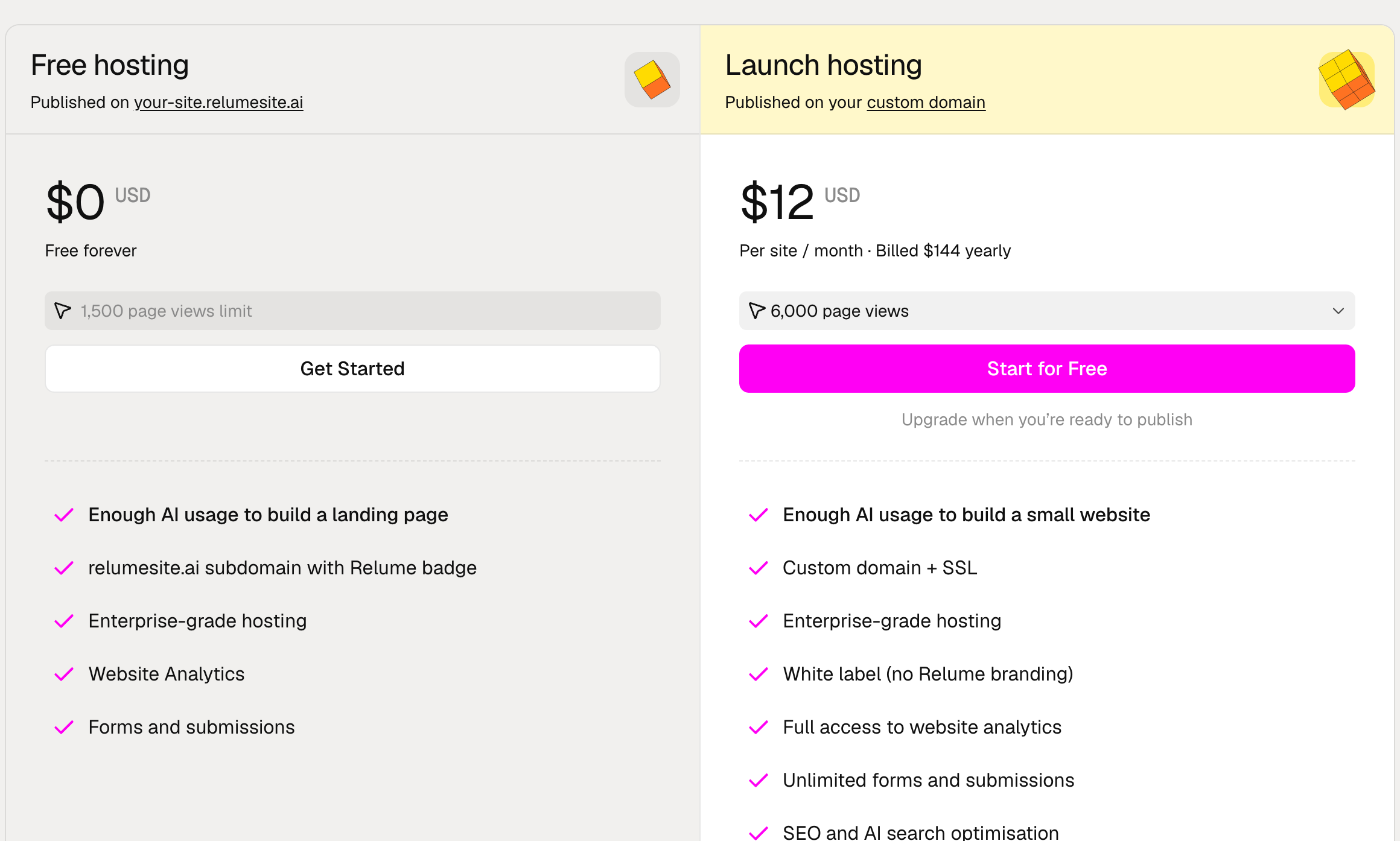
Free hosting
Free hosting puts the site on a your-site.relumesite.ai address with a Relume badge. The pricing page lists a 1,500 page view limit, website analytics with a 7-day window, and 20 form submissions a month. The FAQ says the free plan includes enough monthly AI usage to build a full website.
For client work, I see Free hosting as a review environment, not a launch option. Relume itself describes the relumesite.ai subdomain as “good for drafts and client review”. Sending a client a live link instead of a static mockup is useful, and it costs nothing.
Launch hosting
Launch hosting is where a client site goes live. It costs $12 per site per month billed yearly ($144 a year), or $16 per month billed monthly, according to the FAQ. It starts at 6,000 monthly page views, and the page has a selector for higher traffic levels. Launch includes:
- Custom domain with SSL that Relume renews automatically.
- Hosting on a global edge network with DDoS protection and a 99.99% uptime figure.
- No Relume badge (white label).
- Full website analytics and unlimited forms and submissions.
- SEO and AI search controls: custom robots.txt, sitemap.xml and JSON-LD, plus indexing control for search and AI crawlers.
- Google Analytics and Meta Pixel, custom code and 301 redirects.
The key detail for quoting: hosting is per website. The FAQ is explicit that each site on its own domain needs its own Launch hosting. Ten client sites means ten Launch subscriptions.
Pro AI workspace
The Publish side also has an AI upgrade called Pro. It gives 5x or 20x more AI usage across all projects, premium AI models and priority access at busy times. The card shows $14 per month billed yearly ($168 a year), while the comparison table and FAQ describe Pro as “from $24 per month”, which appears to be the month-to-month price. Pro has a 7-day free trial and, unlike hosting, it is billed per account.
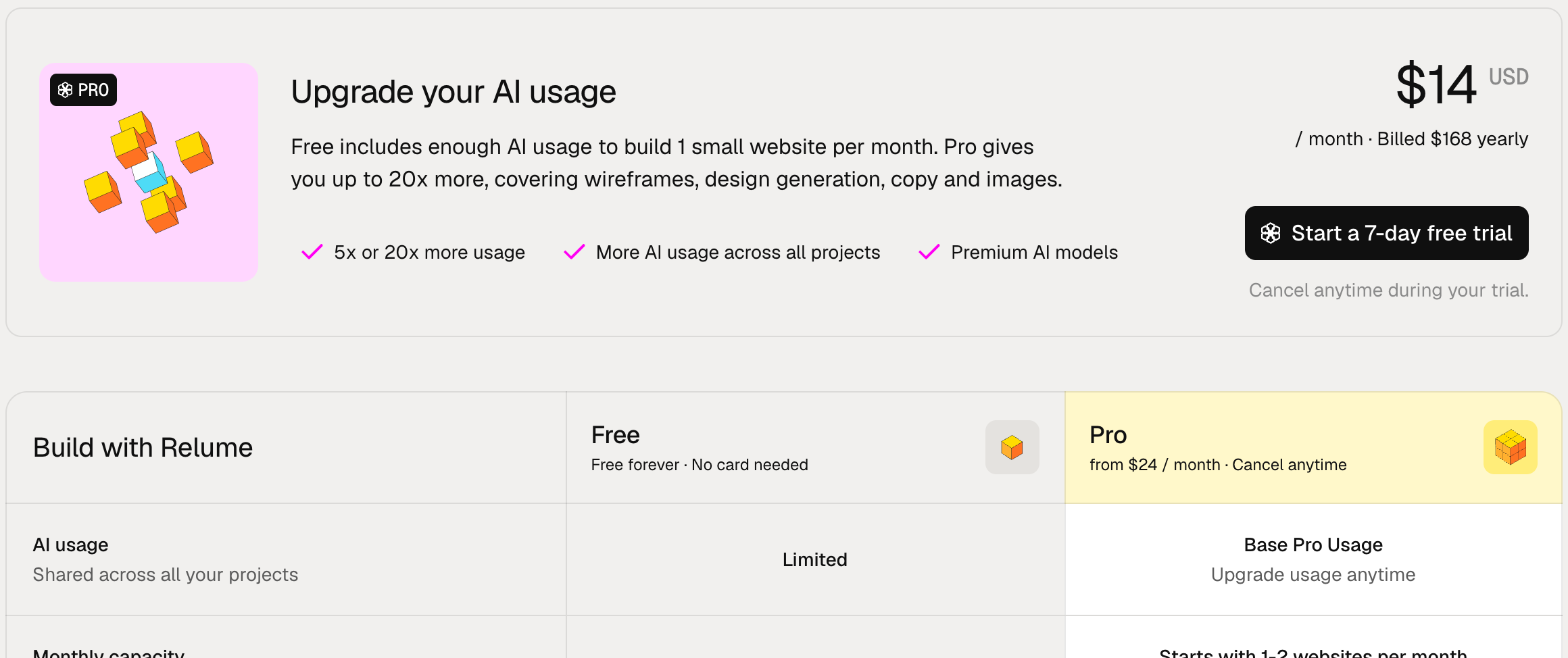
One more point I liked: collaboration on the Publish side has no per-seat charge. The FAQ says you can invite anyone into the workspace as an editor, which includes a client’s staff.
Relume pricing for the Export path
The Export tab is the Relume many of us already know, and it is billed per user, not per site. There are four plans, with a 30% discount for yearly billing.
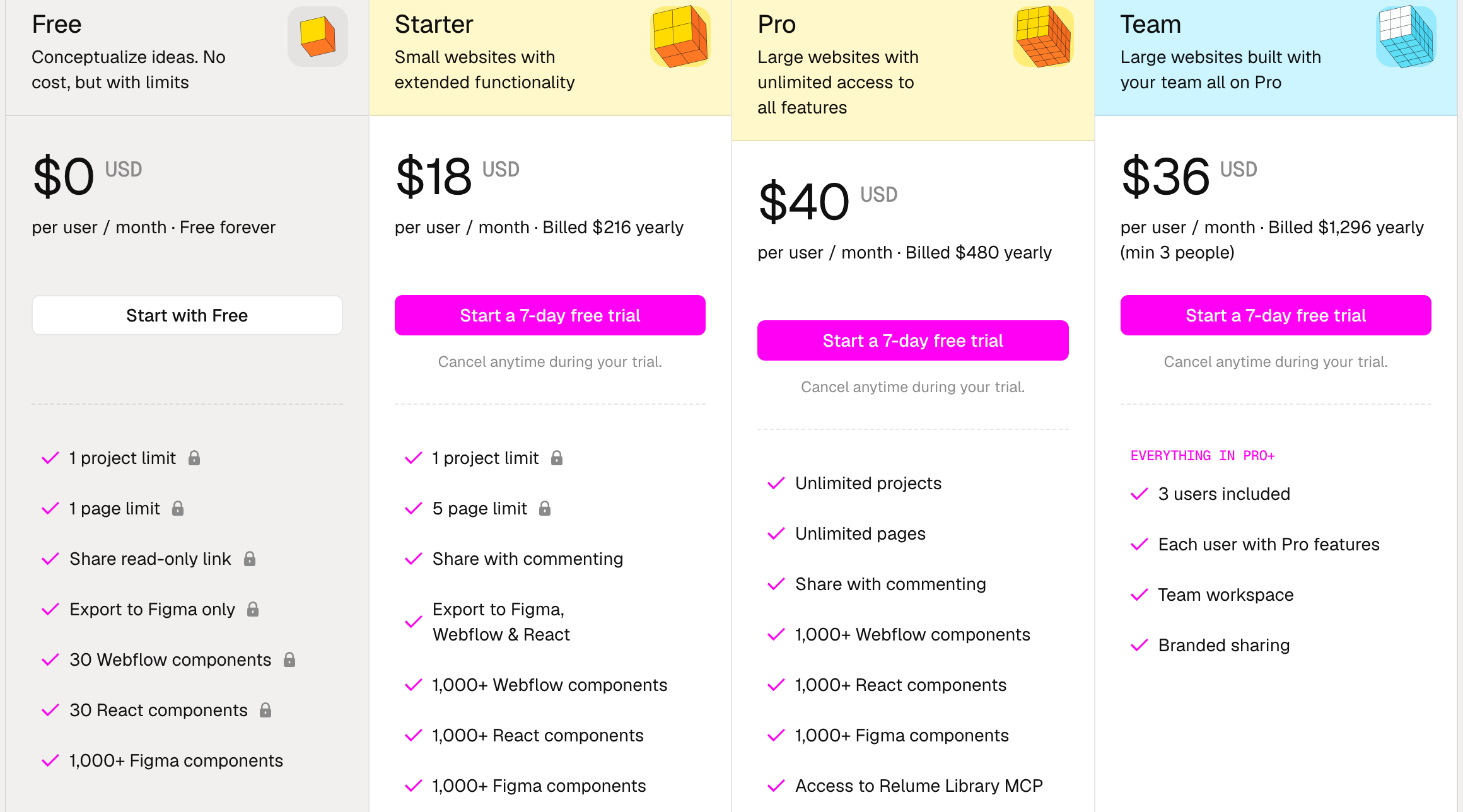
| Plan | Price (billed yearly) | Limits | Export to |
|---|---|---|---|
| Free | $0 | 1 project, 1 page, read-only share link | Figma only (30 Webflow and 30 React components) |
| Starter | $18 per user/month ($216/year) | 1 project, 5 pages, commenting | Figma, Webflow and React |
| Pro | $40 per user/month ($480/year) | Unlimited projects and pages | Figma, Webflow and React |
| Team | $36 per user/month ($1,296/year, minimum 3 people) | Pro for each user, team workspace, branded sharing | Figma, Webflow and React |
Starter and above include 1,000+ components each for Webflow, React and Figma, access to the Relume Library MCP, and an option to export the design system to Claude. All paid Export plans come with a 7-day free trial.
The Starter limit is the one to watch
Starter allows one project and five pages. That fits a single five-page brochure site, but a freelancer with two client projects in progress at the same time hits the wall. For overlapping projects, Pro at $40 per month is the practical plan. The FAQ also notes that once you sign up to the Free plan, you can no longer start a 7-day trial of Starter, so decide which plan you want to trial before creating a free account.
Clients do not need a paid plan to use your library
According to the FAQ, privately shared components can be accessed on the Free plan. A client or their in-house developer only needs a free account to copy components from a folder you share.
Quoting a client site down each path
Here is how I would put both paths into a quote. The numbers below use only Relume’s published prices and leave out anything Relume does not list.
Path A: build and host on Relume
- Your cost to design: free, or Pro AI at $168 a year if you need more generations.
- Client’s running cost: Launch hosting at $144 a year per site at the starting traffic level, or $16 a month if they want monthly billing.
- Who pays for hosting: since it is per site, I would put Launch hosting on the client’s own card or bill it as a line in a care plan.
Path B: design in Relume, export to Webflow
- Your cost to design: Starter at $216 a year for one project at a time, or Pro at $480 a year for overlapping projects.
- Client’s running cost: whatever the destination platform charges. On Webflow, that is a site plan, which I broke down in my Webflow site plan pricing guide for freelancers.
- Who pays: your Relume seat is your own business cost, spread across all projects.
A year with six client sites
Say you deliver six small marketing sites in a year, with some overlap. On Path B you need Pro: $480 for the year, regardless of how many sites you export. On Path A your own cost could be zero or $168 for Pro AI, while each client pays $144 a year for hosting, or $864 across all six. The difference is who carries the cost. On Path A, it sits with each client and continues every year. On Path B, it sits with you and stops when you stop designing.
For clients who want a low-maintenance marketing site and no platform decisions, Path A is easier to sell: one tool, one monthly fee, no Webflow account to manage. For clients who need a CMS-driven blog, e-commerce or integrations beyond custom code, Path B gives you more room.
Handoff questions to settle before you pick a path
- Who owns the account? With Relume hosting being per site, decide whether the site lives in your workspace or the client’s. Because editor invites carry no per-seat charge, you can stay involved either way.
- What happens if traffic grows? Launch starts at 6,000 monthly page views, and higher traffic levels cost more. For a busy local business, check the page view selector before you quote a fixed yearly price.
- Does the client need Webflow at all? The FAQ says no: you can build, host and publish entirely on Relume. Webflow is only needed if you export to it or use Relume components in a Webflow project.
- How will feedback work? Free Export shares read-only links. Starter and up allow commenting, which is the level I would want for client sign-off.
For feedback on a live site with several stakeholders, a dedicated tool still helps. I covered one option in my look at BugHerd plans for client websites with many reviewers.
When Relume is the wrong fit
- Sites that depend on a full CMS, membership areas or e-commerce. Relume positions itself around simple marketing sites.
- Freelancers who need many projects open at once but only want to pay for Starter. The one-project limit will slow you down.
- Clients who must self-host or keep everything in WordPress. Relume’s export targets are Figma, Webflow, React and HTML.
- Very high-traffic sites where page view tiers make hosting harder to predict.
Pros and cons for freelancers
What works
- Sitemap, wireframe and style guide in one flow, which makes early client sign-off easier.
- A free relumesite.ai link for client reviews.
- Launch hosting at a clear per-site price, with white label, forms and SEO controls.
- No per-seat charge for editors on the Publish side.
- Export to Figma, Webflow and React from Starter up.
What to watch
- Two price lists with different billing units (per site and per user) can confuse clients.
- Starter’s one-project, five-page limit.
- Pro AI is shown at $14 a month yearly and “from $24” elsewhere, so confirm the billing period before you subscribe.
- Hosting cost rises with page view tiers.
FAQ
How much does Relume cost?
Building is free. Launch hosting on a custom domain costs $12 per site per month billed yearly, or $16 billed monthly. The Pro AI workspace plan is listed at $14 a month billed yearly and from $24 a month. Export plans run from $18 per user per month (Starter) to $40 (Pro), billed yearly.
Is Relume pricing per website or per account?
Both, depending on the path. Hosting is per website. Pro AI is per account. Export plans are per user.
Do I need Webflow to use Relume?
No. Relume says you can build, host and publish entirely on its platform. Webflow is only needed if you export there or use Relume components in Webflow.
Can my client edit the site?
Yes. You can invite anyone into the workspace as an editor, with no per-seat charge.
Is there a free trial?
Pro AI and the paid Export plans have 7-day free trials. Note that signing up for the Free plan first means you can no longer get the Starter trial.
My take
Relume has become two products under one login. If I am building a simple marketing site for a client who does not want to think about platforms, I would use the Publish path, show the draft on a free relumesite.ai link, and put Launch hosting on the client’s card at $144 a year. If the site needs Webflow’s CMS or the client already has a Webflow account, I would use the Export path on Pro and treat the $480 a year as a business tool spread across every project. In both cases, the sitemap and wireframe step alone is worth trying on your next proposal.