Disclosure: some links on this page may be affiliate links. If you sign up through them I may earn a commission at no extra cost to you.
The SaneBox Snack plan is the cheapest way into SaneBox, and it comes with an unusual rule: you connect one email account and pick only two of SaneBox’s optional features. For a freelancer, that rule is the whole decision. Choose the right two and the plan does most of what you need for a few dollars a month. Choose the wrong two and you will feel boxed in by week two.
This article is about that choice. I go through what Snack includes by default, what “a feature” means in SaneBox’s own definition, and which two features fit different kinds of freelance work. All prices and feature details come from SaneBox’s pricing page and help center as published this week.
What SaneBox Does
SaneBox is an AI email organizer that works on top of the email account you already have. Its help center says it creates special folders and tools that prioritize important messages, move less urgent mail aside, and reduce interruptions, while you keep using your usual email app. It learns from where you move messages, so filing gets more accurate over time.
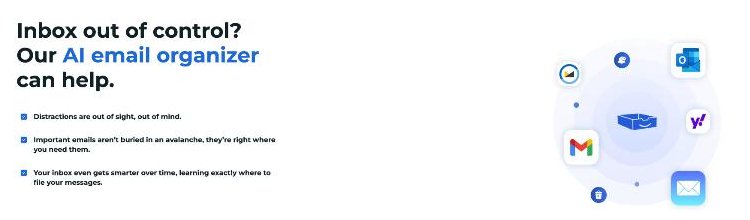
The pricing page says it works with all email clients on every plan. That matters for freelancers who use a mix of Gmail on the phone and a desktop client on the laptop.
SaneBox Snack Plan Pricing, Next to Lunch and Dinner
SaneBox has three plans, each with three billing options. Here is what the pricing page listed, in USD per month.
| Plan | Email accounts | Optional features | Monthly | Paid annually | Billed every 2 years |
|---|---|---|---|---|---|
| Snack | 1 | Pick 2 | $9.49 | $5.42 | $4.54 |
| Lunch | 2 | Pick 6 (per account) | $15.99 | $9.08 | $7.46 |
| Dinner | 4 | All features | $42.99 | $26.58 | $22.04 |
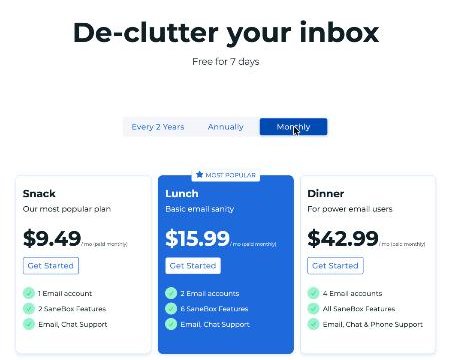
Every plan includes Email Deep Clean, Email Organize, the Daily Digest, the iOS and Android apps, and subject, domain and advanced filters. Snack and Lunch include email and live chat support plus a concierge call; Dinner adds phone support.
There is a 7-day free trial with all features for up to 4 email accounts, and the FAQ says you can ask support for more time. SaneBox also offers an extra 25% off for educational, non-profit and government organizations if you ask during the trial.
What Counts as a Feature
This is the detail that decides how far Snack stretches. SaneBox’s help article “What is a feature?” says a feature is anything you enable, disable or create on the Folders page, and each enabled one counts toward your plan’s limit. It gives examples: @SaneLater counts as one feature, @SaneNews counts as one, and a custom training folder you create, such as @SaneReceipts, also counts as one.
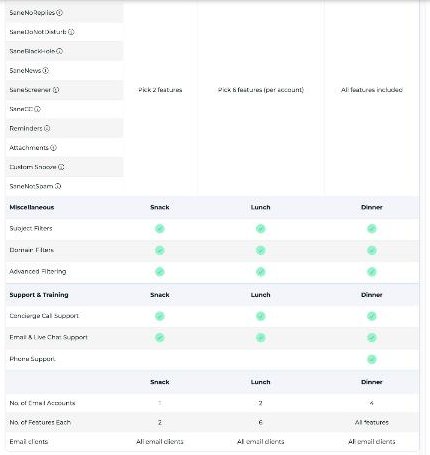
The pricing table lists the optional tools you choose from: SaneLater, SaneNoReplies, SaneDoNotDisturb, SaneBlackHole, SaneNews, SaneScreener, SaneCC, Reminders, Attachments, Custom Snooze and SaneNotSpam. The help center describes a few more, including SaneTodo, SaneSummary and AI Reply Drafts.
Two practical points from the help article:
- After you enable or disable a feature, SaneBox may need about 5 to 30 minutes to update your account.
- You can swap features whenever you want. If you are at your limit, turn one off before turning another on.
So the two picks on Snack are not permanent. You can change them as your work changes.
The Features That Matter Most to Freelancers
Here is what the most relevant options do, based on SaneBox’s descriptions.
- SaneLater: moves lower-priority email out of the inbox into @SaneLater, and the Digest summarizes it so you can review it on your schedule.
- Reminders: reminds you about an email at a future time, or alerts you when someone has not replied by a deadline you set.
- SaneNews: gathers newsletters and mailing lists in one folder for batch reading.
- SaneBlackHole: moves current and future mail from a sender into @SaneBlackHole, from where it can be sent to Trash automatically.
- SaneTodo: turns an email into a task in Todoist or TickTick, with the subject and full context.
- Reply Draft: creates AI reply drafts in your tone in your normal Drafts folder. Nothing is sent automatically.
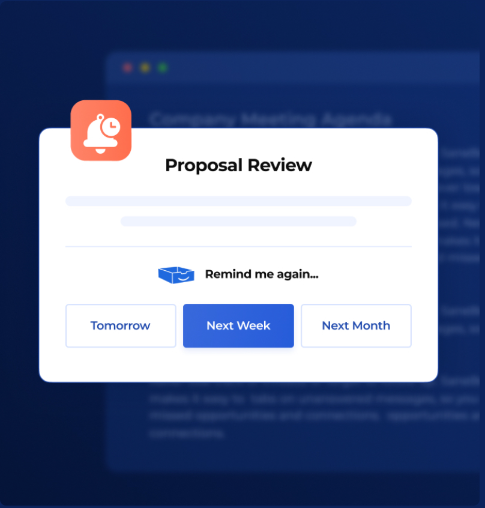
SaneBox’s own illustration for Reminders uses a “Proposal Review” email, which is exactly the freelancer use case: you send a proposal, and you need to know if the client goes quiet.
My Two Picks for Different Freelancers
These are my recommendations, based on how each feature is described and on common freelance workflows.
The default pick: SaneLater + Reminders
For most freelancers this is the right pair. SaneLater keeps tool notifications, receipts and low-priority mail out of your inbox, so client emails stand out. Reminders covers the moments where money is on the line: a proposal waiting for an answer, an invoice reminder, a deliverable you are waiting for feedback on. If you write proposals often, my Better Proposals template walkthrough pairs well with a follow-up reminder.
For writers and researchers: SaneLater + SaneNews
If you subscribe to many newsletters for work, SaneNews gives them their own folder so they do not compete with clients. You would lose Reminders, so set follow-ups in your task manager instead.
For task-driven freelancers: SaneLater + SaneTodo
If your day runs from Todoist or TickTick, SaneTodo turns client requests into tasks without copy and paste. My Todoist setup for freelancers shows how labels and filters can sort those tasks once they arrive.
For inboxes full of cold pitches: SaneLater + SaneBlackHole
If you get a lot of repeated sales email, SaneBlackHole removes a sender for good after one move. This combination is about calm rather than follow-up.
When Snack Is Not Enough
Snack is built for one account and a small toolkit. I would move to Lunch when:
- You run two addresses, such as a personal Gmail and a domain address for clients.
- You want Reminders, SaneNews and SaneTodo at the same time.
- You want custom training folders like @SaneInvoices or @SaneClients, since each one uses a feature slot.
On annual billing the difference is $9.08 versus $5.42 a month. Dinner only makes sense if you manage several inboxes or want phone support.
Setting It Up in the Trial Week
- Day 1: Start the 7-day trial. It includes all features, so try several.
- Days 2 to 4: Train SaneBox by moving misfiled messages between the inbox and @SaneLater. This is what makes the filing accurate.
- Days 5 and 6: Notice which features you actually used. Did you set reminders? Did you open @SaneNews?
- Day 7: Pick your two features based on use, not on what sounded good on day one, and choose a billing period.
I would start with monthly billing for a month or two. The two-year price is the lowest per month, but only worth it once you know the tool fits your routine.
What SaneBox Will Not Do for You
It helps to be clear about the limits before paying. SaneBox sorts and reminds; it does not run your client communication for you.
- It will not reply on your behalf. Even the AI Reply Draft feature only places a draft in your Drafts folder, and SaneBox states that nothing is sent automatically.
- It is not a client portal or CRM. Contracts, invoices and project files still belong in the tools you already use for that work.
- It needs training at the start. The filing gets better as you move misfiled messages, so the first few days take a little attention.
- Folders may need a refresh. The help center notes that new folders can take a few minutes to appear, and some Outlook versions require you to subscribe to new IMAP folders manually.
None of these are deal-breakers for a solo freelancer. They simply mean SaneBox works best as the layer that decides what you see first, while your proposal, invoicing and task tools handle the rest.
My Verdict
The SaneBox Snack plan is a good fit for a solo freelancer with one main inbox. Its limit is not storage or messages; it is the two-feature rule, and SaneBox counts custom training folders toward that limit too. SaneLater plus Reminders covers the needs of most freelancers: a quieter inbox and no forgotten proposals. If you need a second address or more than two tools, Lunch is the better buy.
FAQ
How much is the SaneBox Snack plan?
The pricing page lists Snack at $9.49 a month on monthly billing, $5.42 a month paid annually, or $4.54 a month billed every two years.
What does the Snack plan include?
One email account, Email Deep Clean, Email Organize, the Daily Digest, mobile apps, filters, email and chat support, and your choice of two optional features.
Does a custom folder count as a feature in SaneBox?
Yes. SaneBox’s help center says a custom training folder you create counts as one feature.
Can I change my two features later?
Yes. You can enable, disable or replace features at any time from the Folders page, as long as you stay within your plan’s limit.
Is there a SaneBox free trial?
Yes. The trial lasts 7 days and includes all features for up to 4 email accounts.