
Disclosure: some links in this guide are partner links. If you sign up through them, this site may earn a commission at no extra cost to you. It does not change the facts or the advice below.
Freelance web designers who build on Wix Studio can earn a share of what their clients pay Wix for site plans. It sounds like easy extra income, and for some freelancers it is. But Wix Studio revenue share comes with one rule that quietly decides everything: you only earn on a site if you were its first owner. Get the order of operations wrong at the start of a project, and the commission is gone for good, even if you did all the work.
This guide is not a general Wix Studio review. It looks at one question: how should a freelancer set up, bill and hand over a client site so the revenue share actually lands? Everything about rates and rules comes from Wix’s own Help Center and the Wix Studio plans page as they read today.
What Wix Studio revenue share pays, in one table
Revenue share is part of the Wix Partner Program, which Wix describes as a loyalty program for agencies and freelancers. According to Wix’s Help Center article on receiving revenue share, partners can earn from three sources: eligible Wix plans sold on client sites, transactions processed through Wix Payments on client sites, and clients’ Symphony yearly plans.
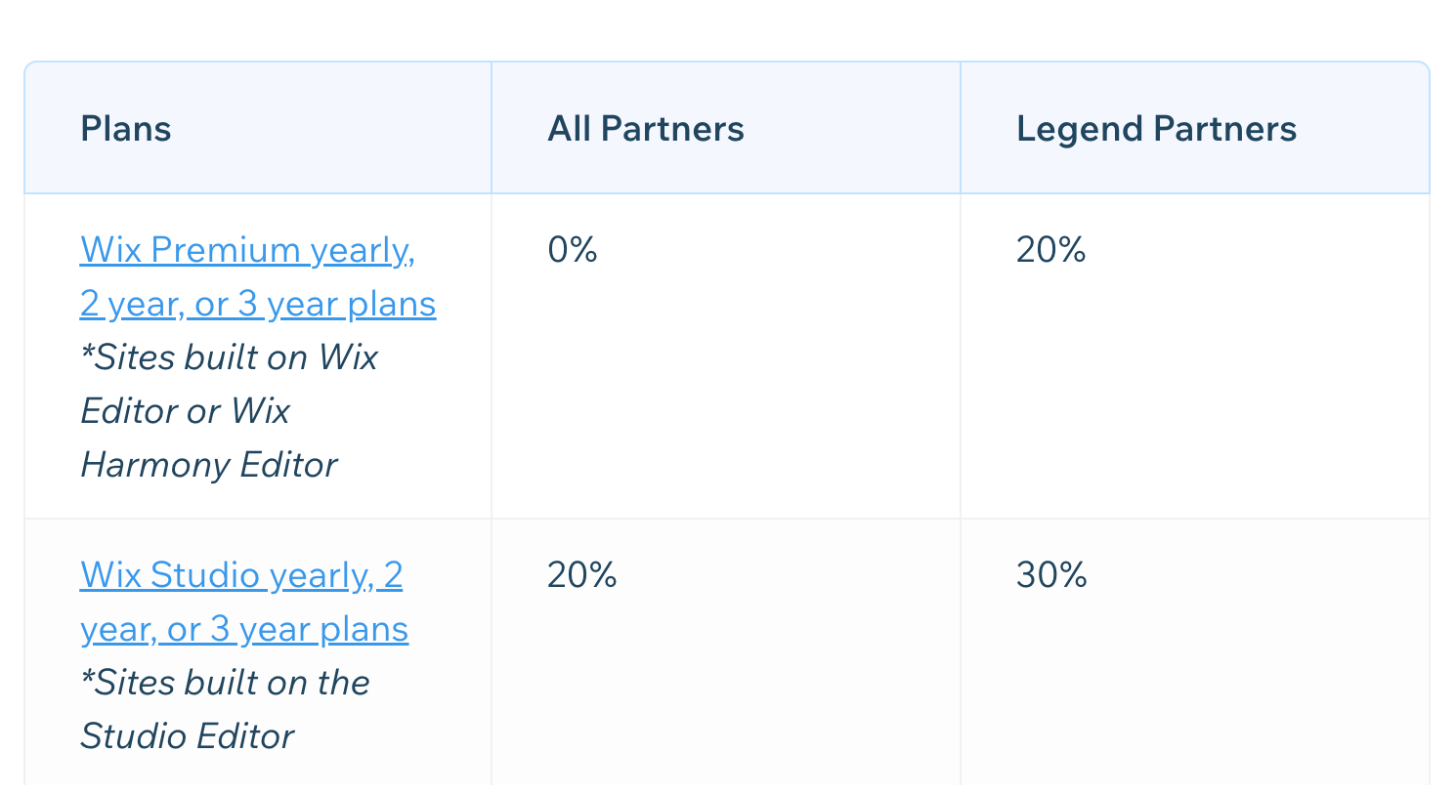
The two rows that matter most for a freelance designer:
- Wix Studio yearly, 2-year or 3-year plans (sites built on the Studio Editor): 20% for all partners, 30% for Legend partners.
- Wix Premium yearly, 2-year or 3-year plans (sites built on the Wix Editor or Wix Harmony Editor): 0% for all partners, 20% for Legend partners.
The same table lists other products too. Mobile App Premium, Email Marketing, Logo, POS and Social Media Marketing Plus are at 50%. Hopp (link in bio) is at 20%. Business Email and Facebook or Google Ads are at 5%.
The practical takeaway: if you are not yet a Legend partner, building on the Studio Editor is what makes plan revenue share possible at all. A site built in the regular Wix Editor earns nothing from its Premium plan at the starting level.
The first-owner rule, and why it decides everything
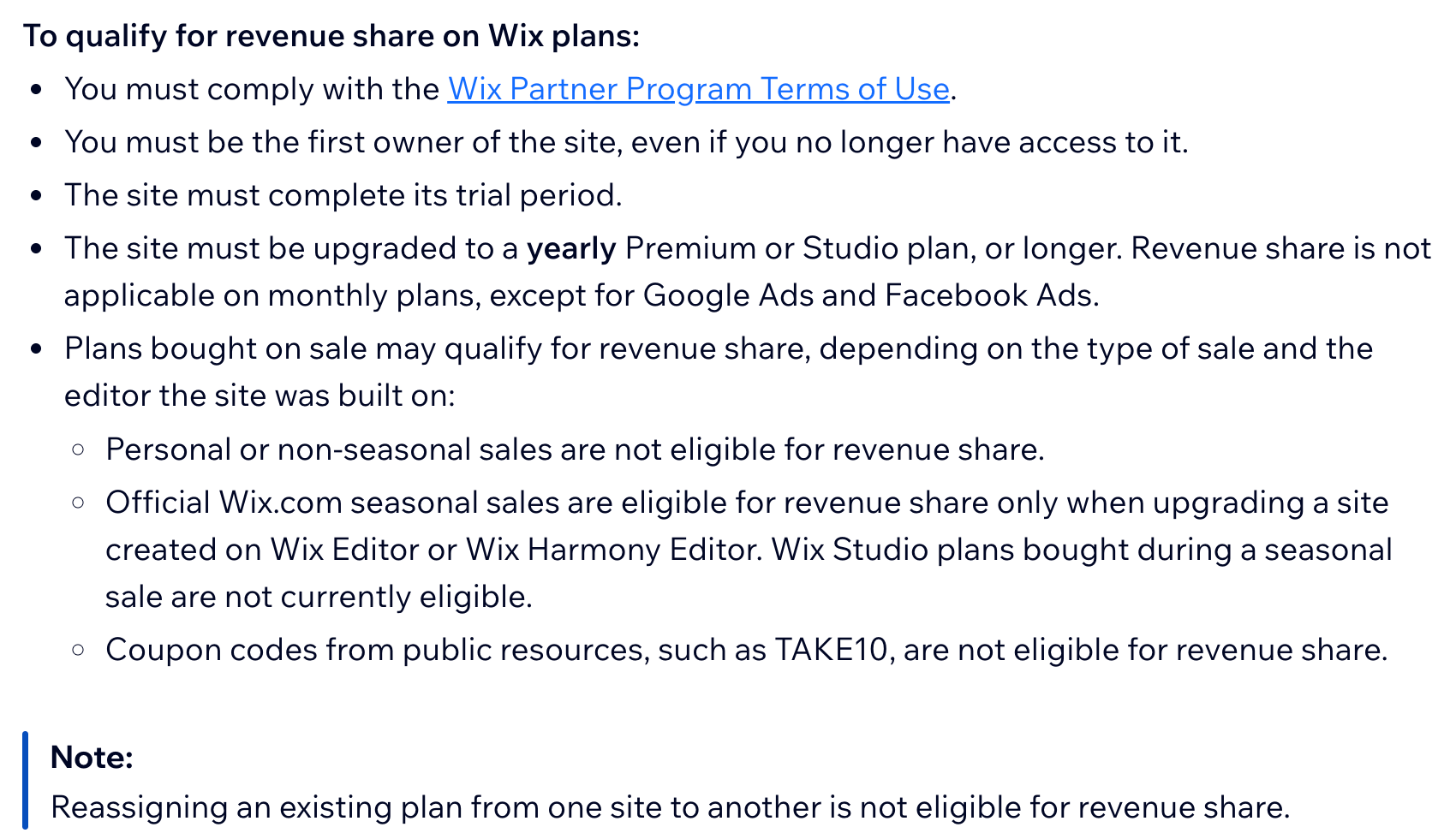
Wix lists several conditions for earning revenue share on plans. The one that trips freelancers up is this: you must be the first owner of the site, even if you no longer have access to it.
Wix’s FAQ defines the first owner as the account that started the site from its Wix Studio workspace. When you click Create New Site in your workspace, you become the first owner, even if you later transfer ownership to the client.
That leads to the two most common ways freelancers lose the commission:
- The client creates the site. A client opens their own Wix account, starts a site and invites you as a collaborator. You build everything, but they are the first owner. No plan revenue share.
- The client already has a Wix plan. Wix’s FAQ answers this directly: for Wix plans, you can’t earn from a client’s existing plan, because you have to be the first owner. (The exception is Symphony yearly plans, when a client using your Symphony pack upgrades.)
So the rule for every new project is simple: start the site in your own Studio workspace, before anything else. If a client has already started a site on their account, it’s better to know at quoting time that this project won’t produce plan revenue share than to find out after launch.
The other conditions that cancel the commission
Being the first owner is necessary, but not enough. Wix lists more conditions:
- The site must complete its trial period.
- The plan must be yearly or longer. Revenue share does not apply to monthly plans, except for Google Ads and Facebook Ads.
- Sales and coupons can disqualify it. Personal or non-seasonal sales are not eligible. Official Wix seasonal sales are eligible only for sites built on the Wix Editor or Wix Harmony Editor. Wix Studio plans bought during a seasonal sale are not currently eligible. Public coupon codes are not eligible.
- Moving a plan doesn’t count. Reassigning an existing plan from one site to another is not eligible.
- You must follow the Partner Program terms.
Two of these clash directly with things clients like to do. Clients often want to pay monthly to keep upfront costs low, and they often look for discount codes. For a Studio site, both remove your share. It is worth explaining this before the client checks out, not after.
What the money looks like on real plans
The Wix Studio plans page shows prices for yearly subscriptions, paid in full at purchase, and notes that taxes are added based on the billing address. When I checked, it showed these prices in US dollars per month:
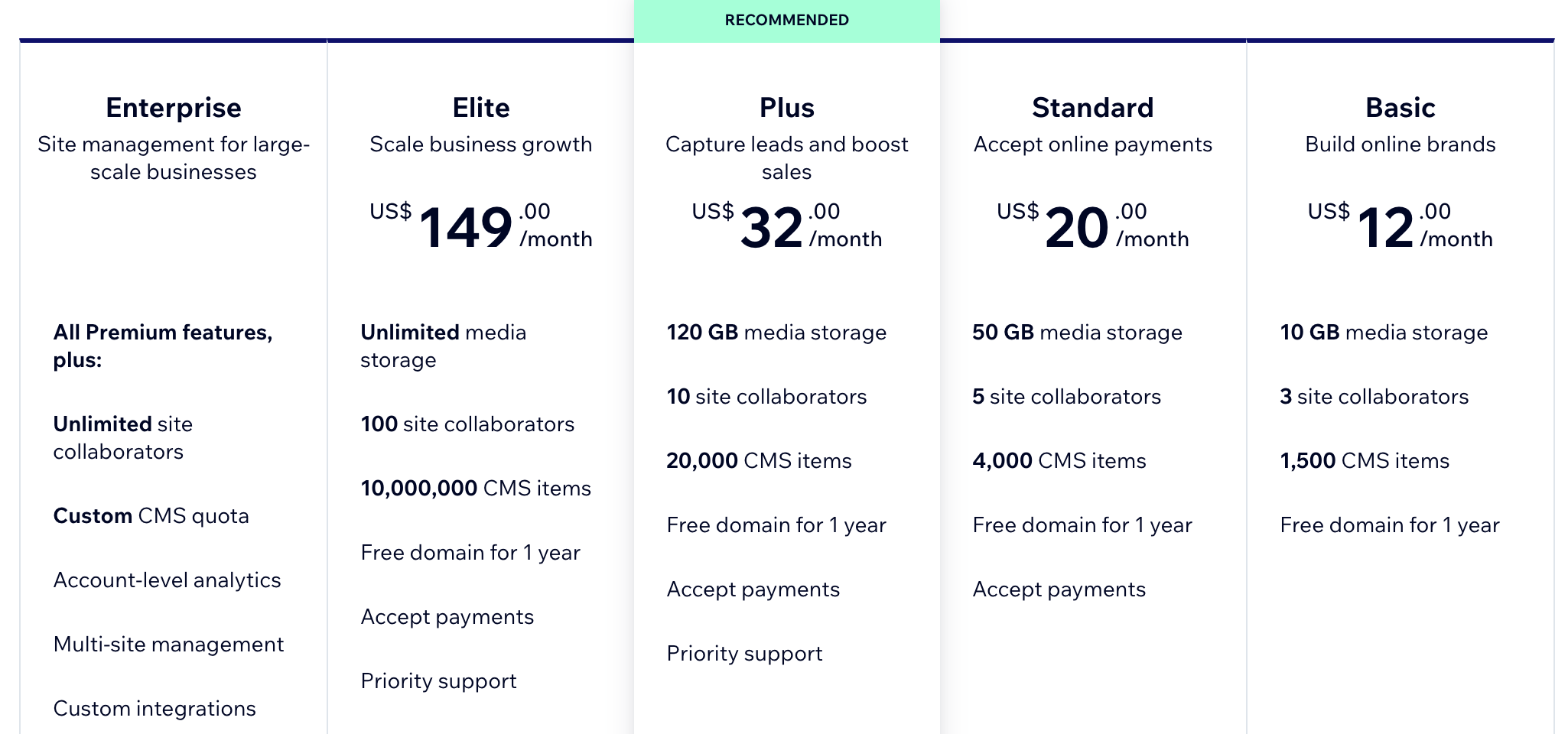
- Basic: US$12/month. 10 GB storage, 3 site collaborators, 1,500 CMS items.
- Standard: US$20/month. 50 GB storage, 5 collaborators, 4,000 CMS items, accepts payments.
- Plus: US$32/month. 120 GB storage, 10 collaborators, 20,000 CMS items, priority support.
- Elite: US$149/month. Unlimited storage, 100 collaborators, 10,000,000 CMS items.
- Enterprise: custom.
Wix also notes that the final price appears on the purchase page before payment, so the price your client sees may differ by location. Using the figures above, and the 20% rate for all partners, here is what one year of each plan would produce. Wix says payouts are calculated on the plan price excluding VAT.
| Studio plan (yearly) | Yearly price | 20% share | 30% share (Legend) |
|---|---|---|---|
| Basic | US$144 | US$28.80 | US$43.20 |
| Standard | US$240 | US$48.00 | US$72.00 |
| Plus | US$384 | US$76.80 | US$115.20 |
| Elite | US$1,788 | US$357.60 | US$536.40 |
For a freelancer with five small business clients on Standard, that is about US$240 a year at the 20% rate. Not life-changing, but it is money for work you already did, and it repeats as long as the sites qualify.
The $200 payout minimum
Wix schedules a payout once your total earnings reach $200, 30 days after the end of that month. If you are under $200, the balance rolls over to the next month. Wix also notes that some plans may follow a 60-day payout cycle, depending on trial length and invoicing time.
For a freelancer with one or two client sites, that minimum matters. A single Standard site earns US$48 a year at 20%, so it would take several sites, or a larger plan, before the first payout arrives. Payouts include earnings from site plans, client sales, Symphony yearly plans and Studio template sales in the Wix Marketplace, so they all count toward the same threshold.
Client sales: small percentages that add up slowly
The second source of revenue share is your clients’ sales through Wix Payments, including online sales and Wix POS Register.
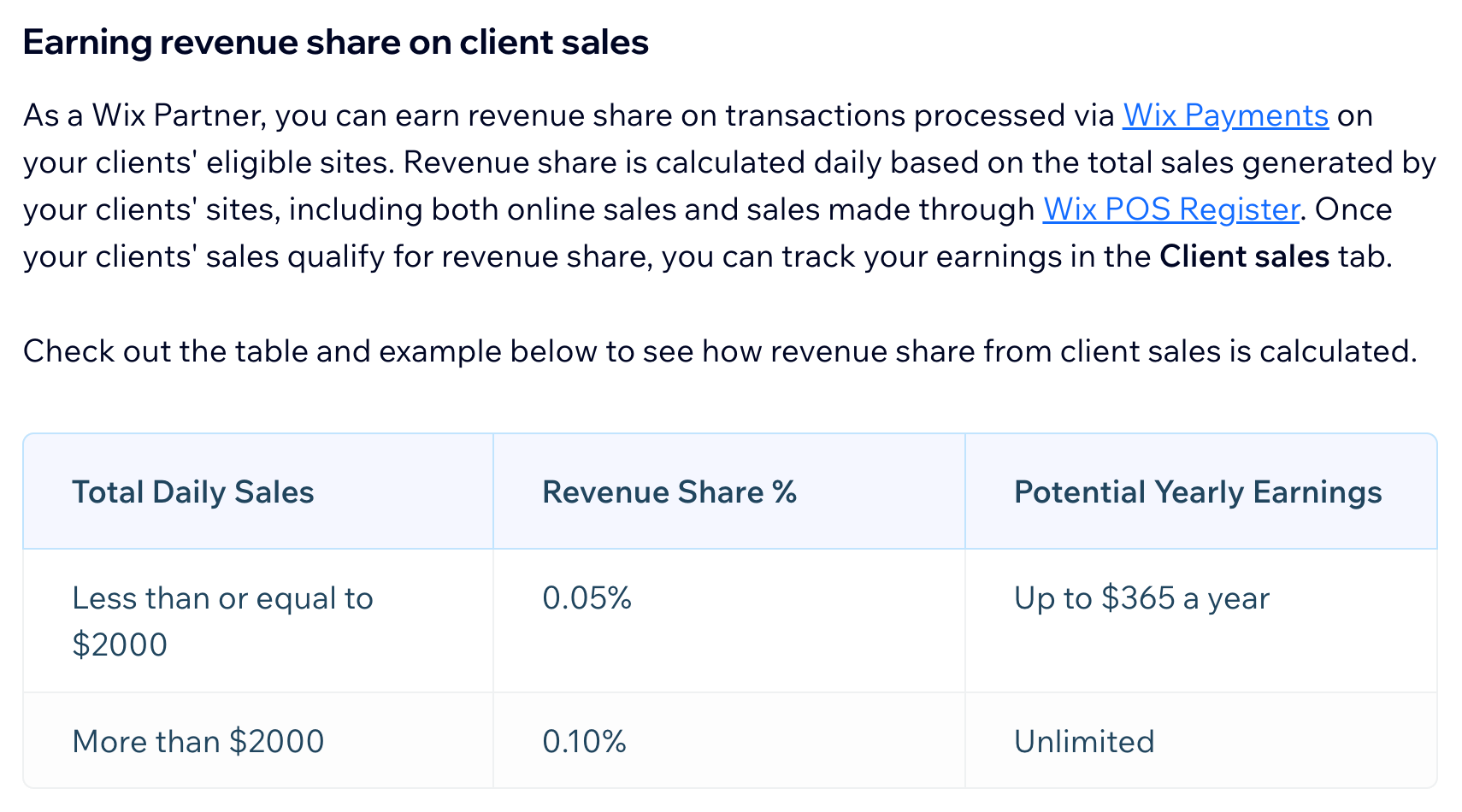
Wix calculates it daily across all your client sites combined:
- Total daily sales of $2,000 or less: 0.05%, which Wix says means up to $365 a year.
- Total daily sales above $2,000: 0.10%, with no stated cap.
Wix’s own example: two client sites that generate $1,500 in one day earn the partner $0.75 for that day. For most freelancers with a few small shops, this is a bonus, not a business model. It becomes more interesting for designers who specialize in e-commerce clients.
Handing the site over without losing the share
Here is where the first-owner rule helps you. Because the share depends on who created the site, you can transfer ownership to the client after launch and still qualify, as long as the other conditions are met.
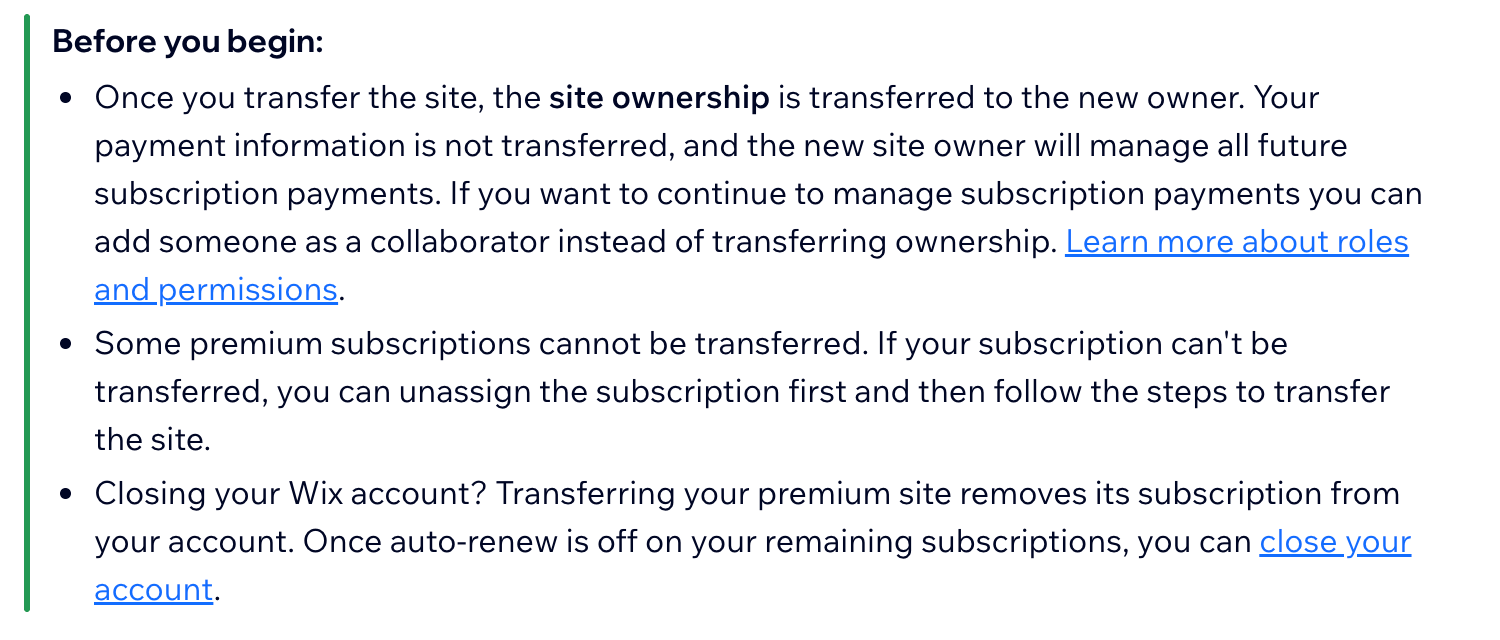
Wix’s article on transferring a premium site explains what happens: ownership moves to the new owner, your payment information does not, and the new owner manages all future subscription payments. If you want to keep handling subscription payments yourself, Wix suggests adding the client as a collaborator instead of transferring ownership. Wix also notes that some premium subscriptions cannot be transferred and need to be unassigned first.
That gives freelancers two clean setups:
- Transfer model. You create the site, build it, the client buys a yearly Studio plan, and you transfer ownership. The client pays Wix directly from then on. You stay the first owner.
- Managed model. You create the site, keep ownership, pay the yearly plan yourself, and re-bill the client as part of a care plan. The client is a collaborator.
The managed model is closer to how many freelancers bill for hosting on other platforms. If you have read our guide on re-quoting Webflow site plans for client hosting or the one on Framer client handoff and site plan billing, the same thinking applies: decide early who pays the platform, and write it into the proposal.
A project checklist that protects the commission
- Join the Partner Program first. Wix says you must be the workspace owner to apply, and you join from the Become a Partner button in your Studio workspace.
- Ask the client if they already have a Wix site or plan. If yes, assume no plan revenue share on that site and price the project accordingly.
- Create the site in your own Studio workspace using Create New Site.
- Recommend a yearly plan in writing and explain that monthly billing and coupon codes remove the partner share.
- Let the trial run its course before you count on the money.
- Choose transfer or managed billing before launch, and put it in the contract.
- Track earnings in the Payouts tab of your workspace, and expect the first payout only after the $200 minimum.
Is it worth choosing Wix Studio for this?
Revenue share alone shouldn’t decide your platform. Pick the tool that suits your clients and your design workflow first. But if you already build on Wix Studio, or you are choosing between platforms of similar fit, a 20% recurring share of client plans is a real advantage, and it grows with every qualifying client. Wix says there is no limit to the number of sites you can onboard to earn from.
FAQ
How much revenue share does Wix Studio pay?
For Wix Studio yearly, 2-year or 3-year plans on sites built in the Studio Editor, Wix lists 20% for all partners and 30% for Legend partners. Some other products, such as Email Marketing, are listed at 50%.
Do I earn revenue share on monthly plans?
No. Wix says revenue share does not apply to monthly plans, except for Google Ads and Facebook Ads. The site must be on a yearly plan or longer.
Can I earn revenue share if my client created the site?
No, not on Wix plans. You must be the first owner, meaning the site was created from your Wix Studio workspace. You can transfer it to the client later and still qualify.
When does Wix pay out revenue share?
Once your total earnings reach $200, Wix schedules a payout 30 days after the end of that month. Below $200, earnings roll over to the next month. Some plans may follow a 60-day cycle.
Does a discount code affect revenue share?
Yes. Wix says coupon codes from public sources are not eligible, personal or non-seasonal sales are not eligible, and Wix Studio plans bought during a seasonal sale are not currently eligible.
What happens to billing when I transfer a site to a client?
The client becomes the owner and manages all future subscription payments. Your payment information is not transferred. If you want to keep paying, Wix suggests adding the client as a collaborator instead.