Disclosure: some links on this page may be affiliate links. If you sign up through them I may earn a commission at no extra cost to you.
Most comparisons of Carrd plans count sites: three, ten or twenty-five. For a freelancer that number rarely matters. You need one portfolio, maybe a second page for a side offer. What actually decides whether Carrd for freelancers costs you $9, $19 or $49 a year is the form at the bottom of the page: a simple contact form, a proper project brief with file uploads, or a form that takes a deposit before you start work.
I went through Carrd’s Pro page and its forms documentation with that one question in mind. Below is what each tier lets a freelancer collect from a prospective client, where the limits sit, and the cheapest plan that covers each kind of portfolio.
Why a One-Page Site Works for Many Freelancers
A freelance portfolio has a short job list: say what you do, show proof, explain how to hire you, and capture the enquiry. Carrd is built for exactly that shape of site. It describes itself as simple, free, fully responsive one-page sites, and you build by stacking sections and elements rather than managing a multi-page site. You can start free, and the paid “Pro” tiers are billed per year, not per month.
If you need a multi-page services site with a blog and separate case-study pages, a bigger builder fits better; I covered that route in my guide to building a Squarespace services page for freelancers. If one well-structured page is enough, Carrd is hard to beat on price.
The Three Pro Tiers in One Table
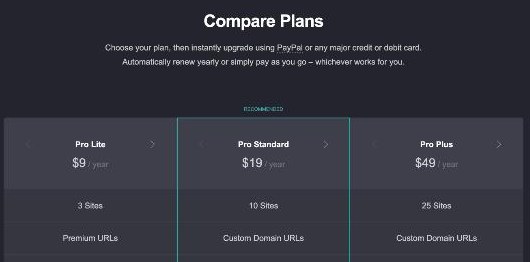
These are the current yearly prices and the features most relevant to a freelancer, from Carrd’s Pro page. Carrd says you can pay with PayPal or any major card, and either renew automatically each year or pay as you go. The Pro page also offers a 7-day free trial of Pro.
| Feature | Pro Lite | Pro Standard | Pro Plus |
|---|---|---|---|
| Price | $9/year | $19/year | $49/year |
| Sites | 3 | 10 | 25 |
| Address | Premium URLs | Custom domains | Custom domains |
| Carrd branding removed | Yes | Yes | Yes |
| Contact and signup forms | No | Yes | Yes |
| Custom forms (any fields, file uploads) | No | No | Yes |
| Payment-enabled forms (Stripe) | No | No | Yes |
| Widgets and embeds | No | Yes | Yes |
| Analytics | No | Yes | Yes |
| Password protection, redirects, site download | No | No | Yes |
Portfolio Type 1: “Email Me” (Pro Lite, $9 a Year)
Pro Lite has no form features at all. What it gives you is a cleaner portfolio: no “Made with Carrd” branding, premium templates, high-quality images, video uploads, slideshows, a site icon and a custom share image. Carrd’s Pro page says paid plans let you upload images and GIFs up to 16MB and videos up to 64MB, which helps if your portfolio is visual.
The catch for a working freelancer is the address. Pro Lite lists “Premium URLs,” while custom domains start on Pro Standard. If you are happy with a Carrd-provided address and a mailto: button that opens the visitor’s email app, Pro Lite is enough. In practice, I would only choose it for a temporary page, for example a portfolio you share while a full site is being built, because a client email address on your own domain looks more established.
Portfolio Type 2: Contact Form and Newsletter (Pro Standard, $19 a Year)
For most freelancers, Pro Standard is the sensible default. Three features do the heavy lifting:
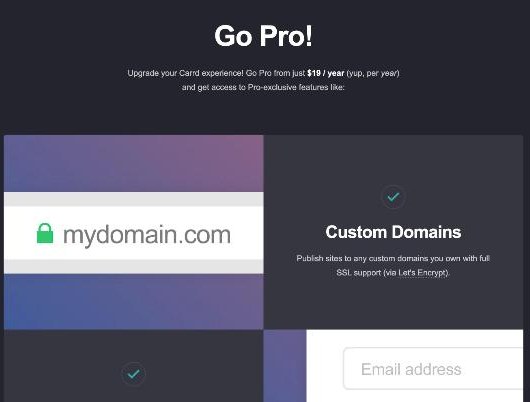
- Custom domains. Publish to a domain you own, with SSL provided through Let’s Encrypt.
- Contact and signup forms. A contact form sends enquiries to you. A signup form connects to an email platform; Carrd’s list includes Kit, MailerLite, Mailchimp, beehiiv, Brevo, ActiveCampaign, HubSpot and others.
- Analytics and embeds. You can add Google Analytics, Plausible, Matomo and similar tracking, and embed widgets or custom code from services such as Stripe, PayPal, Gumroad and Typeform.
The signup form is the underrated part. A freelancer who writes a short monthly note to past clients and leads gets repeat work from it, and a Carrd signup form can feed straight into that list. If you use MailerLite, my walkthrough of a MailerLite welcome email sequence for freelancers pairs well with a Carrd portfolio.
What Pro Standard cannot do natively is collect a structured brief. A contact form is a name, an email and a message box. If you want budget ranges, deadlines and file attachments in the same submission, you either embed a third-party form (embeds are included on Standard) or move up to Pro Plus.
Portfolio Type 3: Project Brief With Files (Pro Plus, $49 a Year)
Carrd’s documentation is clear that custom forms require Pro Plus or higher. They are part of the Advanced Forms feature and let you build a form from any combination of supported fields, including text fields, select fields and file upload fields. The submission can then go to several places:
- an email address,
- a Zapier Zap, a Make scenario or an n8n workflow,
- a table in Airtable,
- a custom URL, or your own JavaScript.
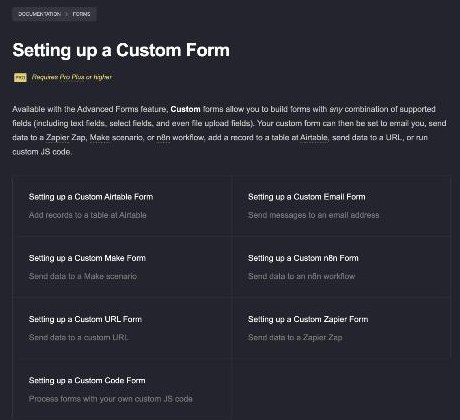
For a freelancer, this turns the portfolio into an intake system. A design freelancer can ask for project type, budget range, deadline and a reference file in one submission. Sending it to Airtable gives you a simple lead list without paying for a CRM. Sending it to Zapier or Make can create a project in your task tool or start a proposal draft. If you prefer a dedicated form builder with conditional logic, I compared that approach in my Jotform client intake form guide; with Pro Plus you can often keep the whole thing inside Carrd instead.
Portfolio Type 4: Paid Deposit or Fixed-Price Offer (Pro Plus)
The second Pro Plus feature that matters to freelancers is the payment-enabled form, which also requires Pro Plus or higher. According to Carrd’s documentation, it inserts a Stripe Checkout payment screen between the moment a visitor submits the form and the moment the form is processed. You set the price in one of two ways:
- Preconfigured price: enter the ID of a Price you already created in Stripe.
- Custom price: enter a name, description and amount in Carrd. On a custom form you can use a fixed amount or let the visitor choose a variable amount before submitting.
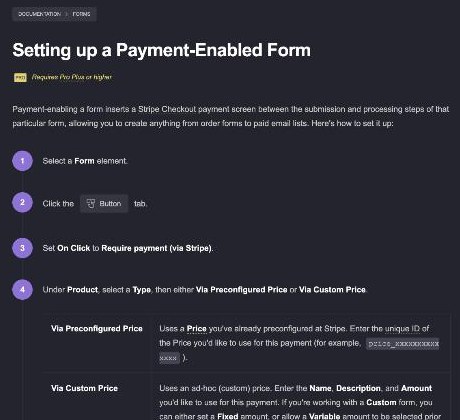
This fits two freelance patterns well. The first is a productised service with a fixed price, such as a logo refresh, an SEO audit or a one-hour strategy call, where the client fills in a brief and pays in one step. The second is a booking deposit: the brief and the deposit arrive together, so you only schedule kickoff calls with people who have already paid. Stripe’s own fees still apply on top of your Carrd plan.
If you sell digital products rather than services, a simpler path may be a Gumroad embed, which works from Pro Standard; I covered that model in Gumroad for freelancers selling a side product.
Can You Take Payments on Pro Standard?
Not through a Carrd form. Payment-enabled forms are Pro Plus only. Pro Standard does include widgets and embeds, and Carrd names Stripe and PayPal among the services you can embed, so a button that sends clients to a payment page you created in Stripe or PayPal is a workable alternative. The difference is that the brief and the payment then happen in two separate steps, and you have to match them up yourself. If you take more than a few deposits a month, the $30 yearly difference to Pro Plus is quickly worth it.
A Simple Build Order for a Freelancer Portfolio
- Decide the form first. Contact form only, brief with files, or brief plus payment. That choice sets your plan.
- Pick a template and cut it down to five sections: headline and offer, three to six work samples, a short process, testimonials you actually received, and the form.
- Connect your domain (Pro Standard and up).
- Add analytics so you can see which traffic sources send enquiries.
- Test the form end to end, including the email or automation it triggers, and a live Stripe payment if you use one.
- Turn on spam protection. Carrd has a documentation page on protecting forms from spam and bots; read it before you share the link widely.
Who Should Skip Carrd
- Freelancers who rely on SEO. A single page gives you little room to rank for many service keywords or publish articles.
- Agencies with several service lines. Separate pages per service are easier to manage in a multi-page builder.
- Anyone who needs client portals, contracts and invoicing in one place. Carrd is the shop window, not the back office. An all-in-one tool like the ones in my HoneyBook pricing breakdown covers that side.
My Verdict
Carrd is one of the cheapest ways for a freelancer to get a professional portfolio on their own domain, and the plan decision is easier than it looks. Choose Pro Standard at $19 a year if a contact form and a newsletter signup are enough. Choose Pro Plus at $49 a year if you want a real project brief with file uploads, or want clients to pay a deposit or a fixed price as they submit. Pro Lite only makes sense for a temporary page, since it lacks forms and custom domains.
FAQ
How much does Carrd cost for a freelancer?
Carrd’s Pro plans are billed yearly: Pro Lite is $9, Pro Standard is $19 and Pro Plus is $49 per year. Most freelancers need Pro Standard or Pro Plus, depending on the forms they want.
Can I use my own domain with Carrd?
Yes, from Pro Standard upward. Carrd says custom domains include SSL through Let’s Encrypt. Pro Lite only offers premium Carrd-provided URLs.
Which Carrd plan has file upload forms?
Custom forms, which can include file upload fields, require Pro Plus or higher according to Carrd’s documentation.
Can clients pay me through a Carrd form?
Yes, on Pro Plus or higher. Payment-enabled forms add a Stripe Checkout screen between submission and processing, using either a preconfigured Stripe price or a custom amount.
Can Carrd forms send leads to Airtable or Zapier?
Yes, with custom forms on Pro Plus. Carrd documents options to send data to email, Zapier, Make, n8n, Airtable, a custom URL or custom JavaScript.